EasyManua.ls Logo

Kyocera PL-601 - Speed Adjustment

Kyocera PL-601
12 pages
Print Icon
To Next Page IconTo Next Page
To Previous Page IconTo Previous Page
Loading...
PL-601,
701
1.
ADJUSTMENT
A.
Turntable
height
adjustment
1,
Put
the
rubber
mat
and
the
disc
stabilizer
on
the
turntable.
2.
Keep
the
space
between
the
base
and
the
turn-
table
platter
1/8"
to
5/32”
(3.0
to
4.0mm)
by
turn-
ing
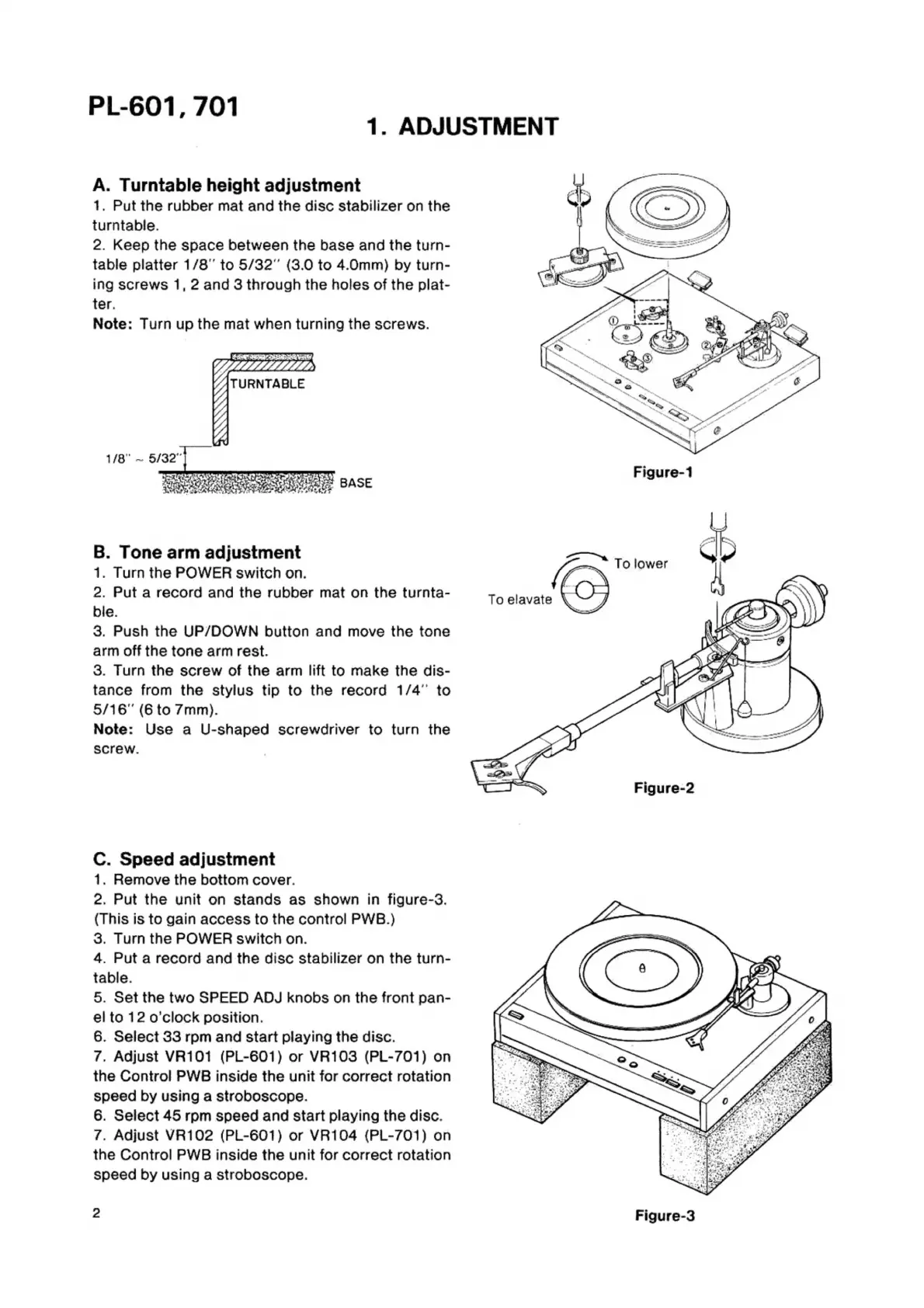
screws
1,
2
and
3
through
the
holes
of
the
plat-
ter.
Note:
Turn
up
the
mat
when
turning
the
screws.
Figure-1
B.
Tone
arm
adjustment
Zt
igwer
1.
Turn
the
POWER
switch
on.
t
2.
Put
a
record
and
the
rubber
mat
on
the
turnta-
7
bie.
3.
Push
the
UP/DOWN
button
and
move
the
tone
arm
off
the
tone
arm
rest.
3.
Turn
the
screw
of
the
arm
lift
to
make
the
dis-
tance
from
the
stylus
tip
to
the
record
1/4”
to
5/16"
(6
to
7mm).
Note:
Use
a
U-shaped
screwdriver
to
turn
the
screw.
Figure-2
C.
Speed
adjustment
1.
Remove
the
bottom
cover.
2.
Put
the
unit
on
stands
as
shown
in
figure-3.
(This
is
to
gain
access
to
the
control
PWB.)
3.
Turn
the
POWER
switch
on.
4.
Put
a
record
and
the
disc
stabilizer
on
the
turn-
table.
5.
Set
the
two
SPEED
ADJ
knobs
on
the
front
pan-
el
to
12
o'clock
position.
6.
Select
33
rpm
and
start
playing
the
disc.
7.
Adjust
VR101
(PL-601)
or
VR103
(PL-701)
on
the
Control
PWB
inside
the
unit
for
correct
rotation
speed
by
using
a
stroboscope.
6.
Select
45
rpm
speed
and
start
playing
the
disc.
7.
Adjust
VR102
(PL-601)
or
VR104
(PL-701)
on
the
Control
PWB
inside
the
unit
for
correct
rotation
speed
by
using
a
stroboscope.
2
Figure-3