LA
LALA
LA8
88
8
AMPLIFIED CONTROLLER
AMPLIFIED CONTROLLERAMPLIFIED CONTROLLER
AMPLIFIED CONTROLLER
USER MANUAL
USER MANUALUSER MANUAL
USER MANUAL
VERSION 4.0
LA8_UM_EN_4-0
w w w . l - a c o u s t i c s . c o m
26
2626
26
7.2 Display
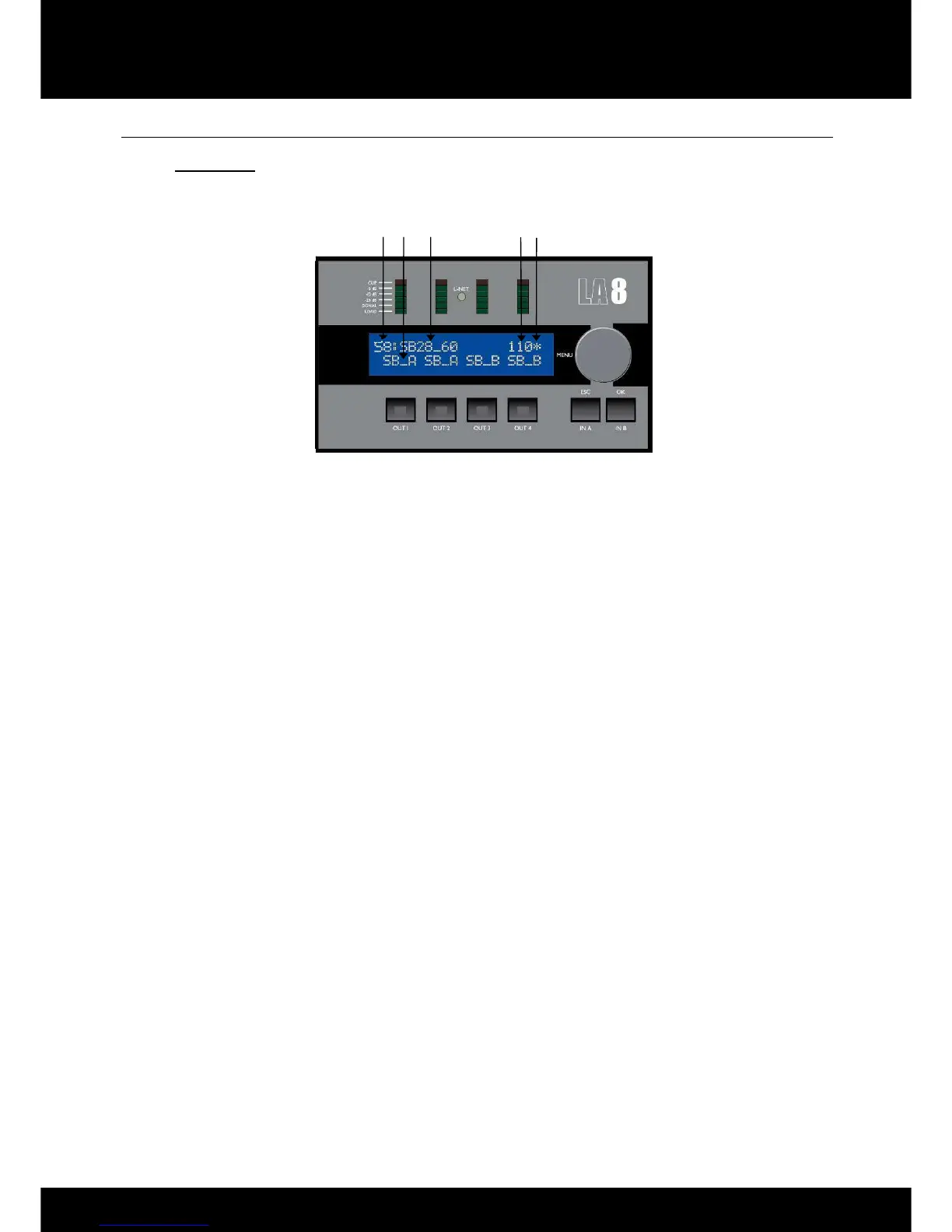
7.2.1 Main screen
Once the LA8 start-up sequence has fully cycled [7.1], the LCD will display the main screen with the following
information:
Figure 15: Main screen
1. Preset allocation (1 to 99)
11 to 99: Allocated factory memory locations for L-ACOUSTICS
®
factory presets.
1 to 10: Allocated memory locations for user presets (initialized from a factory preset). The STORE PRESET
function [7.5] is only available for these 10 user memory locations.
Note: The version of the onboard PRESET LIBRARY can be found in the OPTIONS menu [7.9]. The PRESET
LIBRARY can be updated by uploading the latest version using the L-NET IN port located at the back of the
controller (refer to the LA4-8 PRESET LIBRARIES UPDATE Technical bulletin included in the LA8
PRESET LIBRARY Pack [3.4]).
2. Output type and channel assignment
Directly above each output key the LCD displays the
_
label where:
• The first 2 digits indicate the type of transducer to be connected to the corresponding output channel:
LF: Low frequency transducer
MF: Mid frequency transducer
HF: High frequency transducer
SB: Subwoofer
SR: Reversed subwoofer for cardioid applications
• The last digit indicates which input channel the output is driven by:
A: Output driven by input A
B: Output driven by input B
+: Output driven by the sum of input A and input B
- : Output driven by the difference between input A and input B
3. Current preset name
The preset name can directly come from the current factory PRESET LIBRARY (refer to the LA4-8 PRESET
LIBRARIES User manual included in the LA8 PRESET LIBRARY Pack [3.4]) or can be modified by the
user if prior stored in a user memory location [7.5].
Note: CUSTOM presets can also be created from LA NETWORK MANAGER Software (refer to the LA
NETWORK MANAGER User manual [3.4]).
1


 To Next Page
 Loading...


