3
FEATURES:
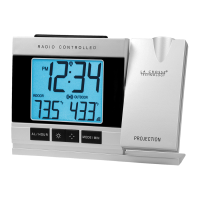
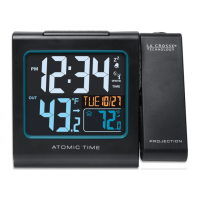
Projects time and outdoor temperature
o Toggles time and outdoor temperature
o Display time only
o Display outdoor temperature only
o (Default----Toggles time and outdoor temperature)
Projection rotate with 90 degree increments
Atomic Clock: 7 Time-zones:(AST, EST, CST, MST, PST, AKT, HAT)
Calendar (Month/date,2000-2099 Default Year 2010)
Time (hour/minute)
Indoor Temperature
Wireless Outdoor Temperature
Indoor/outdoor temp with trend arrow
C/F selectable
Time alarm with snooze function
Low Battery indicator
Atomic display
High/Low/Off backlight and projection controlled
• Sits on desktop or tabletop
• 2 "AA" Alkaline batteries (not included) OR optional 5.0V AC adapter (included)
INITIAL SET UP:
1. Insert A/C adapter into the wall outlet then into the display or insert 2 AA batteries (not included) into
the display (see Power the Atomic Projection Alarm). The Atomic Projection Alarm will light up and
display time and indoor temperature.
2. Insert 2 fresh AA batteries into the transmitter, observing the correct polarity (see Install Batteries in
the Outdoor Transmitter).
3. Keep the transmitter 5-10 feet from the Atomic Projection Alarm for 15 minutes to establish a good
connection.
4. Within 3 minutes the outdoor temperature should be displayed on the Atomic Projection Alarm. If the
outdoor temperature is not displayed after 3 minutes remove power from the transmitter and the
display for 60 seconds and start again from step 1.
5. For optimum 433 MHz transmission, the outdoor transmitter should be placed a distance of no more
than 200 feet (60 meters, open air) from the Atomic Projection Alarm.
IMPORTANT: When operating on a/c power, the backlight/projection will turn off for 2 to 10 minutes
while the Atomic Projection Alarm searches for the WWVB signal, to avoid interference. The backlight and
projection will resume after the 2-10 minute search.
Do Not Mix Old and New Batteries
Do Not Mix Alkaline, Standard, Lithium or Rechargeable Batteries


 To Next Page