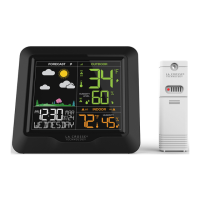
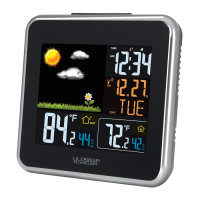
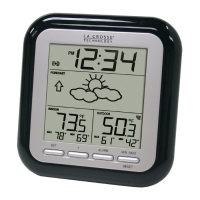
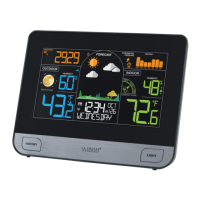
This document is a setup guide for the La Crosse Technology Wireless Weather Station, model S74177, which includes an outdoor sensor (TX141TH-Bv4) and features Atomic Time + Date.
Function Description:
The La Crosse Technology Wireless Weather Station provides indoor and outdoor temperature and humidity readings, along with a weather forecast based on an internal barometer. It includes an atomic clock for precise time and date synchronization. The station can also display data from up to three additional temperature/humidity sensors and an add-on rain gauge. Key features include customizable alerts for temperature and humidity, a moon phase display, seasonal foliage changes in the forecast section, and a pressure history graph.
Important Technical Specifications:
Weather Station (S74177):
- Temperature Range: 32°F to 122°F (0°C to 50°C)
- Humidity Range: 10% - 99% RH
- Relative Pressure Range: 23.62 to 32.48 inHg (800 to 1100 hPa)
- Power Requirements: 5-volt power adapter (included, AC6: GPU280500150WAOO)
- Battery Backup: 1 “CR2032” Coin Cell Battery (included)
- Dimensions: 8.30 in. L x 1.13 in. W x 6.33 in. H (21.09 cm L x 2.88 cm W x 16.09 cm H)
Outdoor Sensor (TX141TH-Bv4):
- Temperature Range: -40°F to 140°F (-40°C to 60°C)
- Humidity Range: 10% - 99% RH
- Transmission Range: Over 330 feet (100 meters) in open air RF 433MHz
- Update Interval: About every 51 seconds
- Power: 2-AA, IEC, LR6 batteries (not included)
- Battery Life: Over 24 months
- Dimensions: 1.57 in. L x 0.79 in. W x 5.12 in. H (4.0cm L x 2.0cm W x 13.0 cm H)
Usage Features:
Power Up:
- Insert 2-AA batteries into the Outdoor Sensor.
- Insert the 5V Power Adapter into an outlet and plug it into the Power Jack on the back of the station. Remove the Insulation Tab from the station's Battery Compartment.
- Place the sensor outside in a shaded location to protect it from the sun's heat.
- ALERTS: Hold to enter Alert Settings; press to move to the next alert item.
- EXTRA: Press to view Pressure or Extra Sensors; hold to search for all Extra Sensors.
- + (PLUS): In Settings, press to increase values; in Alerts, press to arm/disarm alerts.
- SET: Hold to enter Settings Menu; press to confirm values and move forward.
- - (MINUS): In Settings, press to decrease values; in Alerts, press to arm/disarm alerts; in History, hold to reset records; while viewing Extra Sensor, hold to delete sensor.
- ATOMIC: Press to manually search for the Atomic Time Signal.
- HEAT/DEW: Press to view Heat Index and Dew Point Temperature.
- TEMP: Hold to search for the Outdoor Sensor.
- HISTORY: Press to view History Records.
- LIGHT: Press to adjust backlight; hold to enter Auto Dim Settings.
- RESET: Hold to factory reset the station.
Accessed by holding the SET button. Allows configuration of:
- Greeting, Language (English, Spanish, French, German), Beep ON/OFF, Atomic ON/OFF, DST (Automatic ON/ALWAYS ON/ALWAYS OFF), Time Zone (Atlantic, Eastern, Central, Mountain, Pacific, Alaska, Hawaii), 12HR/24HR Time, Hour, Minute, Year, Month, Date, Fahrenheit/Celsius, Decimal/No Decimal (Temperature Reading), Pressure (InHg/hPa), Pressure number setting.
Atomic Time:
- The station automatically searches for the Atomic Time Signal at UTC 7:00, 8:00, 9:00, 10:00, and 11:00.
- Manually start/stop search with the ATOMIC button.
- The Tower Icon will flash during search and remain solid when the signal is received.
Adjustable Backlight:
- Press the LIGHT button to adjust backlight intensity (4 levels + off).
- Hold the LIGHT button to enter Auto-Dim Settings, allowing the display to dim automatically during preselected hours.
Indoor Comfort Level:
- Arrows indicate indoor comfort based on relative humidity (Wet, Good, Dry).
- 10%RH to 25%RH: WET
- 26%RH to 39%RH: WET
- 40%RH to 75%RH: GOOD
- 76%RH to 83%RH: DRY
- 84%RH to 99%RH: DRY
Moon Phase:
- Displays moon phases based on Lunar Calendar and date settings (New Moon, Small Waxing Crescent, Large Waxing Crescent, First Quarter, Small Waxing Gibbous, Large Waxing Gibbous, Full Moon, Large Waning Gibbous, Small Waning Gibbous, Last Quarter, Large Waning Crescent, Small Waning Crescent).
Seasonal Foliage:
- The forecast scene changes seasonally based on pre-programmed dates:
- Spring: March 20th to June 20th
- Summer: June 21st to Sept. 20th
- Fall: Sept. 21st to Dec. 20th
- Winter: Dec. 21st to March 19th
Forecast Icons:
- Uses an internal barometer to predict conditions for the next 12 hours. Requires 7-10 days for calibration.
- Icons include Sun, Partly Sunny, Clouds, Rain, T-Storm, Snow.
- Snow Icon appears when temperatures are below 32°F (0°C) and rain/storms are predicted.
- Sun Icon for clear/partly clear forecasts during daylight (7am-6:59pm); Moon Icon for nighttime (7pm-6:59am).
Pressure Number & History Graph:
- Displays relative pressure from the internal barometer. Requires 10 days for auto-calibration or can be manually set. Arrows indicate rising/falling tendency.
- The Pressure History Graph shows air pressure rise/fall over the past 24 hours (-24h, -18h, -12h, -9h, -6h, -3h, 0h).
History Records:
- Press HISTORY to toggle through indoor/outdoor temperature and humidity records with time and date stamps (High/Low Temperature, High/Low Humidity).
- To reset individual records, view the desired value and hold the (-) MINUS button until dashes appear.
- Rain History (if add-on sensor connected) shows 1 Hour, 24 Hours, 7 Days, 1 Month, Year, and Total.
Heat Index and Dew Point Temperature:
- Press HEAT/DEW button to view these values.
Customizable Alerts:
- Hold ALERTS to enter Alert Settings. Use +/- buttons to activate/deactivate and adjust alert settings. Press ALERTS to confirm.
- Alerts are active when ▲ and/ icon appear on the LCD.
- Alerts can be set for Outdoor Low/High Temperature, Outdoor Low/High Humidity, Indoor Low/High Temperature, Indoor Low/High Humidity.
- When an alert value is reached, the station beeps 5 times per minute until out of range. Press any button to stop the sound. The alert icon flashes until out of range.
- Supports up to 3 additional Temp & Humidity Sensors and an add-on Rain Gauge.
- To add sensors: Install batteries, select different channels (1,2,3) for Temp/Humidity sensors, then hold EXTRA on the station until the Reception Indicator animates to start a search.
- To delete sensors: View the sensor with EXTRA, then hold (-) MINUS.
Maintenance Features:
Search for Outdoor Sensor:
If outdoor readings show “NO” or dashes:
- Hold TEMP to search for the outdoor sensor.
- If not connected after 3 minutes, bring the sensor inside, remove power from both sensor and station.
- Press any button on the station 20 times, leave power off for a few moments.
- Install new alkaline batteries in the sensor, then power up the station.
- If issues persist, contact support or visit bit.ly/basic_restart.
Low Battery Indicator:
- Low Battery Icon by Outdoor Temperature: Replace batteries in the Outdoor Sensor.
- Low Battery Icon by Indoor Temperature: Replace batteries in the Weather Station.
- Low Battery Icon in the Extra Area: Replace batteries in the specific sensor showing the icon.
Coin Cell Battery Warning & Replacement:
- The station uses a CR2032 coin cell battery for backup.
- To replace: Use a coin to turn the battery cover left, pull back the metal pin, remove the battery, insert a fresh CR2032 with the + side up, replace cover, and turn right to lock.
- WARNING: Coin cell batteries are dangerous if swallowed. Keep out of reach of children. Seek immediate medical attention if swallowed. Secure battery compartments. Dispose of used batteries safely.
General Care & Maintenance:
- Do not mix battery types (Alkaline, Lithium, standard, rechargeable).
- Always purchase the correct size and grade of battery.
- Replace all batteries at once; do not mix old and new.
- Clean battery contacts before installation.
- Ensure correct battery polarity (+ and -).
- Remove batteries during periods of non-use to prevent leakage and damage.
- Dispose of used batteries promptly and according to local regulations.
Warranty:
- La Crosse Technology, Ltd. provides a 1-year limited time warranty from the date of purchase against manufacturing defects.
- Double your warranty to 2 years by registering your product online at bit.ly/s74177_register and opting to receive occasional product emails.

 Need help?
 General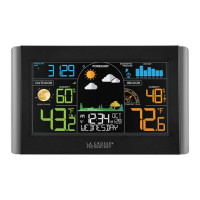



 To Next Page