Buttons
BASICS
07
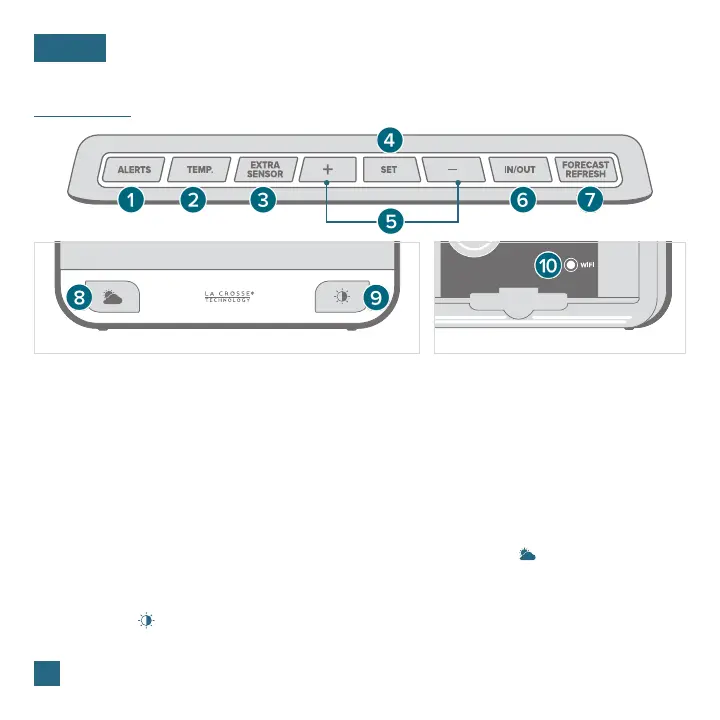
1. ALERTS: Hold to enter alerts setting. Use +/-
buttons to turn alerts on/o.
3. EXTRA SENSOR: Press to view sensor ID
numbers. Hold to add sensors. While viewing,
hold the MINUS button delete the sensor.
2. TEMP: Press to view Temp. & Humidity History.
While viewing, hold MINUS button to reset the
history reading.
4. SET: Press to view Wi-Fi status. Hold to enter
Settings Menu.
5. PLUS/MINUS (+/-): Use to adjust values.
7. FORECAST REFRESH*: Press to refresh
Forecast Readings.
9. BACKLIGHT ( ): Press to adjust backlight.
Hold to enter Auto-Dim settings.
6. IN/OUT: Press to view switch between Indoor
Outdoor Temperature/Humidity display or
autoscroll
8. FORECAST/PRECIP. ( )*: Press to change
Forecast Times. Hold to select Percent of
Precipitation or Amount of Precipitation reading.
10. WIFI: Press during initial setup for Wi-Fi
Connection. Hold to re-enter Configuration
Mode and clear previous Wi-Fi settings.
* Your display must be connected to Wi-Fi to receive Daily/Hourly forecast information.
Front of Station Back of Station















 To Next Page