EasyManua.ls Logo

La Gard 3035 - User Manual

La Gard 3035
3 pages
Print Icon
To Next Page IconTo Next Page
Loading...
Kantooradres: Postadres:
Vlijtstraat 40 Postbus 127
NL-7005 BN Doetinchem NL-7000 AC
H.R. te Arnhem nr: 09087869 Tel: (+31) 314 376 876
E-mail: info@lagard.nl Internet: http://www.lagard.nl BTW nr: NL 8038.72.987.B01 Fax: (+31) 314 376 878
LG 39E Combogard EN
Revise: 1
Datum: 16-02-05
1
LA GARD Locks BV
OPERATING INSTRUCTIONS LG 39E Multi User Combogard /Swingbolt
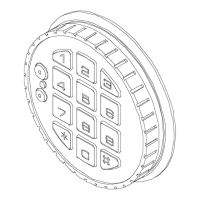
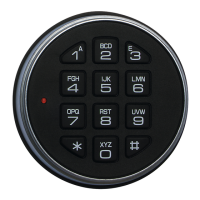
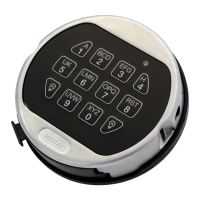
Keypad 3035, 3710, 3750 or 3750K with reading contact Lock 39E
Generally
Each pressing of a key is confirmed by a signal (an acoustic signal and a LED flash). A valid code is
followed by a double signal, an invalid code by a triple signal. After an interval of more than 10-seconds,
the already entered part of the code is deleted and the entire sequence has to be re-entered.
Code entering: Enter the seven-digit numeric code–or a word with 7 characters
a) Operation with parallel code: a double signal is followed.
(manager mode) Manager code: 1234567
b) Operation with dual codes: Six-digit numeric codes or words with six characters.
(must be programmed) For opening two valid codes must be entered.
Manager code: 123456 and User ID# 654321
Opening: Combogard: Enter the code and (after double signal) turn the
entry clockwise within 3 seconds unto the hold. The lock is open
and the entry is rotated.
Swingbolt: Enter the code and (after double signal) turn the
handle within 3 seconds into the OPEN position.
If the lock is not opened within 3 seconds, it is automatically
locked again.
Locking: Combogard: Turn the entry counter-clockwise unto the hold.
The lock is automatically closed and the entry stands straight.
(Check this by trying to turn the entry back again)
Swingbolt: Turn the handle into the CLOSE position.
The lock is automatically locked; check this by trying to turn the
handle into ā€œOPENā€ position.
I M P O R T A N T Check the lock to be locked.
Wrong try penalty: After four invalid codes, the entry is blocked for about 5
minutes. During this period, the lock signals at 10-second
intervals. After this time penalty, the entry of every second
invalid code initiates a new 5 minutes delay period.
The key pressing is refused with a triple signal.
Change of code: The user can change its code anytime.
(always with open door) Enter the code and keep pressed the last number until second
double signal (LED is on), press the ā€œ0ā€ and enter the new code
(double signal), enter the new code once more for confirmation
(double signal).
The new code is now valid. If mistakes are made while
changing the code or if an interval occurs of more than 10
seconds, the old code remains valid and the entire sequence
has to be re-entered.
Test the new code several times by open door!
Contact of
the audit trail
LED
3035 3710
3750 3750K
Get other manuals https://www.bkmanuals.com


Other manuals for La Gard 3035

Question and Answer IconNeed help?

Do you have a question about the La Gard 3035 and is the answer not in the manual?

Summary

LG 39 E Multi User Combogard; Swingbolt Operating Instructions

General Operation Signals

Explains key press confirmation signals and code deletion timing.

Code Entry and Opening Procedures

Covers parallel/dual code entry and opening procedures for the lock.

Locking and Security Features

Details locking, wrong try penalties, and code changing.

Advanced Features and Safety

Silent Alarm and Time Delays

Covers silent alarm activation and time delay for opening/override.

Power Supply and Maintenance

Details battery requirements, replacement, and low battery signals.

Safety Notices and Signal Explanations

Provides safety advice and explains LED/acoustic signals.

Manual Programming and Reset

Factory Mode and Exit Procedures

Explains factory mode, how to exit it, and set the manager code.

Code Length and Program Selection

Details how to select code length and program using function '8'.

User Installation and Code Management

Steps for installing users and handling code acceptance issues.

Reset to Factory Mode

Instructions for resetting the lock using a reset box.

Summary

LG 39 E Multi User Combogard; Swingbolt Operating Instructions

General Operation Signals

Explains key press confirmation signals and code deletion timing.

Code Entry and Opening Procedures

Covers parallel/dual code entry and opening procedures for the lock.

Locking and Security Features

Details locking, wrong try penalties, and code changing.

Advanced Features and Safety

Silent Alarm and Time Delays

Covers silent alarm activation and time delay for opening/override.

Power Supply and Maintenance

Details battery requirements, replacement, and low battery signals.

Safety Notices and Signal Explanations

Provides safety advice and explains LED/acoustic signals.

Manual Programming and Reset

Factory Mode and Exit Procedures

Explains factory mode, how to exit it, and set the manager code.

Code Length and Program Selection

Details how to select code length and program using function '8'.

User Installation and Code Management

Steps for installing users and handling code acceptance issues.

Reset to Factory Mode

Instructions for resetting the lock using a reset box.

Overview

The LG 39E Multi User Combogard/Swingbolt is an electronic lock system designed for secure access control, featuring multiple user capabilities and various operational modes. It supports keypads 3035, 3710, 3750, and 3750K, with the 3750K model including a reading contact for audit trail functionality. The system provides visual (LED flash) and acoustic signals for key presses, with a double signal confirming a valid code and a triple signal indicating an invalid code. If no further input is received within 10 seconds, any partially entered code is cleared.

Function Description:

  • Code Entry:
    • Manager Mode (Parallel Code): Requires a seven-digit numeric code or a seven-character word. A double signal confirms successful entry. The default manager code is 1234567.
    • Dual Code Operation: Requires two six-digit numeric codes or six-character words. The manager code is 123456, and a user ID (e.g., 654321) is also required. This mode must be programmed.
  • Opening the Lock:
    • Combogard: After entering the code and receiving a double signal, the user must turn the entry clockwise within 3 seconds to the "hold" position. The lock is then open, and the entry is rotated.
    • Swingbolt: After entering the code and receiving a double signal, the user must turn the handle within 3 seconds to the "OPEN" position.
    • If the lock is not opened within 3 seconds, it automatically relocks.
  • Locking the Lock:
    • Combogard: Turn the entry counter-clockwise to the "hold" position. The lock automatically closes, and the entry returns to a straight position. Users should verify locking by attempting to turn the entry back again.
    • Swingbolt: Turn the handle to the "CLOSE" position. The lock automatically locks. Users should verify locking by attempting to turn the handle to the "OPEN" position.
  • Code Change: Users can change their code at any time, but this must be done with the door open. The process involves entering the current code, holding the last digit until a second double signal (LED on), pressing "0", entering the new code (double signal), and then re-entering the new code for confirmation (double signal). If errors occur or more than 10 seconds pass, the old code remains valid, and the sequence must be restarted. New codes should be tested multiple times with the door open.
  • Silent Alarm (Programmable): If activated and an optional alarm box or SP-box is connected, entering a code with the last digit chosen one higher (+1) than the actual code will open the lock normally (double signal) but simultaneously activate the alarm. For example, if the combination is 471147, the alarm code would be 471148.
  • Time Delay for Opening (Programmable): If active, after a valid code entry (double signal), a delay period begins, indicated by the LED flashing red every 2 seconds. At the end of the delay, an "Open window" starts, with the LED flashing every second and the lock beeping every 2 seconds. The lock must be opened during this window by re-entering a valid code. If the window expires, the lock re-secures with the time delay. The current delay time can be deleted by pressing "0" or extended by re-entering a valid code.
  • Time Delay Override (Programmable): User ID# 9 (money carrier) can open immediately. In dual code operation, ID# 9 is entered as the second code.
  • Factory Mode (Pre-Setup-mode): The lock may be in factory mode upon initial setup. In this mode, it opens by pressing key "1" and sends a silent alarm signal. This mode is designed for easy mounting and has only one version storage. To exit factory mode, press and hold "0" until a double signal (4-5 seconds) is heard. The manager code then becomes 555555.
  • Code Length and Program Selection: Configured using function "8" with a 2-digit group. The first digit specifies the code length, and the second digit specifies the program number (e.g., Program 0: Manager mode, Program 2: Two code operation, Program 4: Manager mode with alarm, etc.). For 7-digit codes, the manager code is 7x "5".
  • Programming (Function 8): Enter the manager code "555555", hold the last number until a double signal repeats (LED on), then press "8". Enter the 2-digit group (code length and program number), confirm it by re-entering the group.
  • Install (Enable) User (Function 1): Enter the manager code, hold the last digit until the LED stays on. Press "1", enter the user ID (e.g., "1"), enter the user code, and re-enter it for confirmation. If a new code is not accepted (triple signal), it is too similar to an existing code. New codes must be selected. Users not installed at this stage will be blocked after the manager code change.
  • Program "Freeze": After changing the manager code, the program "freezes," and program settings can only be changed after a reset to Factory Mode.
  • Reset to Factory Mode: This can be done using a RESET-BOX (PN#6066) or by following a specific procedure: unplug the battery, press "0" for approximately 3 minutes (or leave it powerless for 10 minutes), plug in the RESET-BOX to the BAT-connection (requires a connected 9V-DURACELL ALKALINE-battery), wait for a longer signal (0.5 sec). The lock will then be in FACTORY MODE. Disconnect the Reset-Box and plug the battery back in. The lock will open with "1".

Important Technical Specifications:

  • Keypads: 3035, 3710, 3750, 3750K.
  • Signals: Acoustic and LED flash for key presses. Double signal for valid code, triple signal for invalid code.
  • Time-out: 10 seconds for incomplete code entry.
  • Wrong Try Penalty: After four invalid codes, the entry is blocked for approximately 5 minutes, indicated by signals every 10 seconds. Each subsequent invalid code (every second one) initiates a new 5-minute delay. Key presses are refused with a triple signal during this period.
  • Power Supply: Uses DURACELL ALKALINE batteries only.
    • Low Battery Indication: The lock signals for about 3 seconds when opened if batteries are low. A series of triple signals (approx. 3 seconds) also indicates low battery, with approximately 10 openings remaining. Battery change should also occur if double signals are observed.
    • Battery Compartment: 3710, 3750, 3750K have the compartment at the bottom of the entry. 3035 has an internal battery box.
    • Emergency Power: If batteries are too low, a new 9V DURACELL ALKALINE battery can be pressed onto the contacts on the entry until the code is entered and the entry rotated. A battery clip can be used when Time Delay is programmed.
    • Power Security: When connected to alarm equipment via the "SP" interlock device, the power supply is secured from this place.
  • Code Storage: Codes are stored in the lock even without power supply.

Usage Features:

  • Multi-User Capability: Supports manager and multiple user codes, with various programming options for parallel, dual, alarm, and time delay operations.
  • Audit Trail: The 3750K keypad with reading contact supports audit trail functionality.
  • Programmable Modes: Offers flexibility with different operational modes (e.g., manager mode, two-code operation, with/without alarm, with/without delay override).
  • Visual and Acoustic Feedback: Provides clear feedback for user actions and system status.
  • Security Features: Includes wrong try penalty, silent alarm, and time delay for enhanced security.

Maintenance Features:

  • Battery Replacement: Regular replacement of DURACELL ALKALINE batteries is crucial. Low battery warnings are provided.
  • Code Management: Users can change their codes, and managers can install/enable users and manage codes.
  • Factory Reset: A factory reset option is available for lost manager codes or to change lock settings after a program "freeze."
  • Safety Notices:
    • Change the manager code immediately after installation.
    • Do not use personal data (e.g., birth date) as a code.
    • Keep the code confidential.
    • Do not assign codes to users who do not need access; remove unused codes (Function 3 and user number).
    • Always check that the lock is properly locked.

La Gard 3035 Specifications

General IconGeneral
BrandLa Gard
Model3035
CategoryRemote Starter
LanguageEnglish

Related product manuals