SCADA INTERFACE INSTRUCTIONS - OPTION 21Q - FOR A36D/TPSD SYSTEMS/341S
Page 2 of 10
Default Settings
The LaMarche Communications Card is shipped with the following default settings;
Port: RS232
Baud Rate: 9600
Data Bits: 8
Stop Bits: 1
Parity: None
Board Configuration
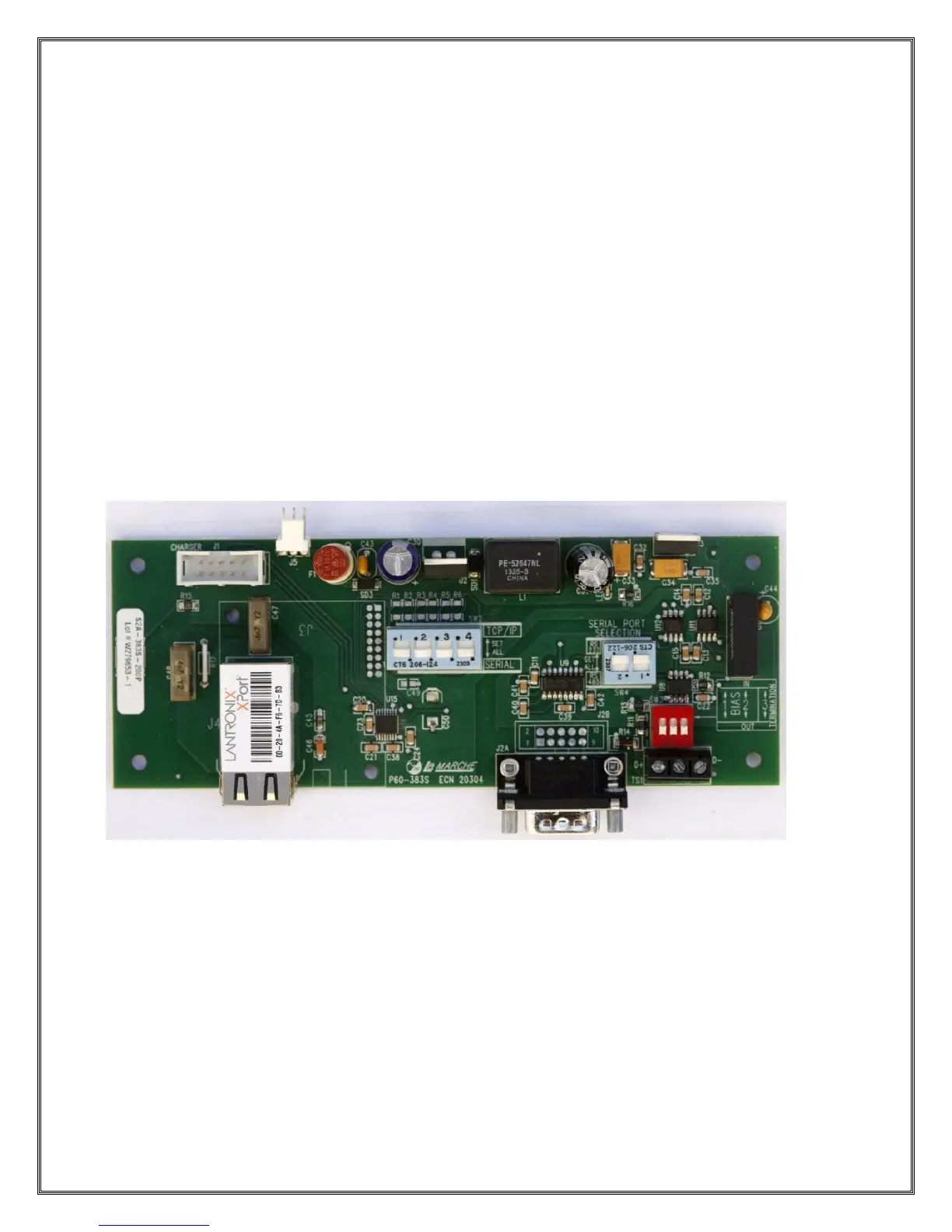
The communications card may be configured for RS232, RS485 or TCP communications.
SW2 configures the board for either Serial or TCP/IP communications.
SW4 configures the board for either RS232 or RS485 communications.
SW3 configures the BIAS and Termination Resistor(s) when using RS485.
The photo below shows the location of the dipswitches of the communications board.
Setting the Modbus Address, Baud Rate & Parity
To change the Address, Baud Rate and Parity you need to enter the customer calibration mode where
you can choose the following;
Modbus Type: Serial or TCP
Modbus Address: 1 through 247
Modbus Baud Rate (Serial Only): 1200, 2400, 4800, 9600, 19200, 38400
Modbus Parity Type (Serial Only): NONE, ODD, EVEN
Read Only Mode: This mode does not allow any settings to be modified remotely.



 To Next Page