40
OPERATING YOURWINE COOLER
If the ambient temperature is above or below the recommended ambient temperature range, the performance of the unit may be
affected. For example, placing your unit in extreme cold or hot conditions may cause interior temperatures to fluctuate.
Note:
When you use the Wine Cooler for the first time or restart the Wine Cooler after having been shut off for a long time, there could
be a few degrees variance between the temperature you select and the one indicated on the LED readout. This is normal and it is
due to the length of the activation time. Once the Wine Cooler is running for a few hours everything will be back to normal.
If the unit is unplugged, power lost, or turned off, you must wait 3 to 5 minutes before restarting the unit. If you attempt to restart
before this time delay, the Wine Cooler will not start.
Warning:
Thermoregulation of your cellar is affected by the number of bottles stored there. Your cellar must be charged to over 60%
capacity to ensure well operation (maintenance of the set temperature and humidity). If it is not the case, humidity and
temperature variations could be observed.
Ⅰ. Main functions
Display temperature and humidity; Control temperature automatically; Control lighting;
Alarm when temperature exceeds temperature limit;Degrees Fahrenheit and Celsius transformation
Ⅱ. Technical parameters:
Measure range:-45℃~+99℃(-45F-210F); Resolution: 0.1℃; Relative humidity: 0-99%RH; Humidity accuracy: ±5%RH;
Temperature accuracy: ±1℃(-40℃~50℃);±2℃(50℃~70℃); Temperature controlling range: 5℃~20℃;
Power supply: 220-240VAC、50/60Hz; Relay contact capacity: Cool 10A/240VAC; Heat 5A/240VAC; Fan 12Vdc/80mA; Lighting
12Vdc/120mA
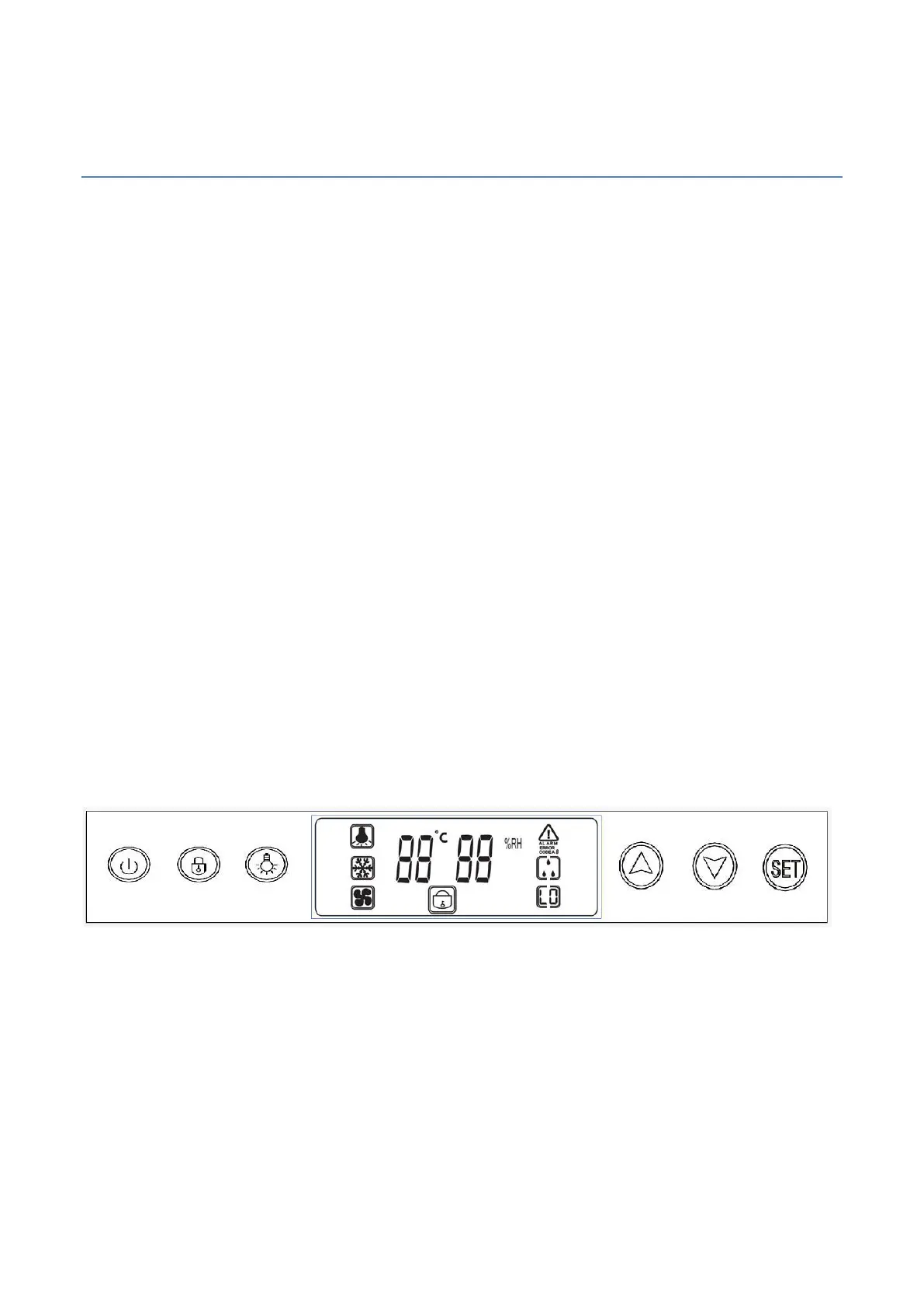
Ⅲ.Operation and panel diagram
1、On/Off:
Press and hold on/off key for 5 seconds to cut off the system; press the on/off key again to display the set temperature value.
After delay, the cold system starts to work.
2、Lighting:
Permanent light: Press lighting key to turn on the light icon is displayed on the screen; When the light is
on, press the lighting key again, the light is off icon is disappear from the screen.
3、Adjust the controlling temperature (users set):



 To Next Page