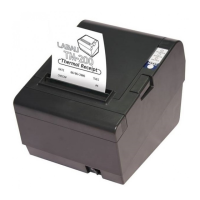
Unpacking
The items illustrated below are included in a standard package.
Printer
Paper Roll
AC Adapter
Power Cord
Communication Cable
Windows Driver & Utility
Printer parts
Printer Cover
Printer-Cover Lever Power Switch
Control Panel
Cutter Cover
Communication Connector Power Supply Connector
Cash Drawer Connector
1.
Specifications
Printer method Direct Thermal Printing
Print speed 250mm/sec
Print resolution 203 dpi
Print font
9(W)
×
17(H) / 12(W)
×
24(H)
Column capacity
34 characters in Font A,
46 characters in Font B
Character set
95 Alphanumeric
32 International
128
×
5 graphics
Bar code
UPC-A
、
UPC-E
、
EAN-13
、
EAN-8
Code 39
、
Codabar
、
Code 93
、
Code 128
、
ITF-25
Interface RS-232 and USB / Parallel
Cash drawer port RJ-11
Paper dimensions
57 mm + 0.5 mm
×
dia 50 mm
Paper thickness 0.06 to 0.12 mm
Power 24V
Overall dimension
120(W)
×
170(D)
×
85 (H) mm
Weight 850 g
Installing the Paper Roll
1. Open the printer cover.
2. Insert the paper roll and pull out a small amount of paper, as shown
below.
2.
Connecting the cables
Power supply cable, communication cable, and cash drawer cable.
Note:
Make sure that you use +24V power supply or equivalent for your
printer. Using an incorrect power supply may cause fire or electrical
shock.
1. Turn off the printer and the host computer.
2. Plug the power cord into the adaptor,
then plug the adaptor into the power
connector of the printer.
3. Plug the communication cable into
the communication connector.
4. Plug the drawer cable into the drawer
kick-out connector, if needed.
Control Panel
The control panel has three LEDs and one button.
POWER light---green light
Light on when the power is on
Light off when the power is off.
ERROR light---red light
Light on when an error occurs.
PAPER light---red light
Light when the paper roll is nearly end.
FEED button
Feed the paper.
3.


 To Next Page
 Need help?

 General