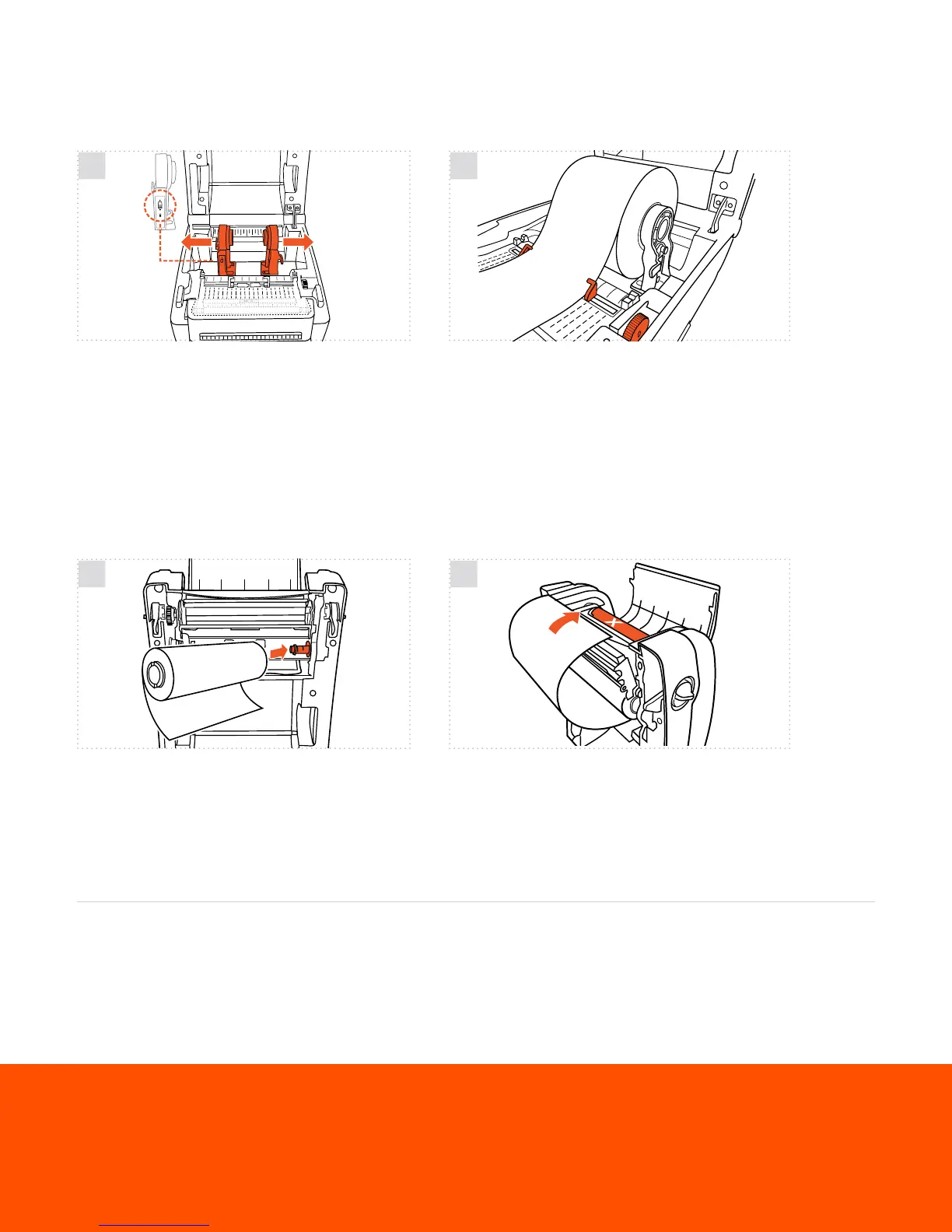
HOW TO | LOAD LABEL SUPPLY
HOW TO | LOAD PRINT RIBBON
Open the printer’s cover. Separate the green media
holders so they’re wider than your supply. (If holders are
locked, flip the lock switch on the left holder.) Place the
supply roll between the holders, close the holders onto
the core, and lock the holders using the switch.
Open the printer cover and ribbon access cover. With the
end of the ribbon underneath, insert the ribbon right-
side rst onto the rear ribbon hub.
Using the green guide adjustment wheel, adjust the media
guides so they’re wider than the supply. Feed the end of the
supply roll through the guides. Then re-adjust the guides so
they t the material. Feed the supply through the cutter and
out the mouth of the printer.
Insert the empty cardboard core (that came in your ribbon
box) onto the front ribbon hub. Pull the end of the ribbon
up and over the print head and tape it to the core. Turn
the green ribbon rewind gear until the ribbon is tight and
wrinkle-free.
1
1
Check out videos on loading supplies and learn some helpful label making tips on our YouTube channel
youtube.com/labeltac
2
2
labeltac.com/support 1-877-356-6584
Need some more help with your printer?
UNLOCK
LOCK


 To Previous Page