Installing multiple units onto a TV system
The EM1000 has a low-loss combiner between the RF IN and RF-OUT and it is therefore possible
to not only
combine the off-air signals with your new channel but to “daisy chain” a number of units to add
more signals. With more than 2 units on a system you may get a better signal balance if you
combine all units and the aerial using a low loss combiner splitter like the 4-way FJU704.
2
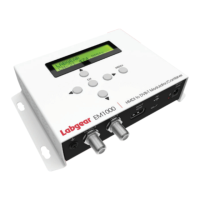
No Description Function
➀
LCD Screen Video display
➁
Change the frequency point or
cursor up
➂
Switch settings in menu or
cursor left
➃
OK
Conrm the current operation
➄
Change the frequency point or
cursor down
➅
Switch settings in menu or
cursor right
➆
MENU
Return to submenu save settings
➀
➅
➁
➂
➆➄
➃
Mounting and Installation
Best mounted in on a vertical surface with the connectors at the bottom. Use the keyhole slots
on the side of the casing to screw the unit onto a stable surface and allow at least 10cm space
around the unit for free ventilation.
Before commencing set-up check what channels or frequencies are being used for local off-air
transmissions and any other devices on the system and decide which unused channel you are
going to use.
• Connect the HDMI
• Connect the RF OUT to the input to the TV system (e.g. distribution amplier) directly or via a
wideband combiner
• Connect the aerial to the RF IN (unless if you are using a wideband combiner)
• Plug the power supply into the mains socket and switch ON
The encoder will power up and display the factory pre-set output channel and frequency.
Press MENU to access the Main Menu and start the set-up.
Screen Indicators and Controls
EM1000 - Specications


 To Next Page
 Loading...