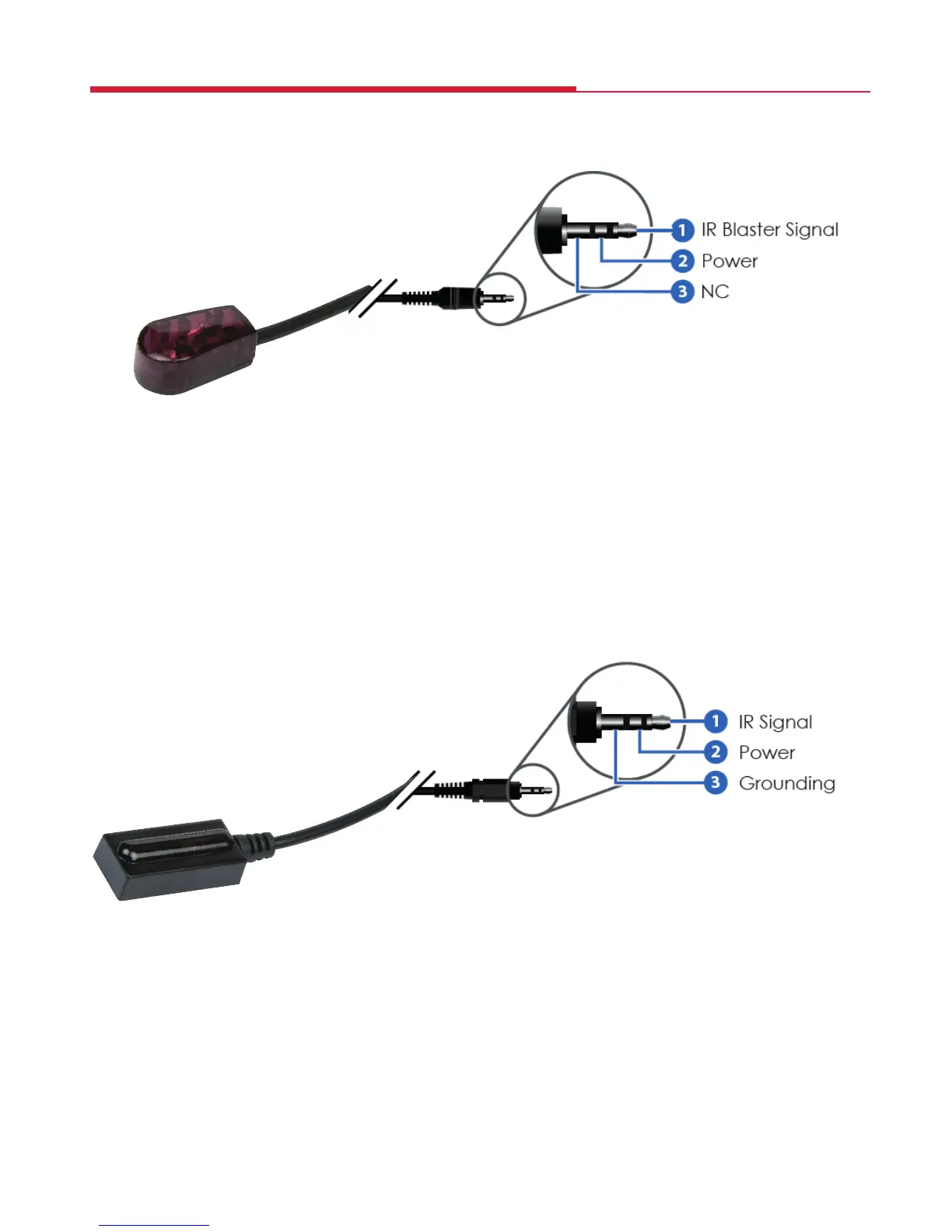
The HDX60P kit is supplied with a wideband IR Blaster and Receiver they
respectively emit or recieve IR signals in the 30-60kHz range.
IR Blaster (TX)
To control the source: Plug the IR Blaster into the IR OUT socket on the
transmitter, place the Blaster as close as possible in front of the IR sensor of
the source device.
To control the display: Plug the IR Blaster into the IR IN port of the Receiver,
place the Blaster as close as possible in front of the IR sensor of the display.
When you are happy with the position of the IR Blaster you can x it in
position by peeling of the backing paper of the sticky pad on the base and
sticking it in position.
IR Receiver (RX)
To control the source: Plug the IR Receiver into the IR IN port of the receiver
unit and place the IR Receiver close to the display and where the source
remote control is in line-of-sight.
To control the display: Plug the IR Receiver into the IR OUT socket of the
transmitter and place the IR Receiver in a position where it is able to receive
signals from the display remote control.
When you are happy with the position of the IR Receiver you can x it in
position sticking the sticky pad supplied to the base of the IR Receiver and
xing it in position.
Wideband IR Blaster and Receiver
7


 To Next Page