EasyManua.ls Logo

LaCie d2 SAFE - Setup Steps; Connect Power Supply; Switch Power Button to ON;AUTO; Connect Interface Cables

LaCie d2 SAFE
23 pages
Print Icon
To Next Page IconTo Next Page
To Previous Page IconTo Previous Page
Loading...
FireWire 400
Power Supply
FireWire 800
USB 2.0
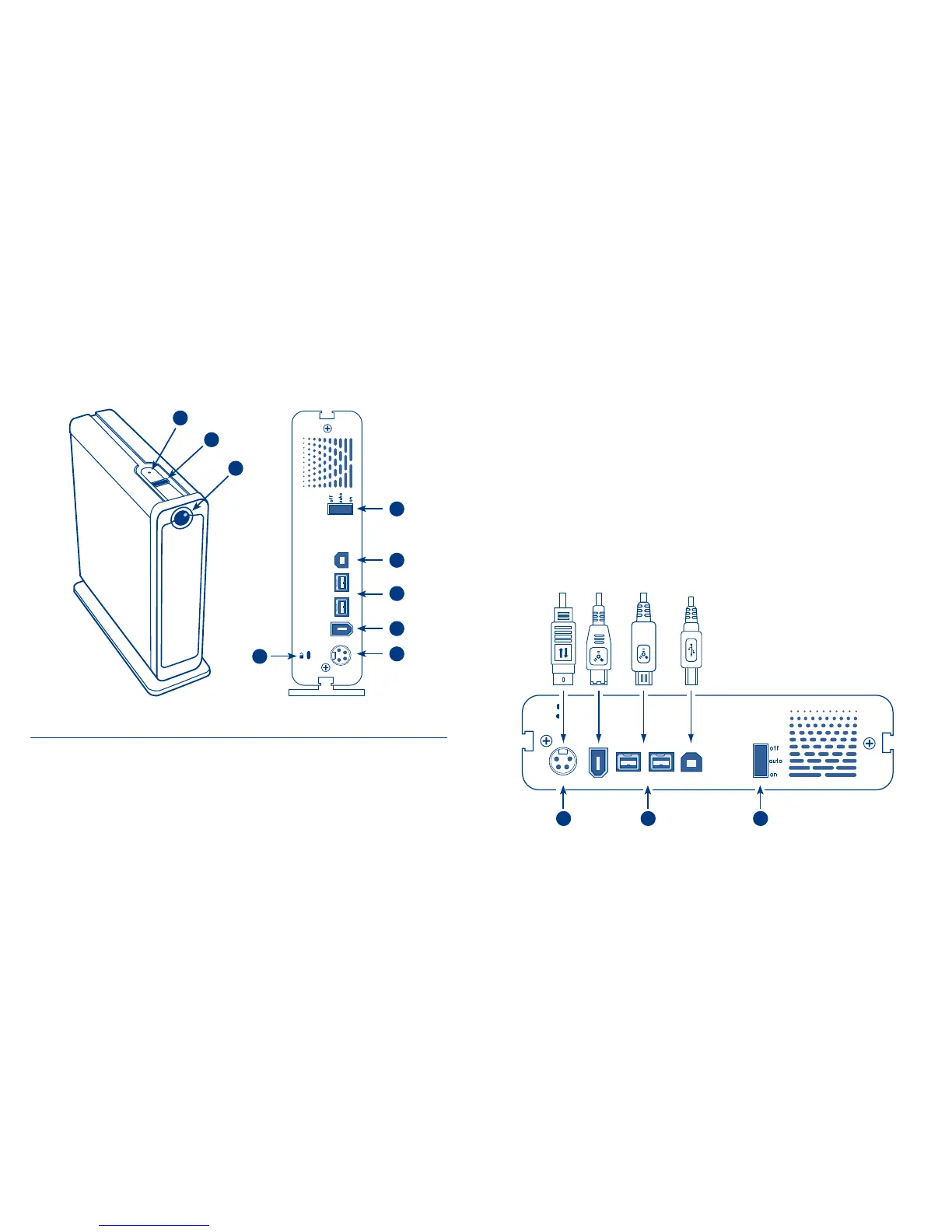
Setup Steps
1. Connect the power supply.
2. Switch the power button on the back of the drive to the ON or AUTO position.
3. Connect the Hi-Speed USB 2.0, FireWire 400 or FireWire 800 cable
to your drive. Connect the interface cable to your computer.
FireWire 400
USB 2.0
FireWire 800
Power Supply
1 23
Front/Top View
1. Drive Mode LED
2. Biometric Fingerprint Sensor
3. Power LED/Activity LED
Rear View
4. Lock Slot
5. On/Off/Auto Power Switch
6. Hi-Speed USB 2.0 Port
7. FireWire 800 Ports
8. FireWire 400 Port
9. Power Supply Connection
1
5
7
6
8
4
2
3
9

Related product manuals