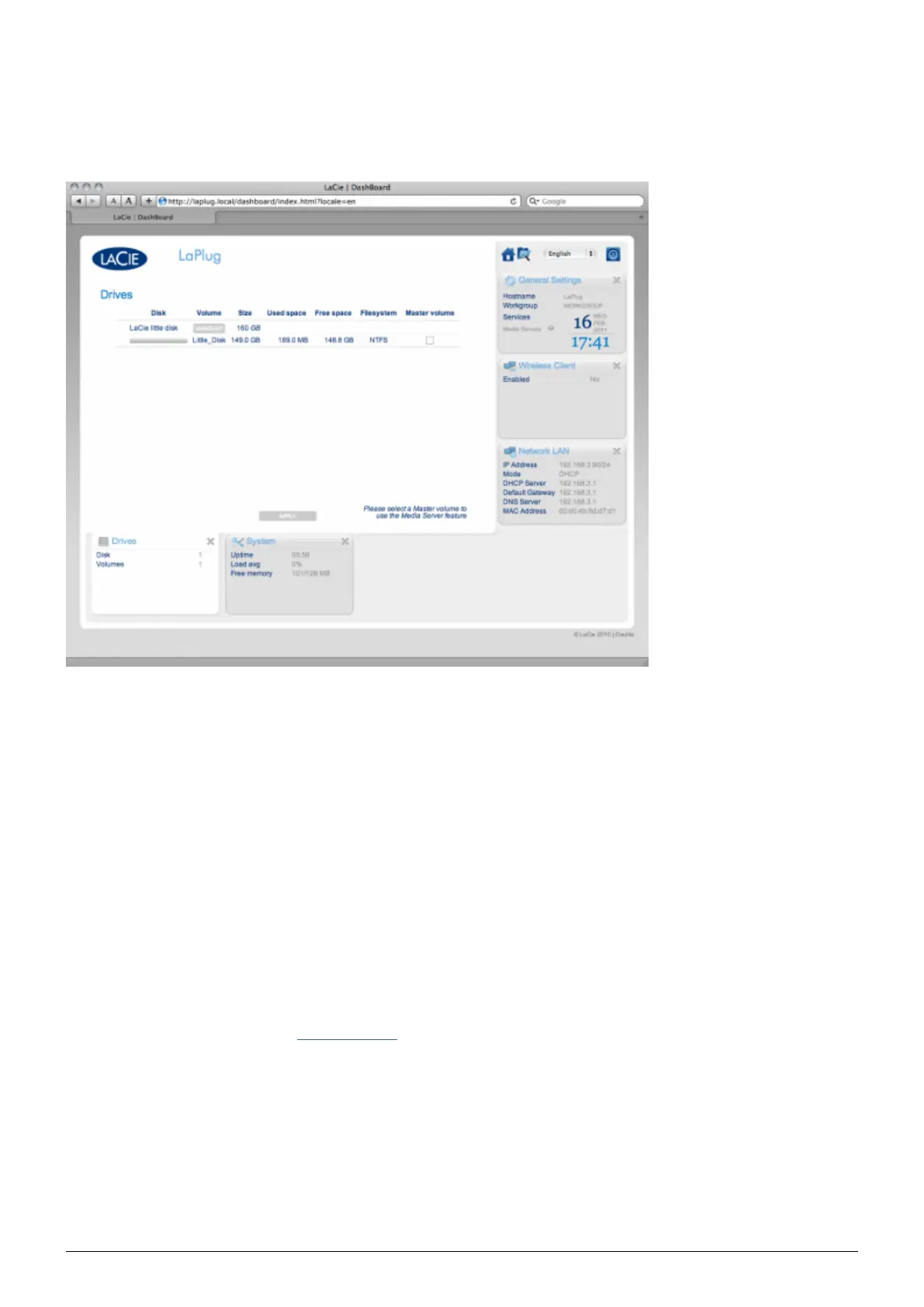
DASHBOARD - DRIVES
This page will list all the USB devices connected to your LaPlug.
Every USB device will take up at least two rows in the table; the first row describes the disk, and its volumes (or
partitions) each take up an additional row(s). So a disk with a single partition will take up two rows, and a disk
with two partitions will take up three rows, etc.
Disk: This column will normally list the drive's manufacturer (or a graphical indication of free space for
■
partitions).
Volume: This column lists a button to unmount the disk or the name of the drive's partition.
■
Unmount: To prevent file system corruption, it's important to unmount a drive by clicking this button
■
before unplugging it.
Size: Indicates the drive's total capacity.
■
Used Space: Indicates how much of the disk's capacity is in use.
■
Free Space: Indicates how much of the disk's capacity is available.
■
File System: Indicates the drive's file system.
■
Master Volume: One of the attached drives must be designated as the master volume in order for the Media
■
Server feature to function. See Media Servers.
LaPlug User Manual LaCie 19


 To Next Page