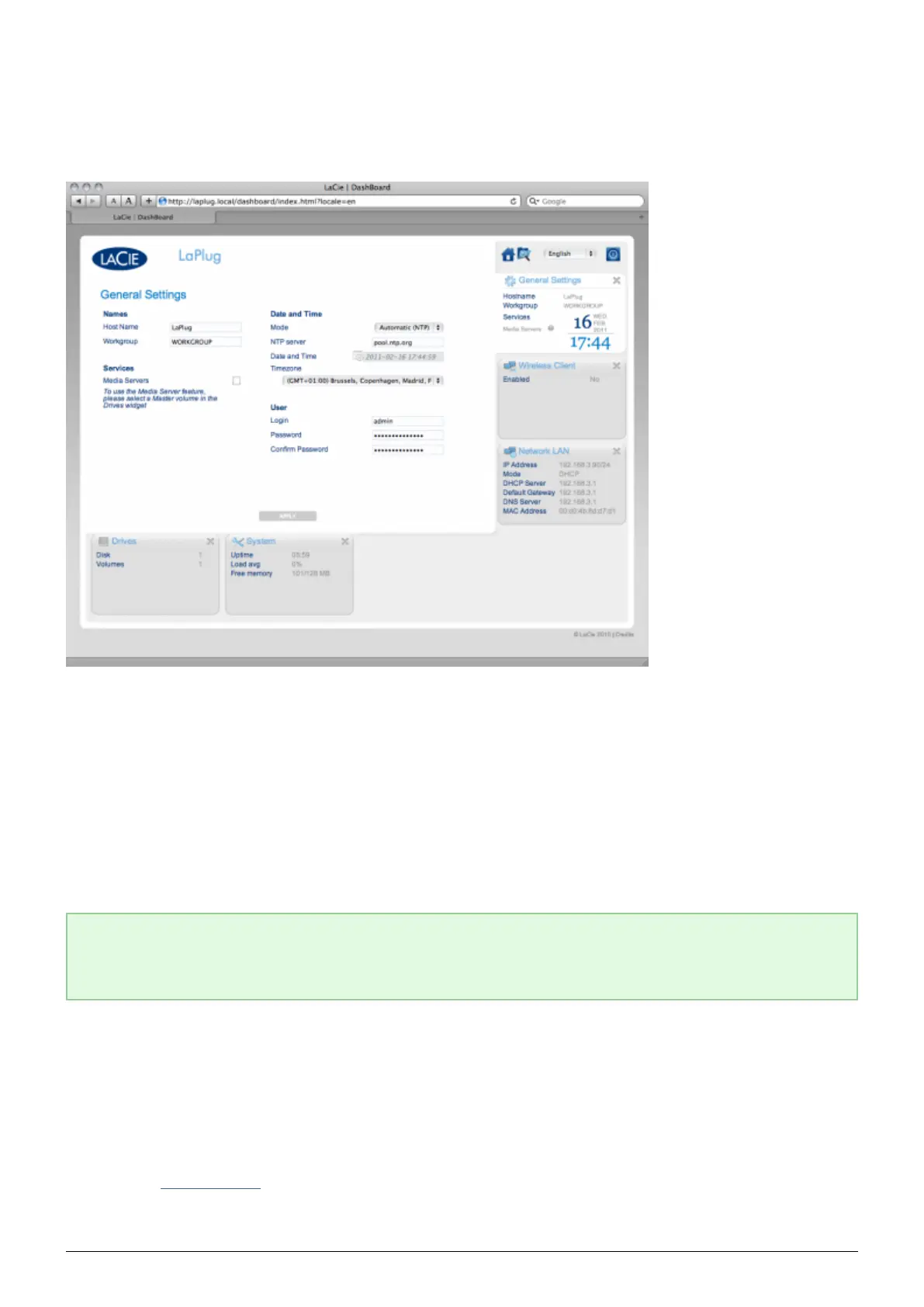
DASHBOARD - GENERAL SETTINGS
This page allows you to modify some of your LaPlug's general parameters.
Names
Host Name: Modify the machine name. The machine name identifies your LaPlug in LaCie Network Assistant
■
and on the local network. The machine name is limited to 15 characters. Please use alphanumeric characters
without spaces or symbols.
Workgroup: Type a Windows workgroup name to connect your LaPlug to a Windows workgroup.
■
Technical note: Mac users connected to a network with Windows computers can also access USB devices
this way by selecting in the Finder Network > [Workgroup] > LaPlug where “Workgroup” is the name of
the Windows workgroup.
Services
Media Servers: This feature allows your LaPlug to act as a UPnP multimedia server. Files stored on USB
■
devices connected to the LaPlug will be available to play on UPnP-enabled players (such as cell phones,
computers, and game consoles). A master volume must be selected in Dashboard > Drives to use this
media server feature. For information on using your LaPlug to stream files to your UPnP devices including
iTunes, see Media Servers. Note that if you've just added new content to the LaPlug, it could take a few
minutes before they are available to UPnP/DLNA-certified players/adapters.
LaPlug User Manual LaCie 26


 To Next Page