EasyManua.ls Logo

Lacrosse WT-8112U - User Manual

Default Icon
5 pages
Print Icon
To Next Page IconTo Next Page
Loading...
1
WT-8112U
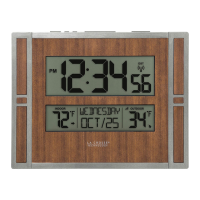
RADIO-CONTROLLED SOLAR CLOCK
INSTRUCTION MANUAL
Contents
Languages Page
__________________________________________
English 2
French 18
Spanish 36
2
LCD1
displa
y
Battery cover
Wall Mount
Location
LCD2
display
Foldable
stands
Sola
r
panel
TABLE OF CONTENTS
Topic Page
Features 3
Battery Installation 3
Setting Up 5
Atomic time - WWVB Radio Controlled Time 5
Function keys 6
LCD Screen 7
Manual Settings 7
Alarm setting and snooze 11
Mounting 12
Care and maintenance 14
Specifications 15
Warranty 16
FEATURES:
RADIO-CONTROLLED SOLAR CLOCK:
Function keys
3
WWVB Radio controlled time with manual time setting
Time display: hour, minute, second
12/24h time format display
Alarm setting with snooze function
Calendar display
Weekday display (4 languages to choose from: English,
Spanish, French, German)
Time zone setting
Daylight savings time ON/OFF option (DST)
Solar mode setting
Indoor temperature display in ºF/ ºC selectable
Indoor humidity display in RH%
Primary Alkaline battery or Solar Rechargeable Alkaline
battery selection
Low battery indicator
Wall mount or freestanding
TO INSTALL / REPLACE BATTERY
The solar clock can use either the included 1 x alkaline rechargeable
battery (charged by solar panel) or 1 x AA alkaline battery (non-
rechargeable; not included).
WARNING! "Do Not recharge the included solar rechargeable
batteries in any device other than the product they came with.
Recharging the solar rechargeable batteries in battery chargers or
other third party devices will damage the batteries and charging
device"
INITIAL SETUP (USING INCLUDED SOLAR RECHARGEABLE
BATTERY FROM THE FACTORY)
1. Open battery compartment on the back of the Clock and make
sure that the battery switch under the battery compartment is
positioned to the left.
If it is not, please slide the switch to the left before proceeding.
2. Locate the battery insulator tab and gently pull to remove it.
3. Next, slide the battery switch to the SOLAR position. The
clock should activate.
4. Wait for WWVB signal.
4
BATTERY COMPARTMENT
NOTE: This clock requires 1 battery.
There is a “filler battery shell” in the top
s
p
ot. Please leave this filler in
p
lace.
Use a non-rechargeable alkaline battery:
1. Remove the included solar rechargeable AA battery from the
compartment.
2. Use the switch to the left to select the alkaline battery.
3. Insert 1 x AA Alkaline battery into the compartment, observing
the correct polarity (see marking inside battery compartment.
4. Replace battery cover
5. IMPORTANT: If the solar panel is facing a permanent strong
light source (eg., on top of a refrigerator with halogen lamp),
please switch the clock to alkaline battery mode to avoid over-
charging re-chargeable alkaline battery.
DO NOT SET THE CLOCK.
Please help in the preservation of the environment
and return used batteries to an authorized depot.
SWITCH RIGHT
(SOLAR OPERATION)
(SOLAR-
RECHARGEABLE
BATTERY)
Slide switch to RIGHT
position once solar-
rechargeable battery
are inserted and
insulator tab is
removed
WARNING
Do NOT recharge the
included solar-
rechargeable battery
outside of this product
because it will damage the
battery and other charging
devices
.
SWITCH LEFT
(START-UP /
RESET)
(STANDARD
ALKALINES)
Slide switch to
LEFT position
before (1) start-up /
reset or (2) any type
of battery
replacement

Questions and Answers

  • D
    Diane CollinsJul 27, 2025
    Why is my Lacrosse WT-8112U not receiving WWVB signal?
    • T
      Thomas TapiaJul 27, 2025
      There are several reasons why your Lacrosse Clock might not be receiving the WWVB signal. To improve reception: * Face the front of the clock towards Ft. Collins, Colorado. * Wait overnight for the signal to be received. * Ensure the clock is at least 6 feet away from electrical devices like TVs or computers. * Try removing the batteries for five minutes, reinserting them, and leaving the unit alone overnight without pressing any buttons.
  • A
    Amanda MullinsAug 1, 2025
    What to do if "OFL" appears on my Lacrosse Clock's indoor temperature display?
    • T
      Tyler SandersAug 1, 2025
      If you see "OFL" displayed in the indoor temperature section of your Lacrosse Clock, it indicates that the surrounding temperature is outside of the measuring range. Move the clock to an area with a warmer or cooler temperature.
  • D
    David GeorgeAug 5, 2025
    How to fix incorrect hour on Lacrosse WT-8112U (but minute and date are correct)?
    • G
      garzajohnAug 5, 2025
      If the hour on your Lacrosse Clock is incorrect, but the minute and date are correct, ensure that you have selected the correct time zone and daylight saving time settings.
  • E
    Eddie JonesAug 10, 2025
    What to do if my Lacrosse WT-8112U LCD is off?
    • D
      dawn22Aug 10, 2025
      If the LCD on your Lacrosse Clock is off, try the following: 1. Move the clock to a brighter environment. 2. Ensure the solar panel is not covered. 3. Replace the battery if you are using an alkaline battery. 4. Enter the program menu and turn Solar Mode OFF, as this is a power-saving feature.
  • P
    Paul LewisAug 16, 2025
    What to do if "00" appears in the humidity section of my Lacrosse Clock LCD?
    • C
      Christopher OconnellAug 16, 2025
      If "00" appears in the humidity section of the LCD on your Lacrosse Clock, remove the battery from the unit for ten minutes. With the battery removed, press any button 20 times, then reinsert the battery.
  • R
    Robert OlsonAug 21, 2025
    What to do if my Lacrosse WT-8112U Clock appears locked up or displays partial segments?
    • C
      cookgregoryAug 21, 2025
      If your Lacrosse Clock appears to be locked up or is displaying partial segments, remove the battery, slide the battery switch to BATTERY, and then reinsert the battery. If you're using a rechargeable battery, you can then slide the battery switch to SOLAR.

Summary

Features

Radio-Controlled Solar Clock

Overview of the clock's primary functions and capabilities.

Battery Installation and Setup

Initial Setup with Solar Battery

Step-by-step guide for initial clock setup using the included rechargeable battery.

Using a Non-Rechargeable Alkaline Battery

Instructions for installing and using a standard alkaline battery.

Setup After Battery Change

WWVB Radio Controlled Time

Understanding WWVB Signal Reception

Explanation of the WWVB signal source, reception range, and factors affecting it.

Manual Settings

Time Zone and DST Settings

Procedure for setting the time zone and enabling/disabling Daylight Saving Time.

Alarm and Snooze Settings

Troubleshooting

Common Display and Reception Issues

Solutions for problems like the LCD being off or no WWVB signal reception.

Lacrosse WT-8112U Specifications

General IconGeneral
DisplayLCD
Atomic TimeYes
Temperature DisplayYes
CalendarYes
Case MaterialPlastic
TypeAtomic Clock
Time Signal ReceptionWWVB
Temperature Range-39.9°C to 59.9°C
Indoor Temperature Range0°C to 50°C
Humidity Range1% to 99% RH
Power SourceBatteries
ColorBlack
Featureslow battery indicator
Time AccuracyAtomic synchronized

Related product manuals