2 3
Index
3
4
5
6
7
8
9
10
11
12
13
14
15
16
17
18
19
20
21
22
23
24
25
26
27
Basicoperations
Modesintroduction
Modesintroduction
Currenttimemode(TIME):Generalguide
Currenttimemode(TIME):Generalguide
Currenttiemmode(TIME):Setup
Compassmode(COMP):Generalguide
Compassmode(COMP):DirectionandBearing
Compassmode(COMP):Declination
Compassmode(COMP):Calibration
Barometermode(BARO):Generalguide
Barometermode(BARO):Setup
Altimetermode(ALTI):Generalguide
Altimetermode(ALTI):Setup
Altimeterdatamode(ALTIDATA):Generalguide
Chronographmode(CHRO):Generalguide
Chronographmode(CHRO):Laptime
Chronographdatamode(CHRODATA):Generalguide
Alarmmode(ALRM):Generalguide
Alarmmode(ALRM):Setup
Timermode(TIMER):Generalguide
Timermode(TIMER):Setup
Pedometermode(PEDO):Generalguide
Pedometermode(PEDO):Setup
Batteryreplacementandothermaintenance
A-1
A-2
A-3
B-1
B-2
B-3
C-1
C-2
C-3
C-4
D-1
D-2
E-1
E-2
F-1
G-1
G-2
H-1
I-1
I-2
J-1
J-2
K-1
K-2
L-1
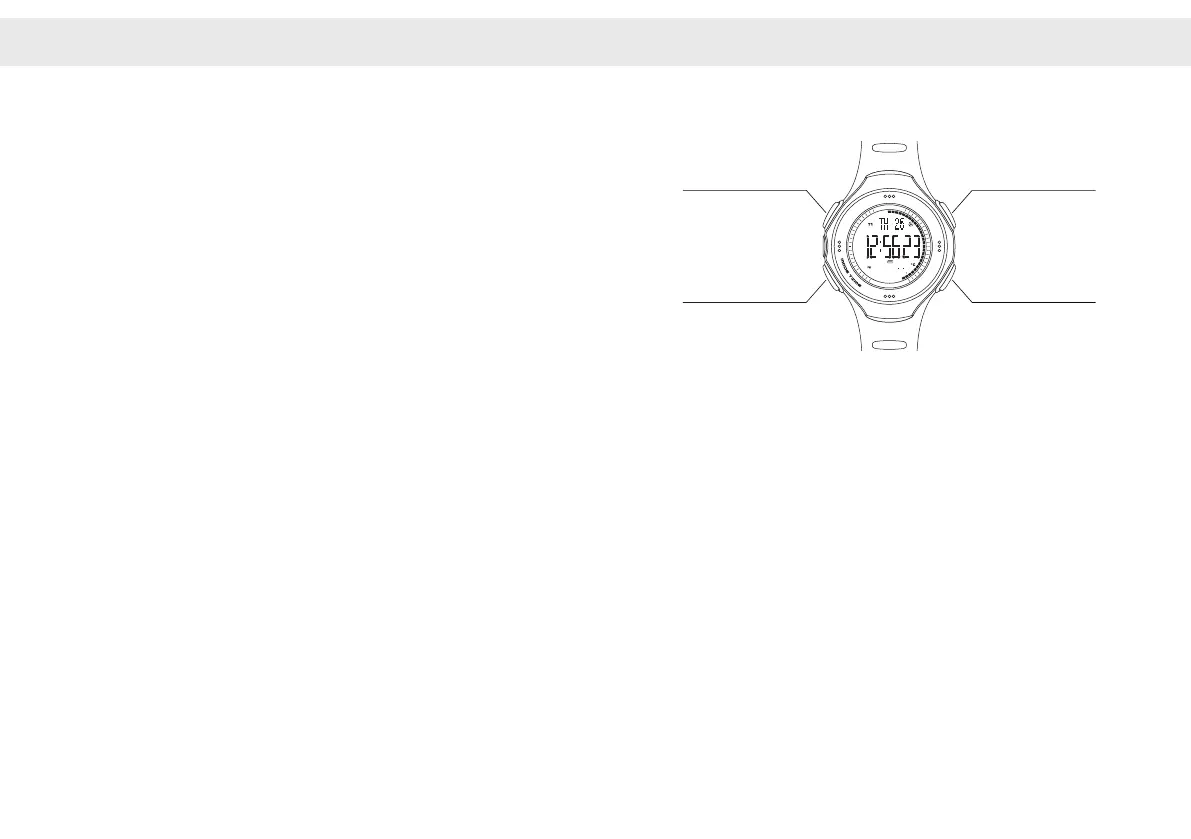
A-1Basicoperation
■Buttonsandhowitworksingeneral
ButtonA([SET/LIGHT]Key)
-Turnonbacklight
-Startsetup
ButtonB([MODE/TIME]Key)
-Switchmodes
-Selectnextmenuinsetup
ButtonC([START/LAP]Key)
-Start/Stopmeasuring
-Addvalueinsetup
ButtonD([Stop/Reset]Key)
-Resetmeasureddata
-Decreasevalueinsetup
ButtonA
ButtonB
ButtonC
ButtonD
S
E
N
S
O
R
M
A
S
T
E
R
Ⅱ
L
A
D
W
E
A
T
H
E
R
S
E
T
L
I
G
H
T
-
S
T
O
P
R
E
S
E
T
S
T
A
R
T
L
A
P
+


 To Next Page