the instrument will power off automatically.
The function of the rotation speed switch key, self-leveling key, area scanning function key and slope function key on the
remote control is same with the instrument.
5. Self-check and Calibration
The instrument must be self-checked after service for a certain time or before operation in a major project. If the
accuracy is found beyond tolerance, user makes some adjustment according to methods as follows.
5.1 Accuracy check
X、Y accuracy check
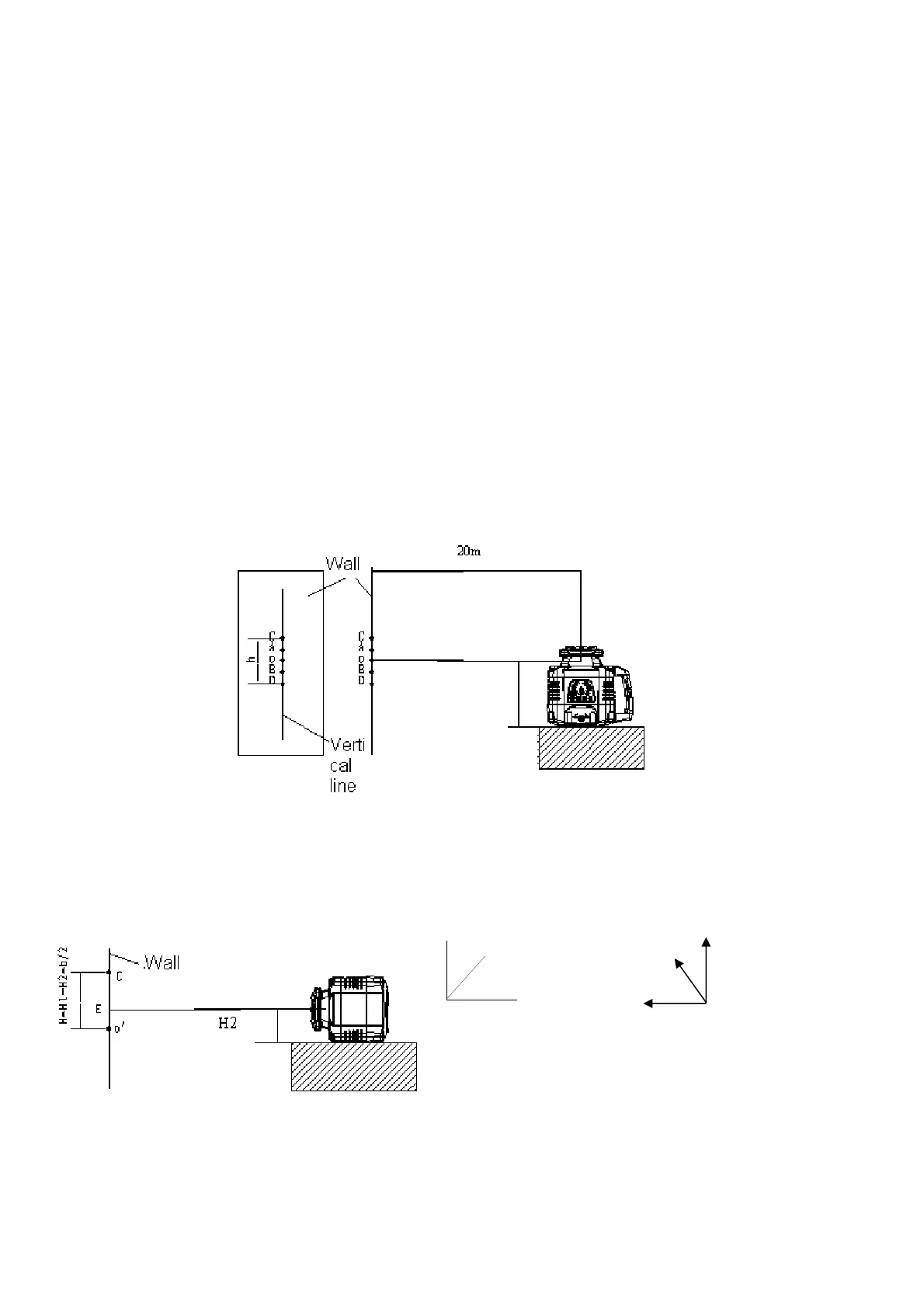
(1) Set a platform in a room which is 20m far way from the wall, put the instrument on the platform, and take the X axis
face to the wall.
(2) Power on and after the instrument is auto-leveled, mark the laser line which is on the wall as sign A, and make a
vertical line along sign A
(3) Rotate the instrument by 90 degrees in turn, after the instrument is auto leveling, mark the point of intersection of the
laser line and the vertical line as point B, C and D separately.
(4) Measure the maximal distance h between two points which among point A, B, C, D.
(5) If h≤3mm, the accuracy is OK; If 3mm< h≤20mm, the accuracy is beyond tolerance, the user could adjust and
calibrate the accuracy; If h>20mm, the accuracy is beyond tolerance, user must contact with seller for service
Z axis accuracy check
(1)Follow X, Y accuracy check figure, measure the height H from horizontal laser plane to the platform when placing
the instrument horizontally.
(2)Place the instrument vertically on the platform, and take Z axis face to the wall.
(3)Power on the instrument, make the peak to project on the wall, after the instrument is leveling, mark E.
(4)When placing the instrument transversely, measure H2 from the laser dot to the platform, calculate H value
H
1
Z direction
X direction
Y direction
Z direction
Y direction
X direction
H1


 To Next Page
 Loading...