- 7 -
* If the car‘s windscreen is tinted with a reective layer or heated, it can limit the recording quality and
especially the GPS signal. In this case, the camera may not receive the GPS signal at all. GPS positio-
ning data and speed are indicative.
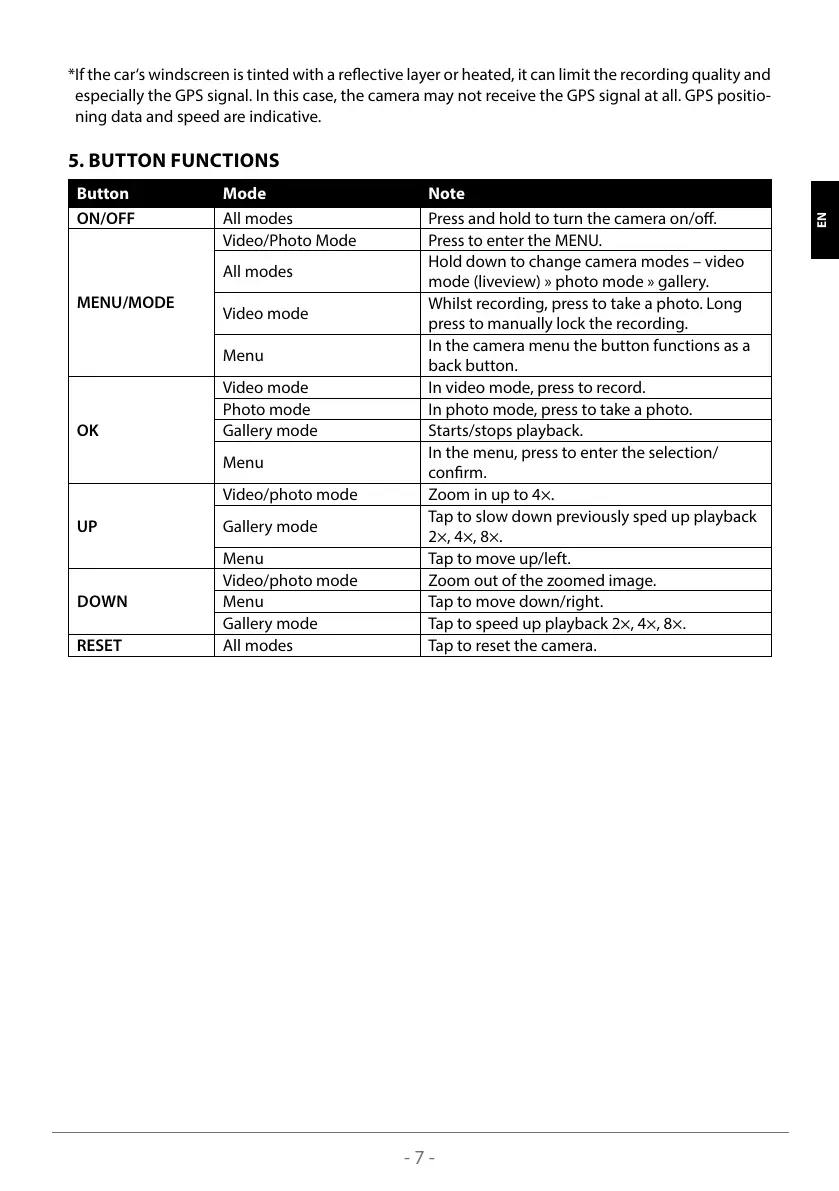
5. BUTTON FUNCTIONS
Button Mode Note
ON/OFF All modes Press and hold to turn the camera on/o.
MENU/MODE
Video/Photo Mode Press to enter the MENU.
All modes
Hold down to change camera modes – video
mode (liveview) » photo mode » gallery.
Video mode
Whilst recording, press to take a photo. Long
press to manually lock the recording.
Menu
In the camera menu the button functions as a
back button.
OK
Video mode In video mode, press to record.
Photo mode In photo mode, press to take a photo.
Gallery mode Starts/stops playback.
Menu
In the menu, press to enter the selection/
conrm.
UP
Video/photo mode Zoom in up to 4×.
Gallery mode
Tap to slow down previously sped up playback
2×, 4×, 8×.
Menu Tap to move up/left.
DOWN
Video/photo mode Zoom out of the zoomed image.
Menu Tap to move down/right.
Gallery mode Tap to speed up playback 2×, 4×, 8×.
RESET All modes Tap to reset the camera.
SLO HR LT FR HU SK CZ PL DE EN



 To Next Page