4
3. CAMERA CONTROLS
Turn on / off Hold down the POWER button or swipe down and press the POWER icon
Start / stop the recording
or take a photo
Press the REC button
Switch quickly between
photo / video mode
Swipe to the side or press the MODE button
Select the mode
Touch the icon or swipe up and select the desired mode
Settings Touch the icon
View files Touch the icon
Switch between displays Hold the MODE button
Turn WiFi on / off Press the POWER button or touch the WiFi icon, which you can find by
touching the icon
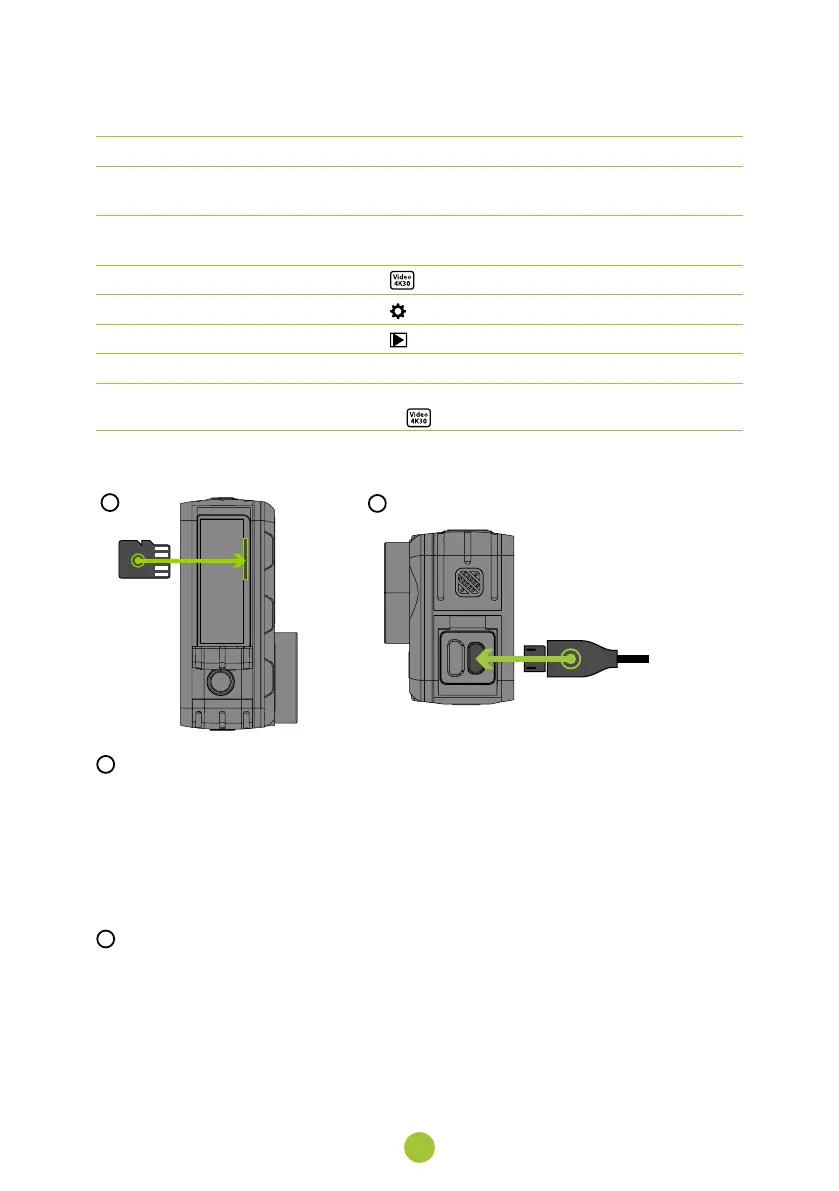
4. TURNING IT ON FOR THE FIRST TIME
A
B
A
INSERT THE MICROSD CARD INTO THE CAMERA AS SHOWN (CONNECTORS TOWARDS
THE LENS)
›
Only insert the card when the camera is turned off and not connected to your computer.
›
Format the card directly in the camera the first time you use it.
›
We recommend memory cards with a higher write speed (UHS Speed Class -U3 and higher) and a maxi-
mum capacity of 128 GB.
Note: Use only micro SDHC or SDXC cards from reputable manufacturers. With generic third-party cards, there
is no guarantee that the data storage will work properly.
B
CONNECT THE CAMERA TO A POWER SOURCE
›
You can charge the camera by either connecting it to your computer or using an optional AC adapter.
›
It takes approximately 4.5 hours to charge the battery from 0 to 100%. When charged, the charge indi-
cator turns off.
Note: Charging the battery from 0 to 80% takes 2.5 hours.


 To Next Page