www.howdens.com
812110AA
Cancel
3 sec.
Load
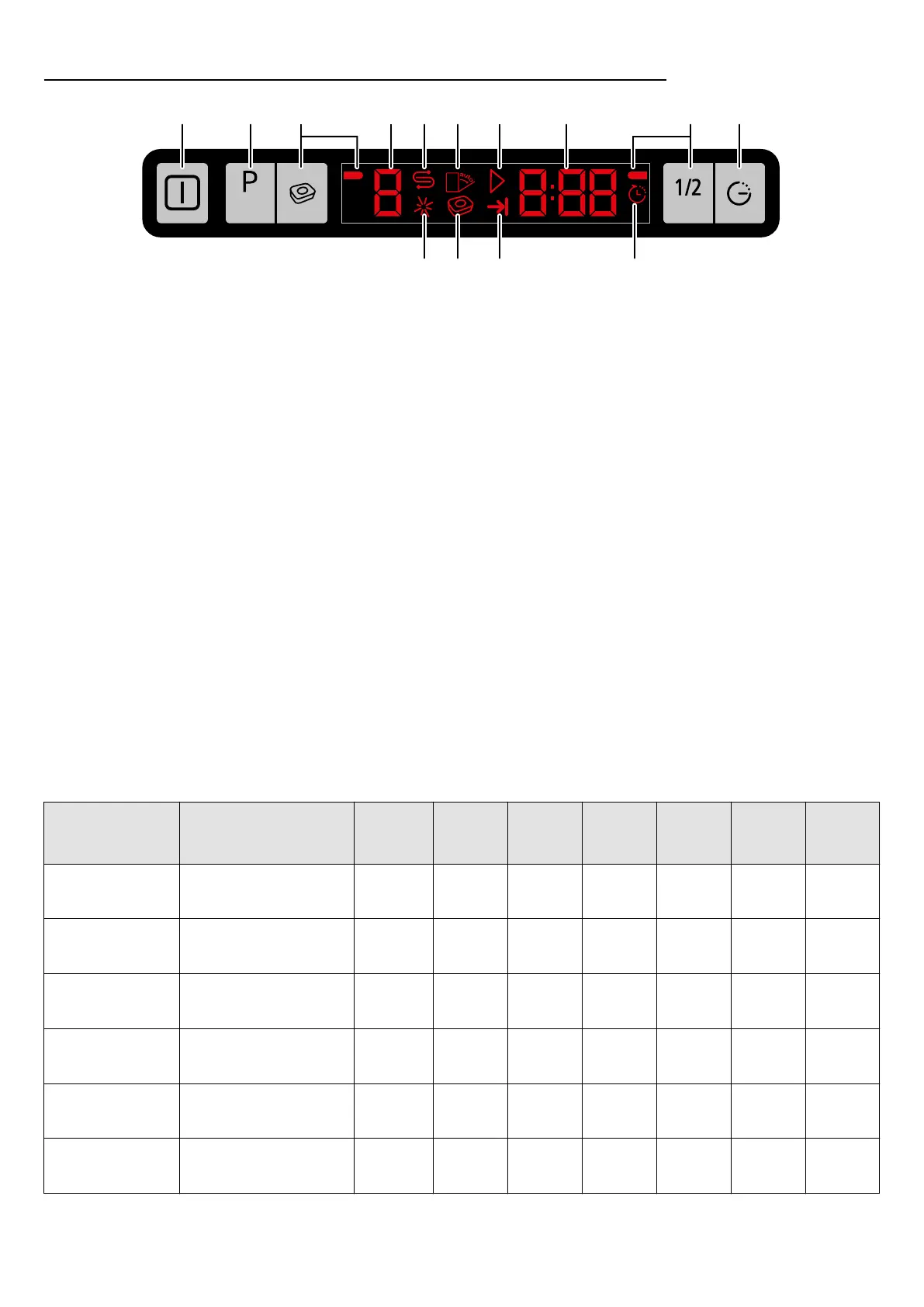
1 2 3 4 5 6 7
11 101213
8 3 9
Choose a programme
The consumption values shown in the table were determined under standard conditions. Differences may therefore occur under practical conditions.
*Reference programme for testing institutes. The tests in accordance with EN 50242 must be carried out with a full water softener salt dispenser and a full rinse aid
reservoir, and using the test programme.
Programmes and
temperatures.
Cycle selection
information.
Most economical washing
programme for medium
soiled dishes.
P1
eco* 50°C
P3
NORMAL 60°C
P2
INTENSIVE 70°C
P5
PREWASH
P4
RAPID 35°C
+ +Medium + 210 238
186
Heavily soiled dishes,
pots and pans.
+ +High + 120 147
102
Normally soiled dishes,
fast cleaning.
- +
Low -
Medium
+ 58 83
-
Lightly soiled dishes
that are scraped or
pre-cleaned.
- +Low - 30 63
-
Heavily soiled dishes. + -High - 15 -
-
Prewash Wash
Degree of
soiling
Dry
Time
(mins)
+ Tablet
option
(mins)
+
1
/
2
Load
option
(mins)
1. Power On/Off
Display illuminates when the power is On.
For energy saving, the machine automatically turns off
following the completion of the programme or if the
programme is not started.
2. Programme Selection/Programme Cancel
Press until the desired programme appears.
The programme will start when the dishwasher
door is closed.
To cancel a running programme or
time delay function;
• Open the dishwasher door
• Hold for 3 seconds, (countdown 3-2-1),
until 0:01 is displayed.
• Close the dishwasher door.
• Wait for 2 minutes until the draining process is
completed and an audible warning is heard.
• Power Off/On and re-programme.
3. Function Keys
All in one tablet.
Half load.
Use the function keys to select tablet or half load
options after selecting the desired programme.
4. Programme Indicator
The programme will start when the dishwasher door is
closed.
5. Salt Indicator
Rellsaltreservoirwhenilluminated.
6. Not used
7. Start / Cancel Indicator
8. Programme Time Indicator / Time Delay
Indicator displays the duration of the programme or the
time delay before starting the selected programme.
9. Time Delay - 30 minutes to 24 hours.
Press and select the desired time delay before starting
the selected programme.
10. Time Delay Indicator
Illuminatesandasheswhentimedelayisselected.
11. End of Programme Indicator
Illuminateswhentheselectedprogrammenishes.
12. Tablet Detergent Function
Illuminates when the tablet function key has been
selected.
13. Rinse Aid Indicator
Rellrinseaidreservoirwhenilluminated.
P0
SELF CLEAN
70°C cleaning cycle.
Do not use for washing
dishes.
75



 To Previous Page
 Loading...