3
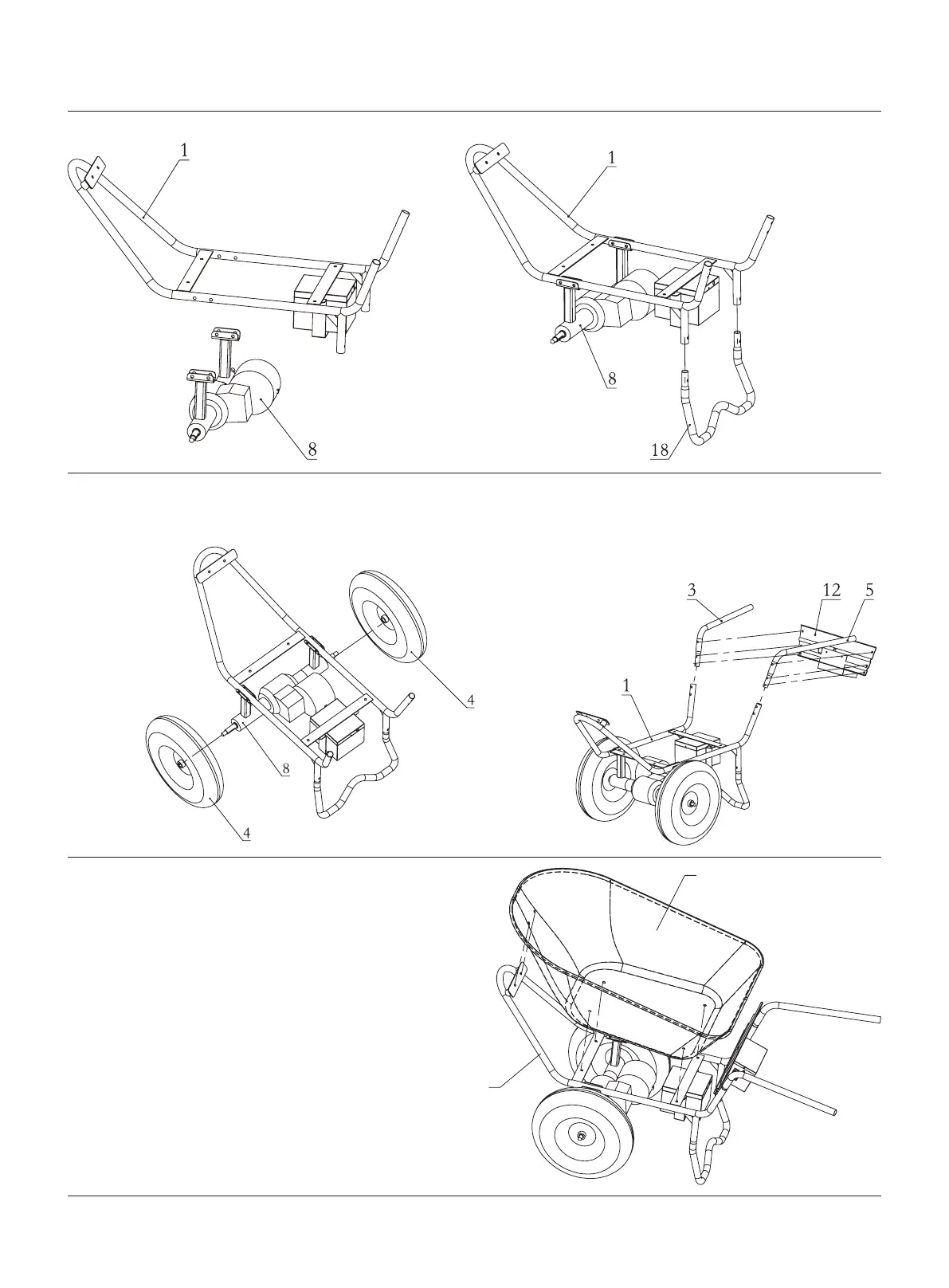
ASSEMBLY
Step 2:
Install bucket bracket (number 1)
and supporting leg (number 18)
with bolts. (See Figure 2)
Step 1:
Install bucket bracket (number 1)
and drive axles (number 8) with
bolts. (See Figure 1)
Step 3:
Fixed assembly of installation nuts with wheels
(number 4) and drive axles (number 8).
(See Figure 3)
Step 4:
Fix the bucket bracket (number 1) and the right handle-
bar (number 3) the left handlebar (number 5) and the
handlebar connecting plate (number 12) with bolts,
respectively. (See Figure 4)
Step 5:
Fixed the bucket bracket (number 1) and the bucket
(number 2) with bolt separately. (See Figure 5)
Figure 1 Figure 2
Figure 3 Figure 4
Figure 5


 To Next Page