EasyManua.ls Logo

Lantus clickstar - How to Get Started

Lantus clickstar
8 pages
Print Icon
To Next Page IconTo Next Page
To Previous Page IconTo Previous Page
Loading...
How to get started
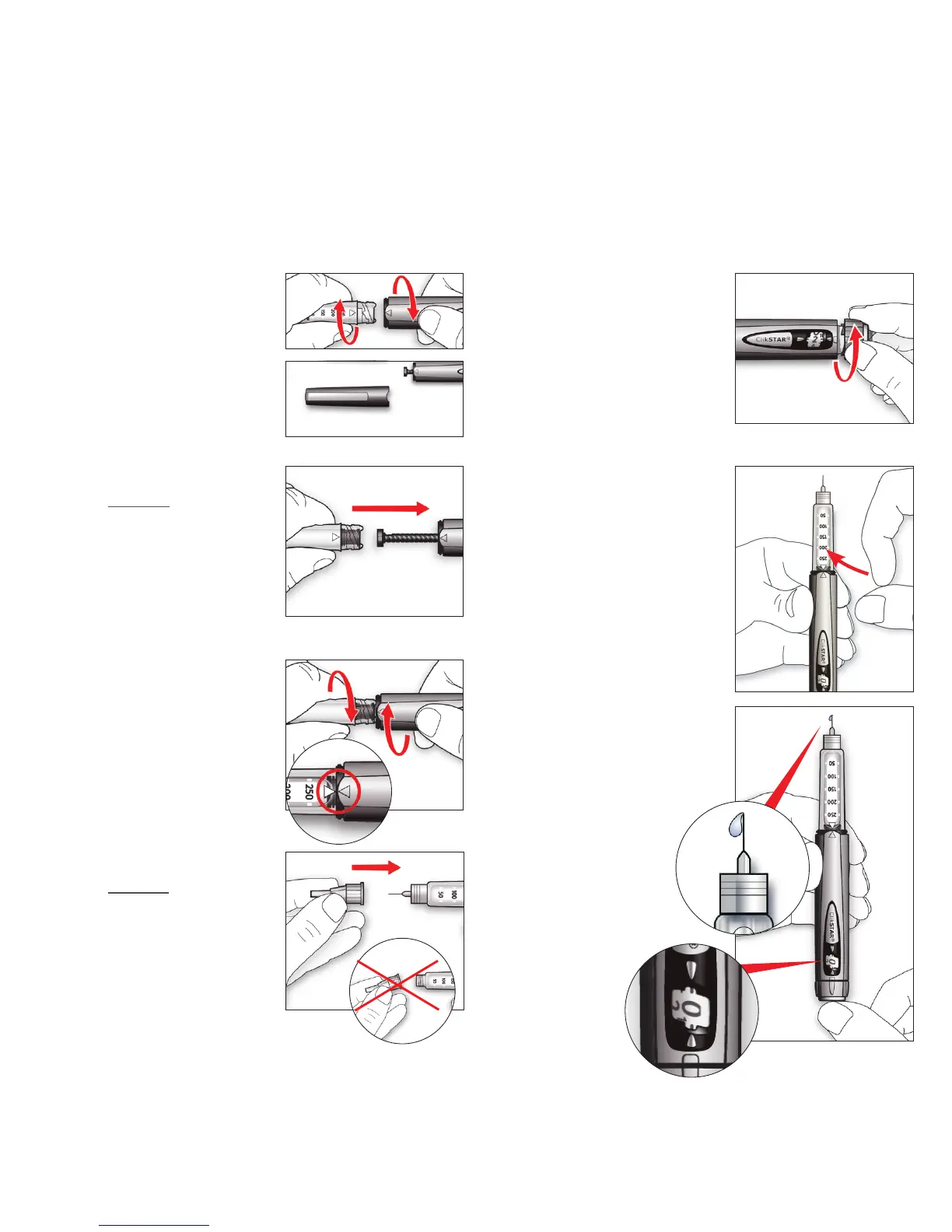
1
Remove the protec-
tive sleeve. Unscrew
the ampoule sleeve
from the pen body.
Insert a new cylinder
ampoule into the
ampoule sleeve.
5
Hold the pen with the
needle pointing up.
Get rid of any air
bubbles by tapping on
the insulin reservoir.
6
7
Press the injection
button all the way in.
Check that there is
insulin coming out of
the tip of the
needle and
that the dose
window is
displaying “0”.
Choose a dose of 2
units by turning the
dosage knob. Remove
the outer and inner
needle caps.
2
Push the plunger rod
straight in with the
aid of the ampoule
sleeve. You can also
push the plunger rod
in using your finger.
3
Screw the ampoule
sleeve back onto the
pen body until it
”clicks” into place
and the markings line
up.
4
Attach a needle
directly to the pen.
Screw or push the
needle on depending
on which needle you
are using.
Carry out a safety test prior to each injection

Related product manuals