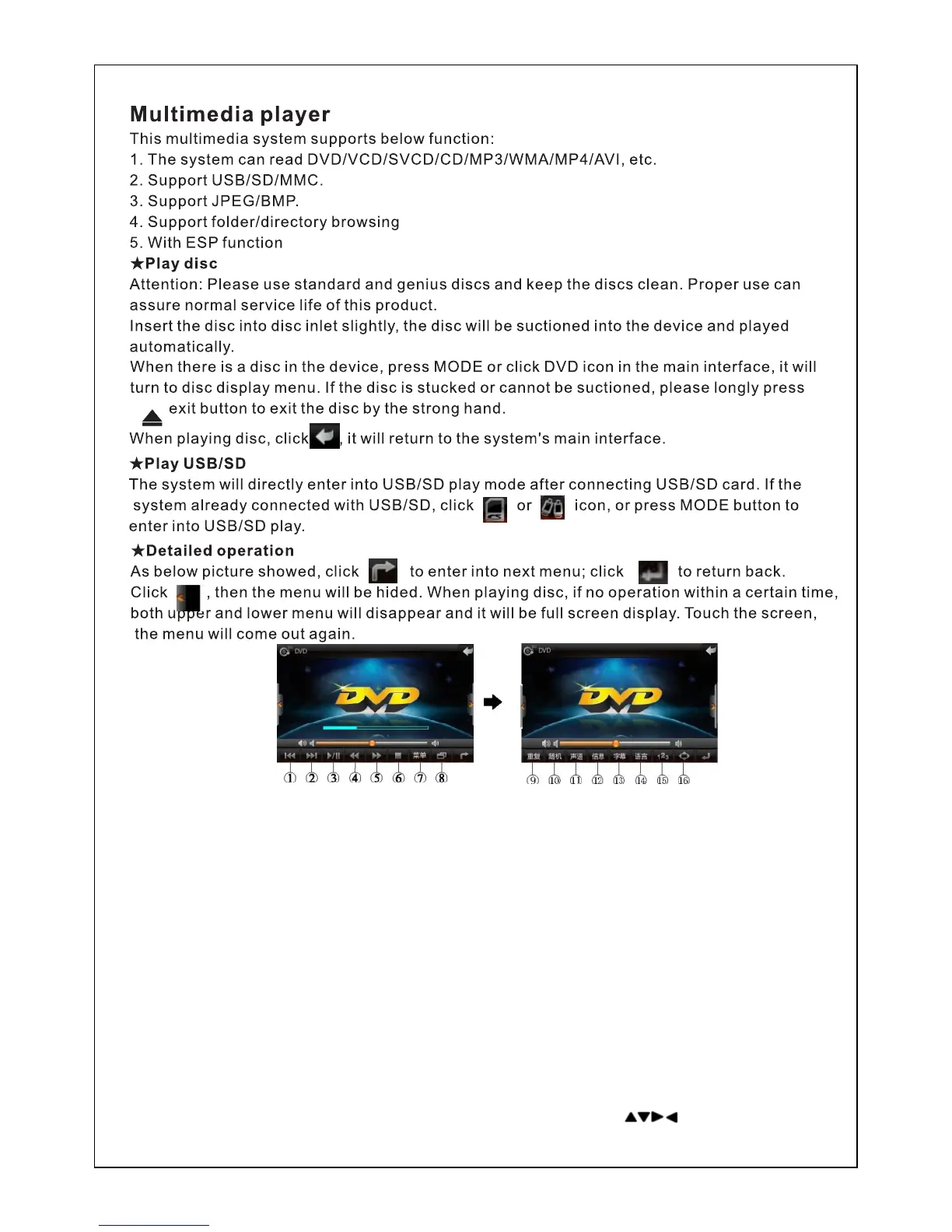
【1】…Click to select previous section(item)
【2】…Click to select next section(item)
【3】…Play/pause
【4】…Fast backward(for each click, it will fast backward at 2,4,8 and 20x).
【5】…Fast forward(for each click, it will fast forward at 2,4,8 and 20x).
【6】…Stop key( Click to stop playing; click play key again, it will play the disc from the first item).
【7】…Click the key to enter primary menu of the disc.
【8】…PIP. Click this key to enter PIP function
【9】…Repeat.
【10】…Radom. Click this key to turn to random play.
【11】…Sound track.
【12】…Click the key, DVD play information will be displayed.
【13】…Subtitles selection.
【14】…Language selection.
【15】…Click this key, the search keyboard will come out. Enter a number, then it will play the
corresponding section.
【16】…Under zoom display mode, click this key to select by moving the cursor up and down.
【17】…Press 'ZOOM' key on the remote control, the image size can be down or up. (Note: After
the image size enlarged, image position can be adjusted by pressing on remote control.)



 To Next Page