Power
Connections
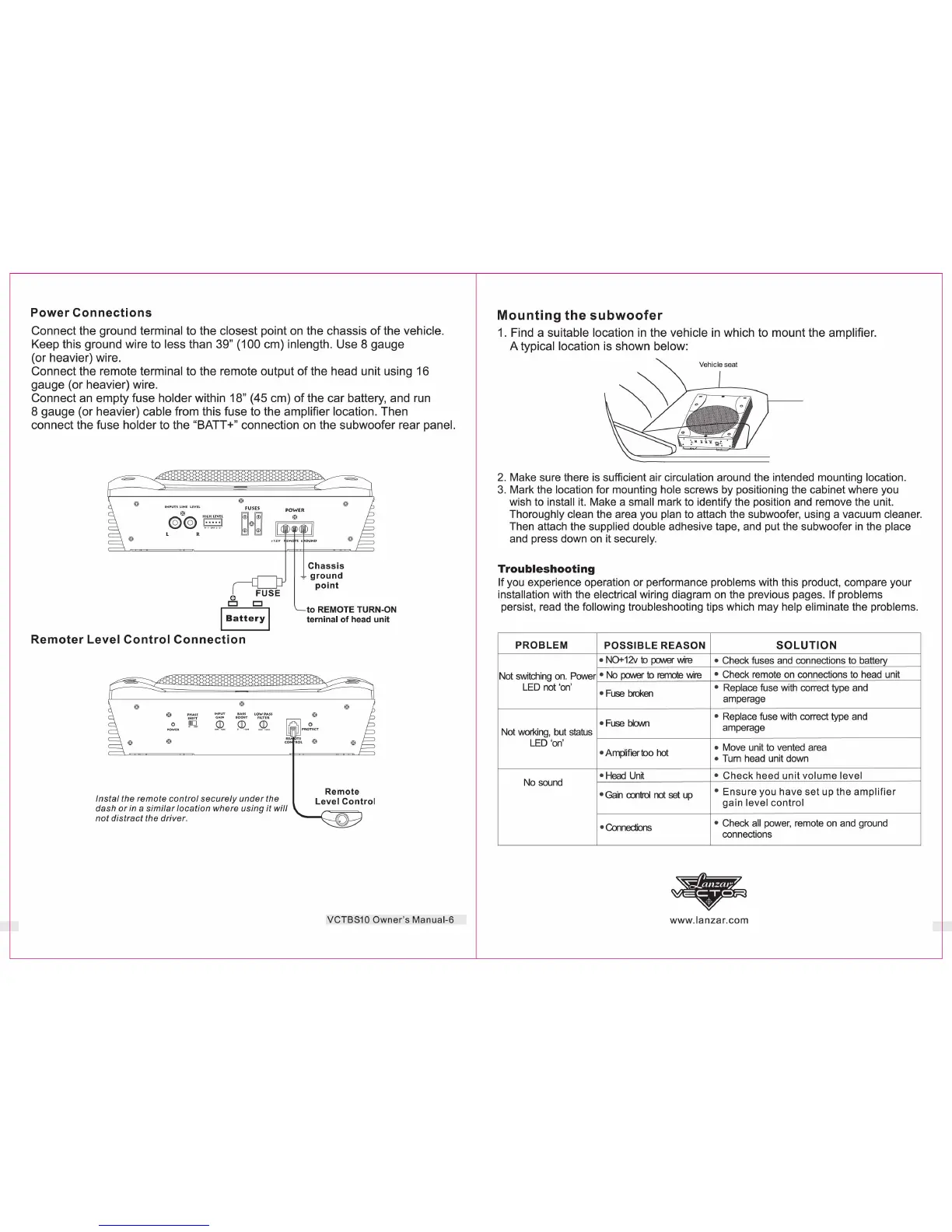
Connect the ground terminal to the closest point on the chassis
of
the vehicle.
Keep this ground wire to less than 39" (100 cm) inlength. Use 8 gauge
(or heavier) wire.
Connect the remote terminal to the remote output
of
the head unit using 16
gauge (or heavier) wire.
Connect an empty fuse holder within 18" (45 cm)
of
the car battery, and run
8 gauge (or heavier) cable from this fuse to the amplifier location. Then
connect the fuse holder to the "BATT +" connection on the subwoofer rear panel.
FUSE
8
CJ
I
Battery
I
Remoter
Level
Control
Connection
Instal
the
remote
control
securely
under
the
dash
or
in a
similar
location
where
using
it
will
not
distract
the
driver
.
Chassis
7
ground
point
to
REMOTE
TURN-ON
terninal
of
head unit
VCTBS10
Owner
's Manual-6
Mounting
the
subwoofer
1.
Find a suitable location in the vehicle
in
which to mount the amplifier.
A typical location is shown below:
2.
Make sure there is sufficient air circulation around the intended mounting location.
3. Mark the location for mounting hole screws by positioning the cabinet where you
wish to install i
t.
Make a small mark to identify the position and remove the unit.
Thoroughly clean the area you plan to attach the subwoofer, using a vacuum cleaner.
Then attach the supplied double adhesive tape, and put the subwoofer
in
the place
and press down
on
it securely.
Troubleshooting
If you experience operation or performance problems with this product, compare your
installation with the electrical wiring diagram
on
the previous pages. If problems
persist, read the following troubleshooting tips which may help eliminate the problems.
PROBLEM
POSSIBLE
REASON
SOLUTION
• N0+12v
to
po.NeI"
wire
• Check fuses and connections to battery
Not switching
on
. Power • No
po.NeI"
to
remote
wire
• Check remote on connections to head unit
LED not 'on'
•
Fuse
broken
• Replace fuse with correct type and
amperage
•
Fuse
bbNn
• Replace fuse with correct type and
Not working, but status
amperage
LED
'
on
'
• Move unit to vented area
• Amplifier too
hot
• Tum head unit down
No sound
•
Head
Unit
•
Check
heed
unit
volume
level
•
Gain
control
not
set
up
•
Ensure
you
have
set
up
the
amplifier
gain
level
control
•
Connedions
• Check
all
power, remote on and ground
connections
www.lanzar
.
com


 To Previous Page
 Loading...