E-book
1. Enter the Main Menu and use the “Prev” or “next” to select the “E- Book” icon and then press
“Menu.” button to enter the “E-Book feature.
2. Press the “Prev” or “Next” button to select the required E-book file.
3. Press “Menu” to display the file.
4. Use the “Prev” or “Next” button to navigate through the file.
Game.
Russia Block
NB: Game may vary
1. Enter the Main Menu and use “Prev” or “next” to select the “Game” icon and then press
“Menu” button to enter the “Game” feature.
2. Press the “Prev” or “Next” button to select the required “Game” file.
3. Press “Menu” to start the game.
4. During game player, use the “Prev” or “Next” buttons to move the block from side to side as
they descend. Use the “play button to rotate the block .
Converting Video files
Video files must be converted prior to being downloaded to the player.
1. Install the MP3set4_15 program as supplied on the software CD.
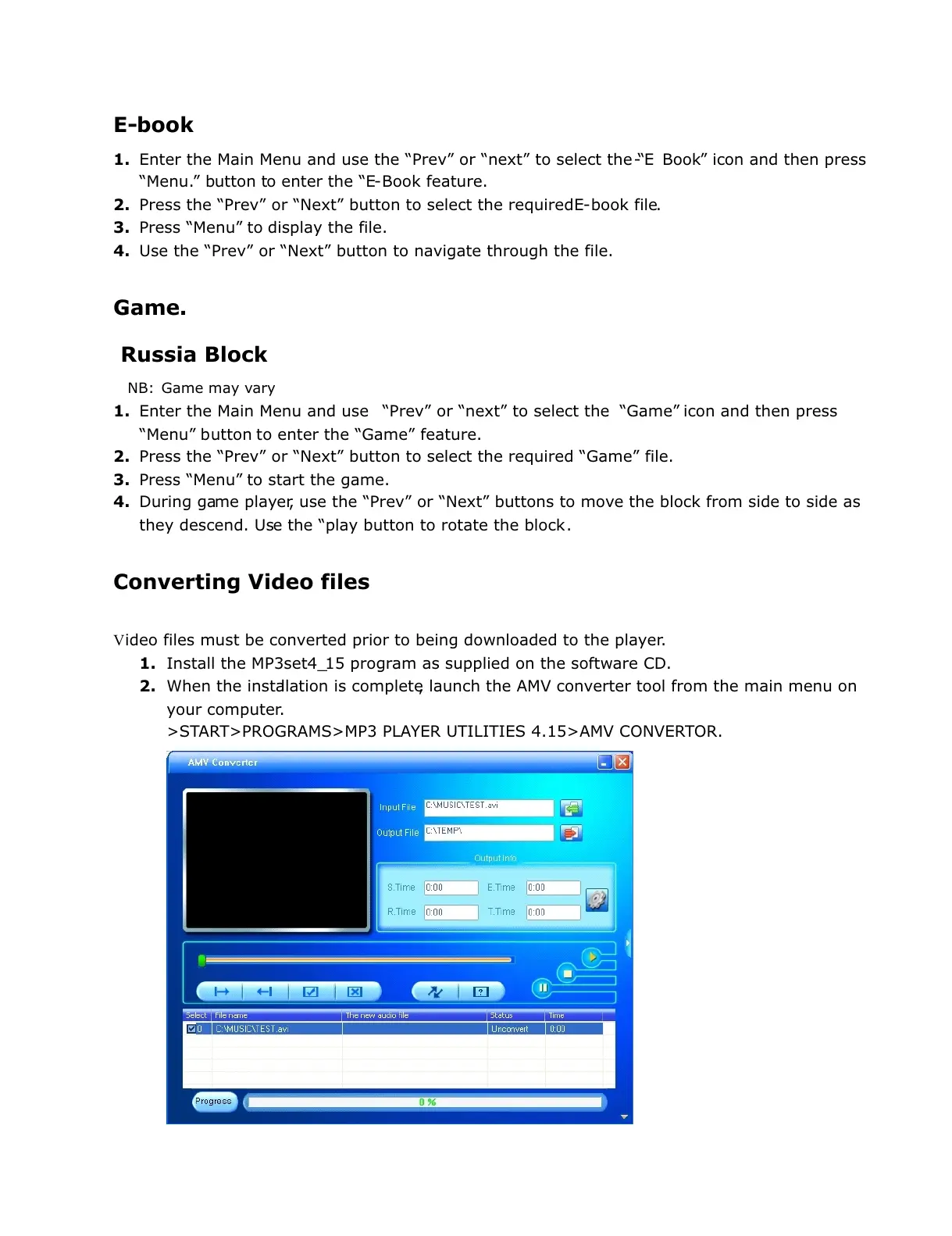
2. When the installation is complete, launch the AMV converter tool from the main menu on
your computer.
>START>PROGRAMS>MP3 PLAYER UTILITIES 4.15>AMV CONVERTOR.


 To Next Page
 Loading...