
 Need help?
Do you have a question about the Laser NRGVAULT PV500 and is the answer not in the manual?
Disconnect devices after full charge to prevent overheating and extend battery life.
Match device voltage and amp requirements to the power station's output ports for optimal use.
Always charge on non-flammable surfaces to mitigate heat-related risks.
Do not charge or leave the power station in environments with extreme temperatures.
Stay nearby while charging to quickly disconnect if any defect is detected.
Steps to resolve charging issues, including checking cables, power settings, and battery levels.
Normal heat is expected; unplug and cool down if the device or station becomes excessively hot.
Fan noise is normal for the air-cooled system, varying with workload.
Device cannot be taken on planes as its battery capacity exceeds the 160Wh regulation.
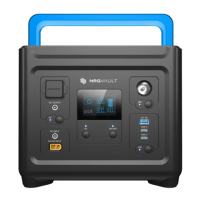
The NRGVault PWR-PV500-PS is a portable energy storage power generator designed for a variety of applications, including emergency relief, outdoor camping, office equipment, and entertainment. Its compact size ensures portability, while its robust capabilities allow it to power small to medium appliances.
The PWR-PV500-PS serves as a versatile power source, capable of delivering AC, DC, and USB output to charge and operate various electronic devices and appliances. It features multiple input options for charging, including AC wall charging, solar panel charging, and car charging, providing flexibility in different environments. The device is equipped with a main power button to turn it on and off, and separate switches for AC, DC, and USB outputs, allowing users to control power delivery to specific ports. An integrated LCD display provides essential information about the device's status, including battery level, power input/output, and remaining charge/discharge time. Additionally, it includes an LED light with multiple modes (half-bright, full-brightness, SOS, and strobe) for illumination in various situations.
To operate the PWR-PV500-PS, users first long-press the main power button for 3 seconds to turn on the unit, which activates the main power indicator and the LCD screen, entering a standby state. For AC output, users plug in their AC appliances and then tap the AC on/off switch to initiate power supply. The device can deliver up to 500W of total power across all AC outlets simultaneously. A system power check is performed for approximately 8-10 seconds when AC output is enabled, indicated by the AC icon on the LCD display, before power becomes available. To turn off AC output, the AC power on/off switch should be long-pressed. Similarly, for DC output, users plug in their DC devices and tap the DC on/off switch. For USB output, devices are plugged into the USB ports, and the USB on/off switch is tapped to activate the function. After use, the respective on/off switches for DC and USB outputs should be tapped to turn them off. If the product is not in use for an extended period, a long press of the main power switch for 3 seconds will turn off the unit to conserve power. The LED light function is activated by pressing and holding the LED light button for 3 seconds to enter half-bright mode. Subsequent taps cycle through full-brightness, SOS, and strobe modes. To turn off the LED light from any mode, the LED light button should be pressed and held for 3 seconds. It is crucial not to plug the DC input cable into the DC output connector or the USB input cable into the DC output connector, as this can damage the product.
Proper maintenance ensures the longevity and safe operation of the PWR-PV500-PS. The unit should be cleaned only with a soft, dry cloth, and users must avoid using water or other liquids to prevent damage to internal components and electric shock. For extended storage, the device should be disconnected from power outlets and any connected devices, then powered off. It is recommended to charge the unit to approximately 80% battery level every 3 to 6 months during long storage periods. The PWR-PV500-PS is designed for indoor storage only, with a recommended storage temperature range of 0 – 25°C. When charging, it is important to avoid overcharging by disconnecting devices and the power station once the battery reaches full charge, as prolonged charging can lead to overheating and reduced battery life. Users should match the correct voltage and amp values required by their devices when using the power station's output ports. Charging should always occur on non-flammable surfaces, away from beds, pillows, paper, or any fabric, as the device can generate heat during charging. Extreme environments, especially high temperatures, should be avoided during charging. Monitoring the charging process is advised, preferably while nearby, to immediately disconnect the unit in case of a defective battery or power station. The power station utilizes an air-cooled system with built-in fans to dissipate heat, and fan speed may vary depending on the workload, which is normal. The battery in the unit exceeds the 160Wh regulation, meaning it cannot be taken on a plane.
 General
| Rated Output Power | 500W |
|---|---|
| Peak Output Power | 1000W |
| Battery Type | Lithium-ion |
| DC Output | 12V/10A |
| Charging Methods | AC Wall Outlet, Solar Panel, Car Charger |
| USB Output | 5V/2.4A |
| Output Ports | 2x AC, 1x DC, 2x USB |
| Weight | 13.2 lbs |
| Cycle Life | 500 cycles to 80% capacity |

 To Next Page