Need help?
Do you have a question about the Laser PJT-DVDHD-906 and is the answer not in the manual?
Placing the projector on a table in front of the screen for quick setup and portability.
Mounting the projector upside-down from the ceiling in front of the screen.
Placing the projector on a table behind the screen, requiring a special rear projection screen.
Mounting the projector upside-down from the ceiling behind the screen.
Instructions and diagrams for adjusting the vertical dimension and display angle of the image.
Guide on adjusting focus for sharpness and keystone correction for image distortion.
Diagram labeling all external ports, buttons, and indicators on the projector unit.
Steps to connect the power adapter to the projector and the mains outlet.
Guide for connecting devices via HDMI cable and selecting the appropriate input source.
Instructions for connecting devices using AV cables and selecting the AV input mode.
Steps for connecting computers or other devices via VGA cable and selecting VGA input.
How to connect external audio devices like amplifiers or speakers via audio output.
Instructions for connecting USB drives and Micro SD cards for media playback.
Guide for playing media files from TF cards and USB devices via the Media Player mode.
Instructions on inserting a disc and playing DVDs or CDs through the built-in player.
Steps to pair the projector with Bluetooth speakers or audio devices for sound output.
Configuration settings for Clock, Timers (Off, On, Sleep), and Auto Sleep function.
Checks for power light, lens cover, cable connections, and correct input source.
Instructions for cooling, checking vents, and cleaning the air filter.
Explains keystone effect and how to correct it using the projector's function.
Recommendations to clean the lens and adjust picture settings or ambient light.
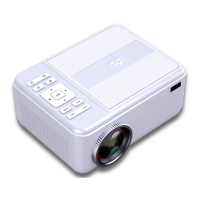
The Laser Bluetooth DVD Projector (PJT-DVDHD-906) is a versatile entertainment device designed for projecting video and audio content from various sources onto a screen. It offers a range of features for flexible setup, media playback, and sound output, making it suitable for both quick, portable use and more permanent installations.
The core function of the PJT-DVDHD-906 is to project images and videos. It supports multiple input sources, including HDMI, VGA, AV, USB, and Micro SD cards, allowing users to connect a wide array of devices such as DVD players, laptops, gaming consoles, and media players. A built-in DVD player further enhances its utility, enabling direct playback of DVDs and CDs without the need for an external player.
A key feature of this projector is its Bluetooth capability, which allows it to output audio wirelessly to a connected Bluetooth speaker or audio device. This provides flexibility in sound setup, enabling users to enhance their audio experience with external speakers without physical connections.
The projector offers various projection modes to accommodate different viewing environments:
For media playback, the projector includes a media player function that supports files from USB devices and Micro SD cards. Users can browse and play music, photos, and movies directly from these storage devices. The integrated DVD player handles DVD and CD discs, offering controls for playback, chapter selection, and audio channels.
The device also incorporates a casting feature, allowing users to mirror the screen of their Android or iOS devices onto the projector. This is achieved by connecting both the projector and the mobile device to the same Wi-Fi network, then selecting either Miracast (for Android) or iOS Cast (for iOS) on the projector's main menu.
Setting up the projector involves a few straightforward steps. The lens cover must be removed before use and replaced when the unit is not in use to protect the lens. Power is supplied via an included adapter, which connects to the DC input port and a mains outlet.
Connecting external devices is facilitated by multiple input ports:
Image adjustment features are crucial for optimizing the projected display:
The projector is controlled via an included remote control, which provides comprehensive functions for power, volume, source selection, menu navigation, playback controls (play, pause, stop, fast forward, rewind, next/previous track), and specific DVD functions like title menu, DVD menu, and subtitle selection. On-device buttons also offer basic controls for volume, play/pause, stop, navigation, source, menu, return, and power.
General setup options include:
The manual emphasizes several precautions to ensure the longevity and safe operation of the projector:
The PJT-DVDHD-906 is designed for user-friendly operation and maintenance, with clear instructions for setup, usage, and basic troubleshooting to ensure a consistent and enjoyable projection experience.
 General
| Light Source Type | LED |
|---|---|
| Brightness Output | LED bulb output 3800 Lumens White light output 85 Ansi lumens |
| Color Temperature | 6000K - 8000K |
| Display Native Resolution | 1280 x 720 |
| HDMI Input Supported Video Resolution | 1080p, 1080i, 720p, 576i, 480p, and 480i |
| Projection Size | 30-100 inch |
| Power Consumption | Operating 48W; Standby 0.8W |
| Power Input Connect Included Adapter | DC 12V, 4A |
| Included Adapter Connect DC input of unit | Input AC 100-240V, 50/60Hz Output DC12V, 4A |
| Signal Port | AV / VGA / HDMI |
| USB Port | Support USB device up to 32GB Support format mpeg1, mpeg2, mpeg4, mp3, jpeg |
| MICRO SD | Support MICRO SD card up to 32GB Support format mpeg1, mpeg2, mpeg4, mp3, jpeg |
 Weight and Dimensions
| Weight | 0.9 KG |
|---|---|
| Dimension | 203 x 160 x 94 mm |

 To Next Page