
 Need help?
Do you have a question about the Laserco AO-AB300 and is the answer not in the manual?
Steps to connect earphones to a device via Bluetooth.
Instructions to re-sync earphones if they lose connection.
How to turn the earphones on and off.
Control audio playback using touch gestures.
Navigate tracks using touch gestures.
Adjust audio volume using touch gestures.
Handle incoming calls using touch gestures.
Activate voice assistant via touch gestures.
Troubleshooting sound issues with one earphone.
Steps to resolve Bluetooth connection problems.
Tips for improving audio playback stability.
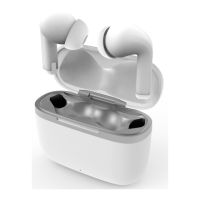
The Laser Wireless Earphones (AO-AB300) are a pair of true wireless stereo (TWS) earphones designed for audio playback and hands-free communication. They come with a portable charging case and a USB-A to USB-C charging cable, along with a set of silicone earbuds for a comfortable fit.
These earphones are primarily designed for wireless audio streaming and managing phone calls. They connect to your device via Bluetooth, allowing you to listen to music, podcasts, or other audio content without the need for physical cables. The TWS design means each earphone operates independently but can also sync together for a stereo audio experience.
To begin using the earphones, first ensure both the earphones and the charging case are fully charged. The manual recommends fully charging both before the first use. The charging case itself is charged via a USB-C port located on its bottom. Simply connect the provided USB-A to USB-C cable to the case and plug the other end into a USB wall adapter or a powered USB port. A full charge for the case takes approximately 1.5 hours. Once the case is charged, place the earphones inside it (after unplugging the USB-C cable from the case) to charge them. A full earphone charge takes about 1 hour.
Pairing the earphones with your device is a straightforward process. Take both earphones out of the charging case. They will automatically power on, sync with each other, and enter pairing mode. Next, open the Bluetooth settings on your smartphone or other compatible device. Search for available devices and select "AO-AB300" from the list to establish the connection.
The earphones offer multiple ways to power them on and off. The most common method is to simply take them out of the charging case to power them on. To power them off, place them back into the charging case. Alternatively, you can manually power them on or off by pressing and holding the touch area on either earphone for approximately 3 seconds.
Controlling your audio playback is intuitive with the touch-sensitive areas on the earphones.
The earphones allow for easy management of phone calls.
For hands-free assistance, you can activate your smartphone's voice assistant. Triple tap either earphone to activate connected smartphones' voice assistants, such as Siri or Google Assistant.
In cases where the two earphones become unsynced or disconnected during use, a re-syncing procedure is provided. First, press and hold the touch area on each earphone for approximately 3 seconds to turn them off. Then, place both earphones back into the charging case and close the lid. Wait for 5 seconds, then open the lid and take the earphones out. They should now be re-synced to each other.
The manual provides guidance for common issues:
The Laser Wireless Earphones are designed for convenience and ease of use, offering a wireless audio experience with intuitive touch controls for various functions.
 General
| Connectivity | Bluetooth |
|---|---|
| Bluetooth Version | 5.0 |
| Operating Distance | 10m |
| Battery Capacity | 300mAh |
| Charging Time | 2 hours |
| Impedance | 32Ω |
| Driver Size | 40mm |

 To Next Page