I
SYSTEM REMOTE CONTROL CONNECTION
WHEN COMBINED WITH OPTIONAL PIONEER
PROJECTION MONITOR (or COMPONENT DISPLAY)
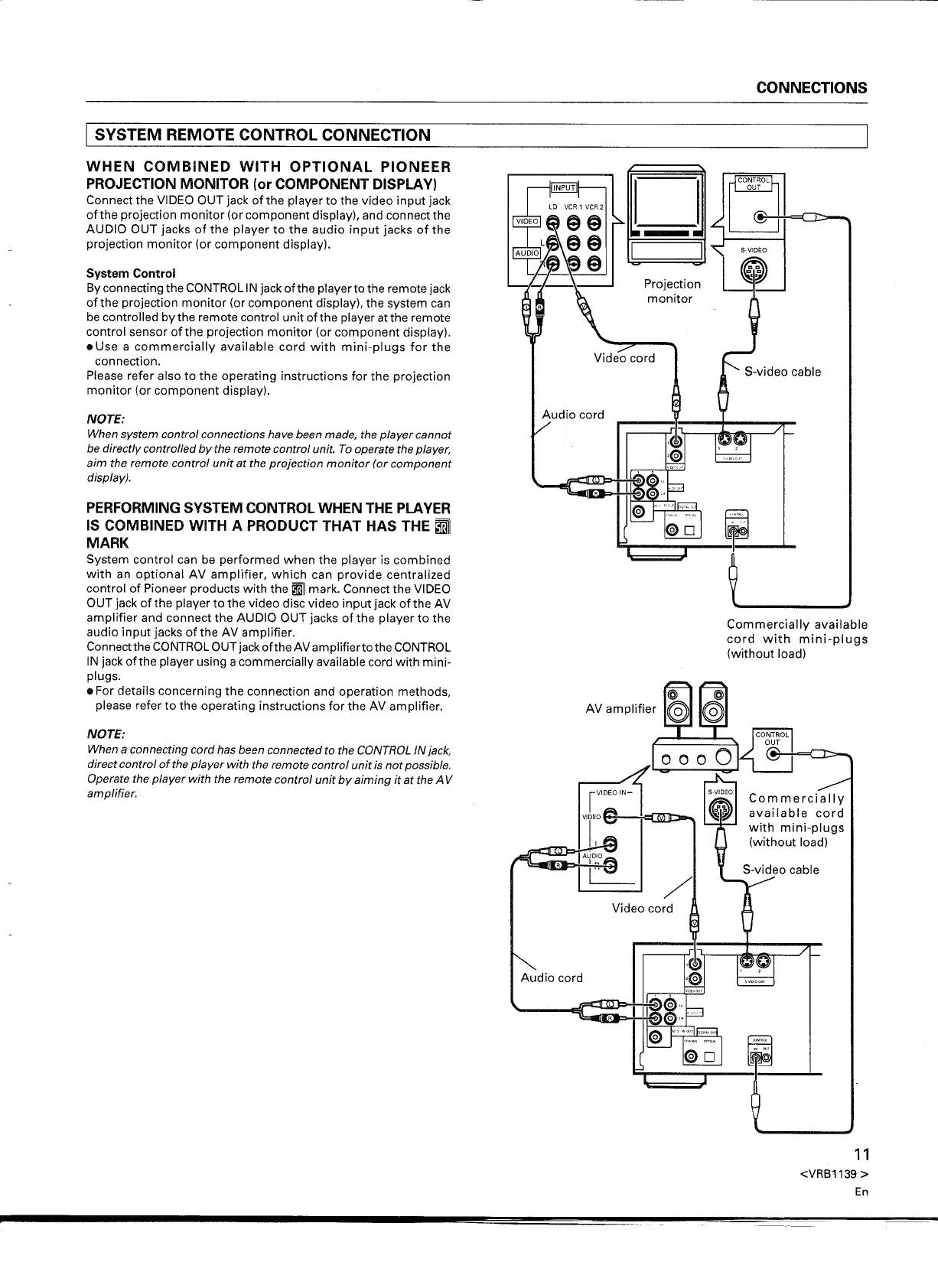
Connect the VIDEO OUT jack of the player to the video input jack
ofthe projection monitor (or component display), and connect the
AUDIO OUT jacks of the player to the audio input jacks of the
projection monitor (or component display).
System Control
By connecting the CONTROL IN jack of the player to the remote jack
ofthe projection monitor (or component display), the system can
be controlled by the remote control unit ofthe player at the remote
control sensor ofthe projection monitor (or component display) .
• Use a commercially available cord with mini-plugs for the
connection.
Please refer also to the operating instructions for the projection
monitor (or component display).
NOTE:
When system control connections have been made, the player cannot
be directly controlled by the remote control unit. To operate the player,
aim the remote control unit at the projection monitor (or component
display).
PERFORMING SYSTEM CONTROL WHEN THE PLAYER
IS COMBINED WITH A PRODUCT THAT HAS THE ~
MARK
System control can be performed when the player is combined
with an optional AV amplifier, which can provide centralized
control of Pioneer products with the
ImiII
mark. Connect the VIDEO
OUT jack ofthe player to the video disc video input jack ofthe AV
amplifier and connect the AUDIO OUT jacks of the player to the
audio input jacks of the AV amplifier.
Connect the CONTROL OUT jack of the AV amplifierto the CONTROL
IN jack ofthe player using a commercially available cord with mini-
plugs .
• For details concerning the connection and operation methods,
please refer to the operating instructions for the AV amplifier.
NOTE:
When a connecting cord has been connected to the CONTROL IN jack,
direct control
of
the player with the remote control unit is not possible.
Operate the player with the remote control unit by aiming it at the A V
amplifier.
Projection
monitor
Commercially available
cord with mini-plugs
(without load)
Commercially
available cord
with mini-plugs
(without load)
/
11
<VRB1139
>
En


 To Next Page
 Loading...