I
TO PLAY AN LD, CDV OR CD
~,p~m ~
~ o~
o[pqoo
00000
00000
00000
0==
000=
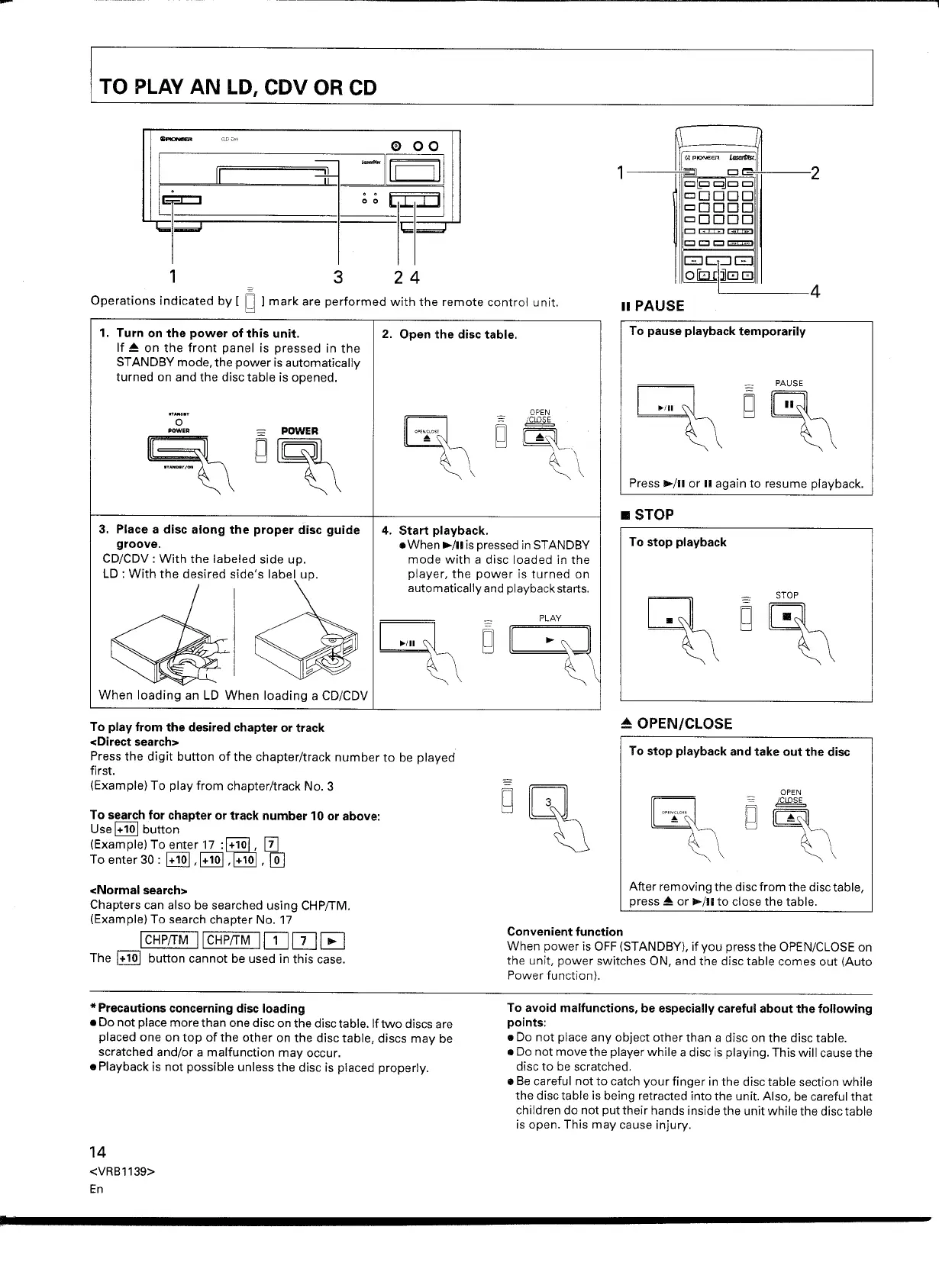
1. Turn on the power of this unit.
If ~ on the front panel is pressed in the
STANDBY mode, the power is automatically
turned on and the disc table is opened.
OPEN
_ (ClOSE
g~ ...
~\
3. Place a disc along the proper disc guide
groove.
CD/CDV : With the labeled side up.
LD: With the desired side's label up.
4. Start playback .
• When ~/II is pressed in STANDBY
mode with a disc loaded in the
player, the power is turned on
automatically and playback starts.
To play from the desired chapter or track
<Direct search>
Press the digit button of the chapter/track number to be played
first.
(Example) To play from chapter/track No.3
To search for chapter or track number 10 or above:
Use
0Qj
button
(Example) To enter 17
:0Qj, [I]
To enter 30 :
0Qj ,0Qj ,0Qj,
@]
After removing the disc from the disc table,
press ~ or ~/II to close the table.
<Normal search>
Chapters can also be searched using CHP/TM.
(Example) To search chapter No. 17
ICHPfTM IICHPfTM IIJJOJ~
The
0Qj
button cannot be used in this case.
Convenient function
When power is OFF (STANDBY), if you press the OPEN/CLOSE on
the unit, power switches ON, and the disc table comes out (Auto
Power function).
To avoid malfunctions, be especially careful about the following
points:
• Do not place any object other than a disc on the disc table.
• Do not move the player while a disc is playing. This will cause the
disc to be scratched.
• Be careful not to catch your finger in the disc table section while
the disc table is being retracted into the unit. Also, be careful that
children do not put their hands inside the unit while the disc table
is open. This may cause injury.
*
Precautions concerning disc loading
• Do not place more than one disc on the disc table. If two discs are
placed one on top of the other on the disc table, discs may be
scratched and/or a malfunction may occur.
• Playback is not possible unless the disc is placed properly.
14
<VRBl139>
En


 To Next Page
 Loading...