I
PICTURE QUALITY ADJUSTMENT (V-DNR 3D)
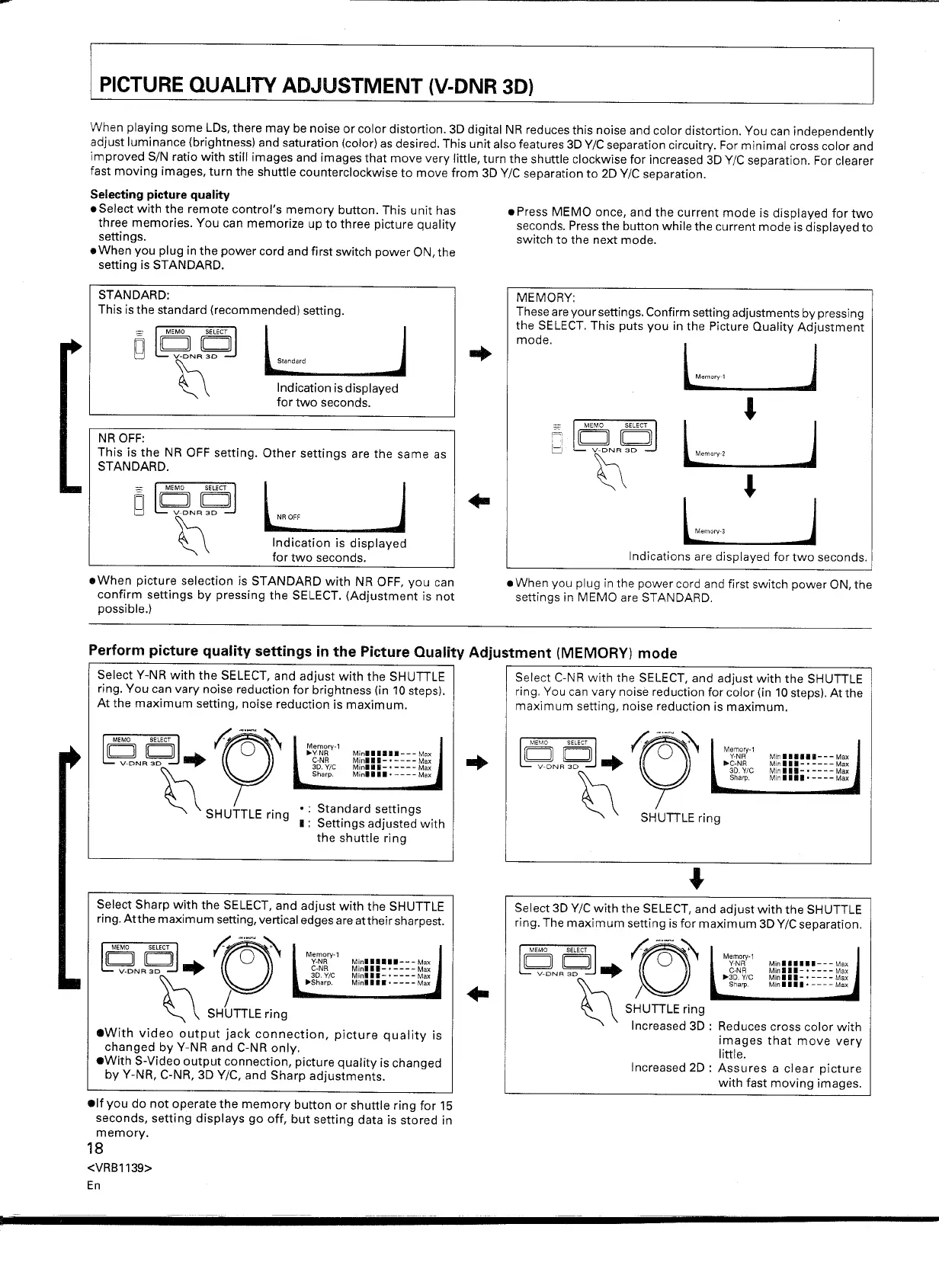
When playing some LDs, there may be noise or color distortion. 3D digital NR reduces this noise and color distortion. You can independently
adjust luminance (brightness) and saturation (color) as desired. This unit also features 3D
Y/C
separation circuitry. For minimal cross color and
improved SIN ratio with still images and images that move very little, turn the shuttle clockwise for increased 3D
Y/C
separation. For clearer
fast moving images, turn the shuttle counterclockwise to move from 3D
Y/C
separation to 2D
Y/C
separation.
Selecting picture quality
.Select with the remote control's memory button. This unit has
three memories. You can memorize up to three picture quality
settings.
• When you plug in the power cord and first switch power ON, the
setting is STANDARD.
STANDARD:
This is the standard (recommended) setting.
Indication is displayed
for two seconds.
NR OFF:
This is the NR OFF setting. Other settings are the same as
STANDARD.
L_OFF
_J
Indication is displayed
for two seconds .
• When picture selection is STANDARD with NR OFF, you can
confirm settings by pressing the SELECT. (Adjustment is not
possible.)
• Press MEMO once, and the current mode is displayed for two
seconds. Press the button while the current mode is displayed to
switch to the next mode .
MEMORY:
These are your settings. Confirm setting adjustments by pressing
the SELECT. This puts you in the Picture Quality Adjustment
mode.
•
J
l,mmv
2
•
J
L·,'"
• When you plug in the power cord and first switch power ON, the
settings in MEMO are STANDARD.
Select Y-NR with the SELECT, and adjust with the SHUTILE
ring. You can vary noise reduction for brightness (in 10 steps).
At the maximum setting, noise reduction is maximum.
Memory 1
"VNR
C NR
3D Vie
Sharp
Minllllll--- Max
Minlll-· -- -- Max
Minlll-· ---- Max
Minll.l· ---- Max
Standard settings
Settings adjusted with
the shuttle ring
Select Sharp with the SELECT, and adjust with the SHUTTLE
ring. Atthe maximum setting, vertical edges are attheir sharpest.
~ ~~ ~·O-·~·~ M
y
e.m
N
o
R
",,'
~ lbdJ •
Minllll •• ---Max
C-NR
Minill-' ----
Max
V-DNR 3D 3D.
Y/e
Minill-' ----
Max
~ sHGnLE';Og ~." "" ••••. ----~
.With video output jack connection, picture quality is
changed by Y-NR and C-NR only.
• With S-Video output connection, picture quality is changed
by Y-NR, C-NR, 3D
Y/C,
and Sharp adjustments.
• If you do not operate the memory button or shuttle ring for 15
seconds, setting displays go off, but setting data is stored in
memory.
18
<VRB1139>
En
Select C-NR with the SELECT, and adjust with the SHUTILE
ring. You can vary noise reduction for color (in 10 steps). Atthe
maximum setting, noise reduction is maximum.
Memory-1
Y-NR
"'C-NR
3D.
vie
Sharp.
Min
111111-- -
Max
Minlll-· ---- Max
Minll.-·----Max
Minl.l.o----Max
Select 3D
Y/C
with the SELECT, and adjust with the SHUTILE
ring. The maximum setting is for maximum 3D
Y/C
separation.
Memory-1
Y-NR
C-NR
"'30.
vie
Sharp
Minl ••••• --- Max
Minl •• -· ---- Max
Minill-' ---- Max
Min ••••• ---- Max
Reduces cross color with
images that move very
little .
Increased 2D : Assures a clear picture
with fast moving images .


 To Next Page
 Loading...