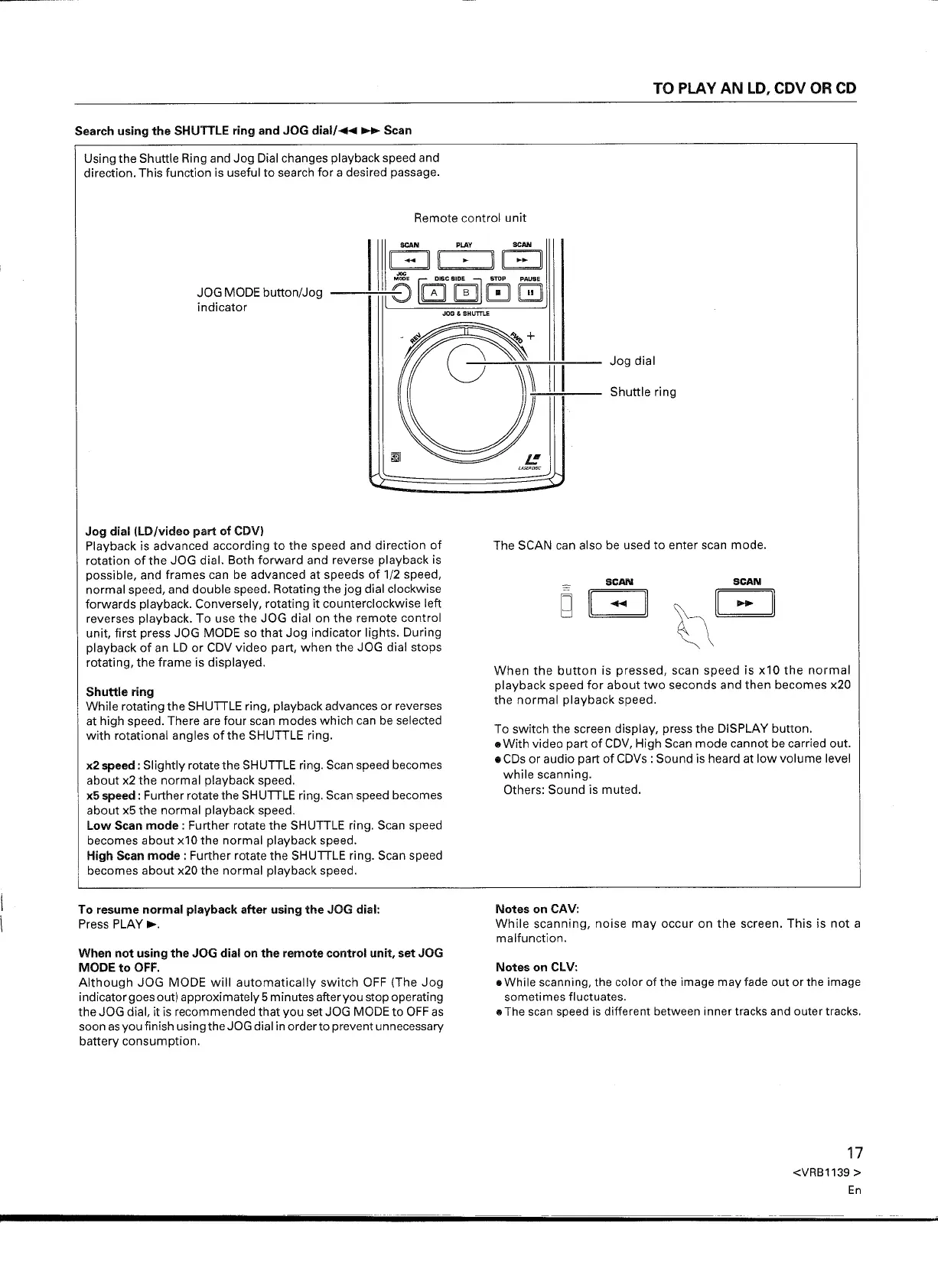
Using the Shuttle Ring and Jog Dial changes playback speed and
direction. This function is useful to search for a desired passage.
SCAN PLAY SCAN
II - II II II II - II
8G
cs
0]00
JOG MODE button/Jog
indicator
Jog dial (LD/video part of CDV)
Playback is advanced according to the speed and direction of
rotation of the JOG dial. Both forward and reverse playback is
possible, and frames can be advanced at speeds of 1/2 speed,
normal speed, and double speed. Rotating the jog dial clockwise
forwards playback. Conversely, rotating it counterclockwise left
reverses playback. To use the JOG dial on the remote control
unit, first press JOG MODE so that Jog indicator lights. During
playback of an LD or CDV video part, when the JOG dial stops
rotating, the frame is displayed.
Shuttle ring
While rotating the SHUTTLE ring, playback advances or reverses
at high speed. There are four scan modes which can be selected
with rotational angles of the SHUTTLE ring.
x2 speed: Slightly rotate the SHUTTLE ring. Scan speed becomes
about x2 the normal playback speed.
x5 speed: Further rotate the SHUTTLE ring. Scan speed becomes
about x5 the normal playback speed.
Low Scan mode: Further rotate the SHUTTLE ring. Scan speed
becomes about x10 the normal playback speed.
High Scan mode: Further rotate the SHUTTLE ring. Scan speed
becomes about x20 the normal playback speed.
To resume normal playback after using the JOG dial:
Press PLAY~.
When not using the JOG dial on the remote control unit, set JOG
MODE to OFF.
Although JOG MODE will automatically switch OFF (The Jog
indicator goes out) approximately 5 minutes after you stop operating
the JOG dial, it is recommended that you set JOG MODE to OFF as
soon asyou finish using the JOG dial in orderto prevent unnecessary
battery consumption.
g
II -
When the button is pressed, scan speed is x10 the normal
playback speed for about two seconds and then becomes x20
the normal playback speed.
To switch the screen display, press the DISPLAY button.
e With video part of CDV, High Scan mode cannot be carried out.
e CDs or audio part of CDVs : Sound is heard at low volume level
while scanning.
Others: Sound is muted.
Notes on CAV:
While scanning, noise may occur on the screen. This is not a
malfunction.
Notes on CLV:
• While scanning, the color of the image may fade out or the image
sometimes fluctuates.
lit
The scan speed is different between inner tracks and outer tracks.
17
<VRB1139 >
En


 To Next Page
 Loading...