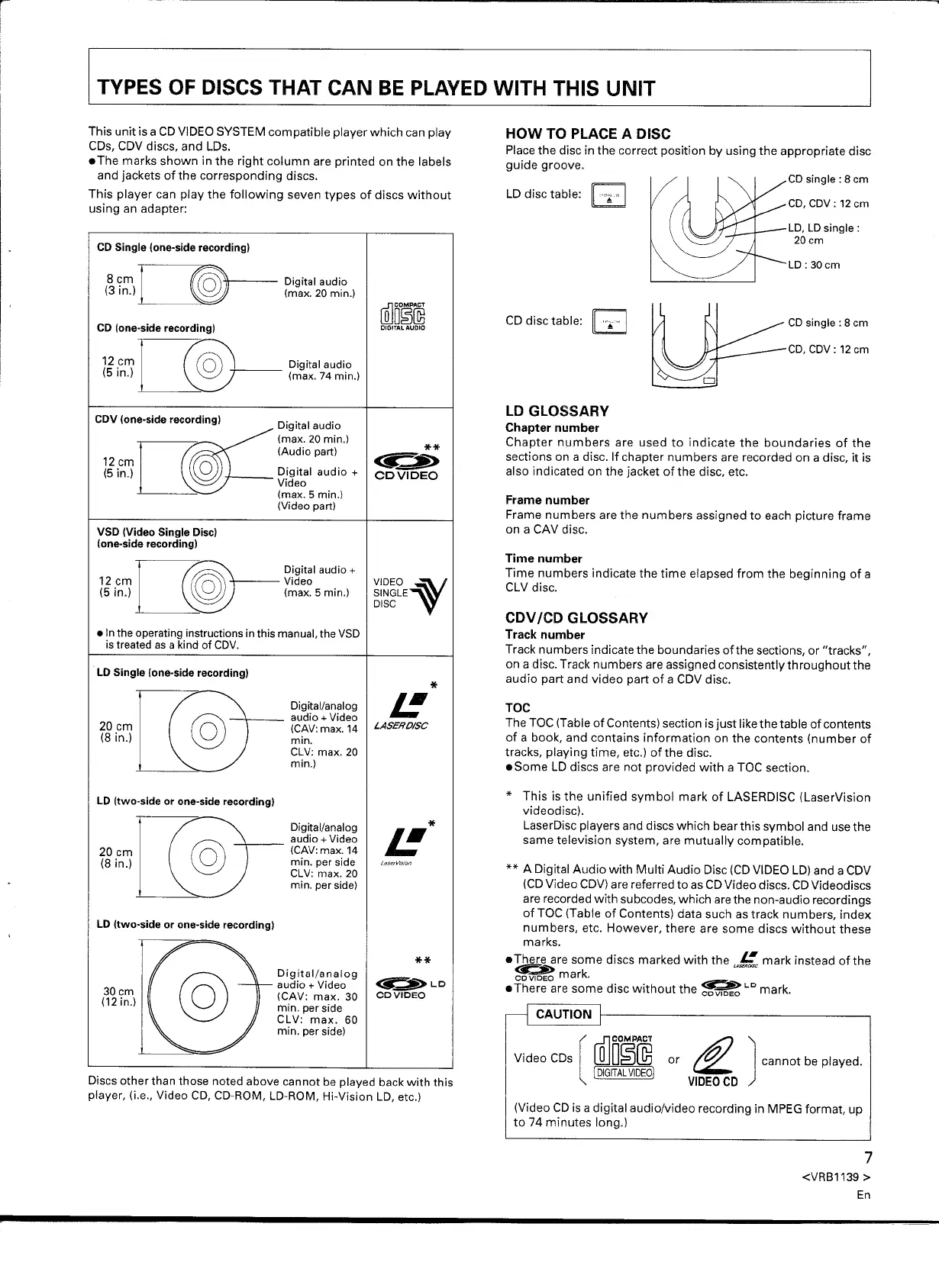
This unit is a CD VIDEO SYSTEM compatible player which can play
CDs, CDV discs, and LOs.
• The marks shown in the right column are printed on the labels
and jackets of the corresponding discs.
This player can play the following seven types of discs without
using an adapter:
8 cm ] ~@--- Digital audio
(3 in.) ~ (max. 20 min.)
Digital audio
(max. 74 min.)
CDV (one-side recording) Digital audio
~
(max. 20 min.)
(Audio part)
i~i~J
r-re@
D!gital audio +
~ Video
(max. 5 min.)
(Video part)
VSD (Video Single Disc)
(one-side recording)
[
@(@)-Digitalaudio+
12cm V~oo
(5 in.) @ (max.
5
min.)
.In the operating instructions in this manual, the VSD
is treated as a kind of CDV.
20
cm
(8 in.)
20 cm
(8
in.)
Digital/analog
audio + Video
<it::">
LD
(CAV: max. 30
CD VIDEO
min. per side
CLV: max. 60
min. per side)
Digital/analog
audio + Video
(CAV:max. 14
min.
CLV: max. 20
min.)
Digital/analog
audio + Video
(CAV:max. 14
min. per side
CLV: max. 20
min. per side)
@D~~
DIGITAL AUDIO
**
<it
$>
CDVIDEO
VIDEO~
SINGLE
DISC
*
e
LASEROISC
*
e
Discs other than those noted above cannot be played back with this
player, (i.e., Video CD, CD-ROM, LD-ROM, Hi-Vision LD, etc.)
HOW TO PLACE A DISC
Place the disc in the correct position by using the appropriate disc
guide groove.
CD disc table:
II
"i"
I
LD GLOSSARY
Chapter number
Chapter numbers are used to indicate the boundaries of the
sections on a disc. If chapter numbers are recorded on a disc, it is
also indicated on the jacket of the disc, etc.
Frame number
Frame numbers are the numbers assigned to each picture frame
on a CAV disc.
Time number
Time numbers indicate the time elapsed from the beginning of a
CLV disc.
CDV
ICD
GLOSSARY
Track number
Track numbers indicate the boundaries of the sections, or "tracks",
on a disc. Track numbers are assigned consistentlythroughoutthe
audio part and video part of a CDV disc.
TOC
The TOC (Table of Contents) section is just like the table of contents
of a book, and contains information on the contents (number of
tracks, playing time, etc.) of the disc.
• Some LD discs are not provided with a TOC section.
* This is the unified symbol mark of LASERDISC (LaserVision
videodisc).
LaserDisc players and discs which bear this symbol and use the
same television system, are mutually compatible.
**
A Digital Audio with Multi Audio Disc (CD VIDEO LD) and a CDV
(CD Video CDV) are referred to as CD Video discs. CD Videodiscs
are recorded with subcodes, which are the non-audio recordings
of TOC (Table of Contents) data such as track numbers, index
numbers, etc. However, there are some discs without these
marks.
• There are some discs marked with the
e
mark instead ofthe
~ U~R=
CDVIDEO
mark.
• There are some disc without the ~
LD
mark.
@Do~rn
(DIGITAL VIDEOI
or
r£
J
cannot be played.
VIDEO CD
(Video CD is a digital audio/video recording in MPEG format, up
to 74 minutes long.)
7
<VRB1139 >
En


 To Next Page
 Loading...