07
Safety instructions
Dealing with electromagnetic radiation
• The measuring device complies with electromagnetic compatibility
regulations and limit values in accordance with EMC-Directive
2014/30/EU.
• Local operating restrictions – for example, in hospitals, aircraft,
petrol stations or in the vicinity of people with pacemakers –
may apply. Electronic devices can potentially cause hazards or
interference or be subject to hazards or interference.
AAA AAA
1 32
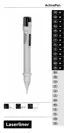
1 Detector tip 2 Pocket clip 3 Battery
compartment
ActivePen
EN
Symbols
Warning about hazardous electrical voltage:
Unprotected live components inside the device
housing are capable of posing a risk of electric
shock.
Protection class II: The test device has reinforced
or double insulation.
Overvoltage category III: Equipment in fixed
installations and for applications where specific
requirements with regard to the reliability and
availability of equipment have to be met, e.g.
circuit-breakers in fixed installations and devices
used in industrial applications which are
permanently connected to the fixed installation.
1
Open the battery compartment and insert batteries according
to the symbols. Be sure to pay attention to polarity
Inserting batteries
Before using the device, you should always test it on a main
circuit you know to be operational within the specified voltage
range.
!



 To Next Page