Instruction Manual
18 ENGLISH
Setting up:
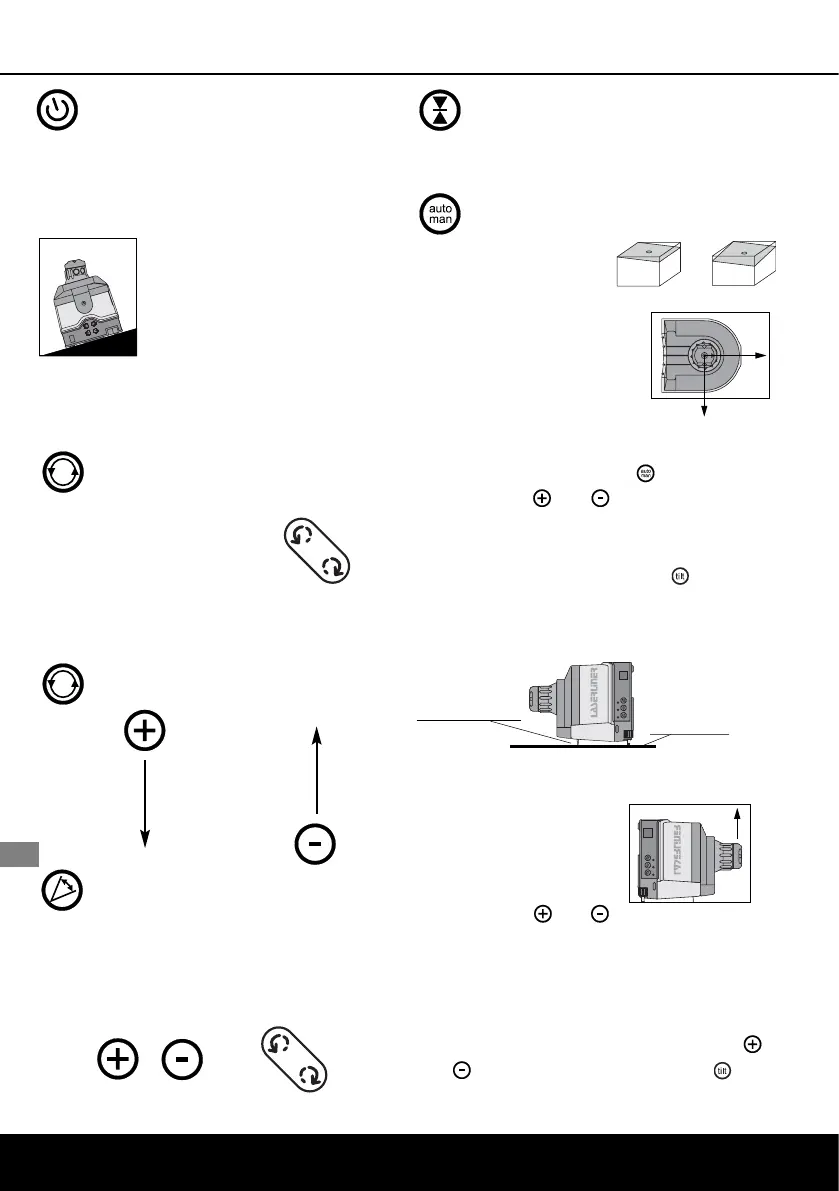
Switch on the ACM. While the laser
beam flashes, the laser is set
automatically.
Note: Should the
instrument, because of an
extremely inclined position,
not be able to adjust itself
properly, then it will switch
itself off after 5 min.
Functions:
1. Spot mode
With this function,
the laser can be
adjusted (with the
direction setting) properly in
relation to the measuring level.
2. Rotary mode
3. Scan mode:
The laser produces a segment
of intense light, with variable
width and position.
4. Hand receiver mode:
Max. 600 RPM
5. Slope mode:
Horizontal
In the horizontal mode of
operation, the SLS levels
the X-axis and the Y-axis.
If, for example, a slope is
to be projected, then the SLS
has to be switched off by pressing the
push-button "auto/man" .Now the
push-buttons and can be used to
adjust the incliniation over the X-axis.
Before adjusting the inclination over the
Y-axis, press the button "tilt" .
Vertical
In the vertical mode of
operation, the SLS levels
the laser level in the
vertical position. The
push-buttons and
can be used to rotate the laser level aro-
und the Y-axis. (Note: The reference
beam moves horizontally) With the SLS
switched off, the laser level can be incli-
ned by operation of the push-buttons
and after the push-button "tilt" has
been pressed.
y
x
y
x
x-y
Unfold the
vertical support
place the instru-
ment on a level
surface
Instructions for vertical levelling:
Press: 90 RPM
150 RPM
300 RPM
450 RPM
600 RPM


 To Next Page
 Loading...