06
MAX MIN
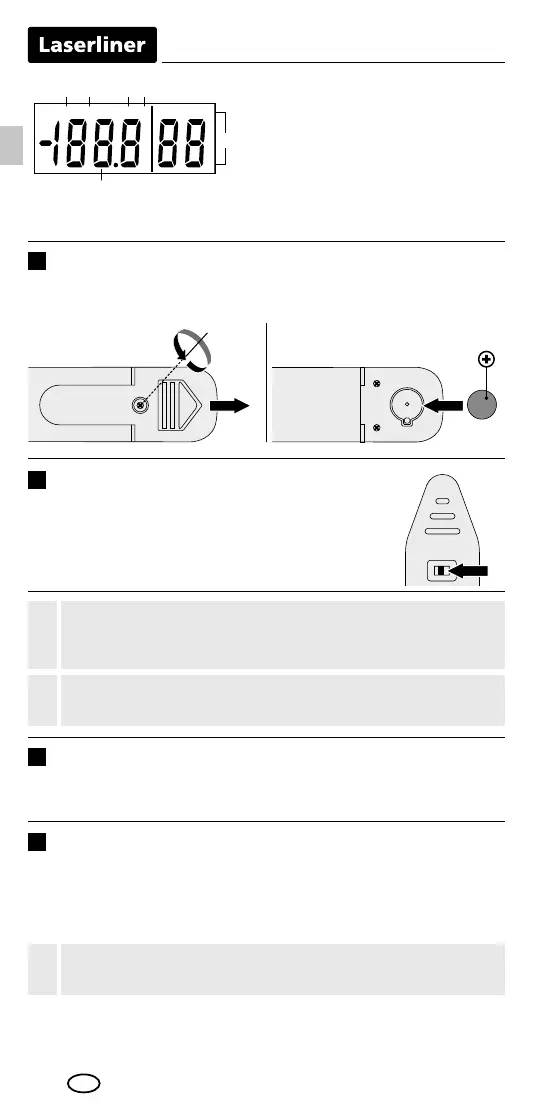
a b c d
e
f
Display of MAX values
Display of MIN values
Measurement in °F
Measurement in °C
Relative humidity in %rH
Room temperature /
dew point display
a
b
c
d
e
f
2
OFFON
When switching to a measuring location with significantly
different temperature and humidity levels, allow the device
time to adapt!
!
For measurements outside of the measuring range, the device
displays „HI“ or „LO“.
!
Switching off the device deletes the min/max values.
!
ON / OFF
To turn on, set the switch (5) to ON. The device
displays the ambient temperature and relative
humidity.
4
MAX / MIN
To determine the maximum or minimum measured values during a
measurement, press and hold the „MAX / MIN“ button until either
„MAX“ or „MIN“ appear on the display. The normal measuring
mode is set when no function ashes on the display.
3
Dew point display
By briey pressing the „MODE“ button, the measured dew point
is displayed.
1
1
2
3
Inserting battery
Open the battery compartment and insert battery according
to the symbols. Be sure to pay attention to polarity.
1x LR44 button cell
EN



 To Next Page