16
* The Bluetooth
®
word mark and the logo are registered trademarks of Bluetooth SIG Inc.
The laser distance meter features a Bluetooth
®*
function that enables
wireless data transfer to mobile devices with a Bluetooth
®*
interface
(e.g. smartphone, tablet).
The system prerequisites for a Bluetooth
®*
connection are specified
at http://laserliner.com/info?an=ble
The device can set up a Bluetooth
®*
connection with Bluetooth 4.0
compatible devices.
The range is set to a maximum distance of 10 m from the terminal
device and greatly depends on the ambient conditions such as the
thickness and composition of walls, sources of interference as well
as the transmit / receive properties of the terminal device.
Data transfer
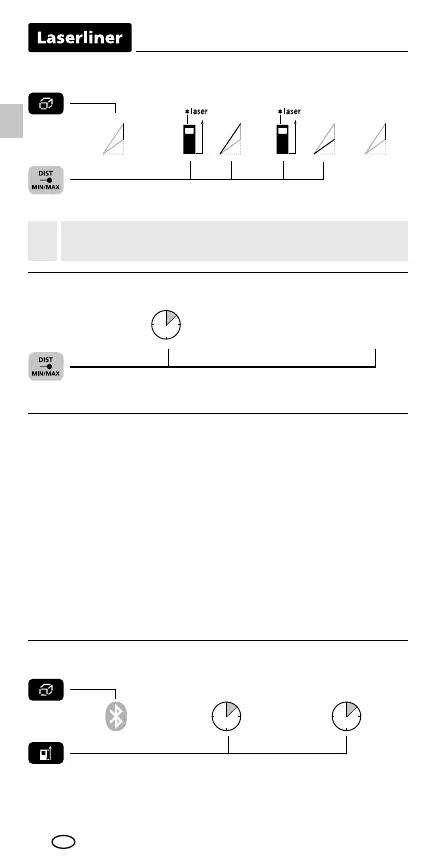
Angle function 1, 2, 3: The back of the device can be used
as a reference surface for measuring angles.
!
EN
1x 2x 3x 4x
Angle function 3:
Angle function 3 1. measurement 2. measurement
result
height
The measurement result is determined by the 360° inclination sensor.
1x 2x
3 sec
min/max continuous measurement:
Press for 3 seconds stop
then release button
The LC display shows the max value, the min value and the current value.
1x 2x
1 sec 1 sec
Enable / disable Bluetooth
®
*
:
Bluetooth
®*
enable disable
When enabled the Bluetooth
®*
symbol appears on the display (e).
When the function is active, a mobile device can connect by means
of an app to the measuring device.
* The Bluetooth
®
word mark and the logo are registered trademarks of Bluetooth SIG Inc.




 To Next Page