2
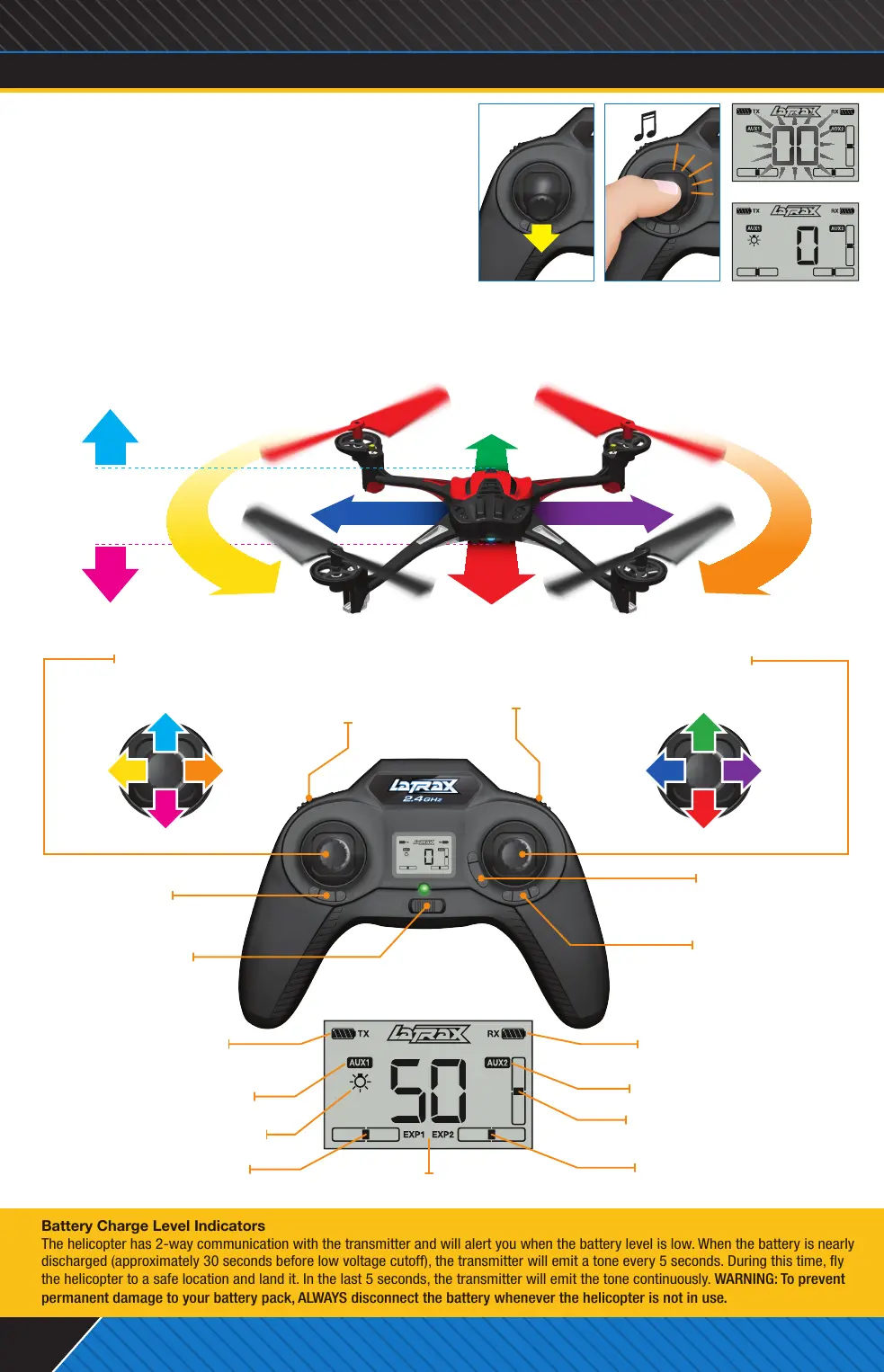
AUX1 Button
Default Setting:
Initiate Trick Sequence
(EXP 1 Mode only)
Aileron Trim
(Sideways Flight)
Rudder Trim
(Rotation)
Elevator Trim
(Forward Flight)
Power Switch
Throttle Stick
Push in to arm/disarm
Flight Stick
Push in to change ight mode
AUX2 Button
Default Setting:
Lights On/Off
5. ARM YOUR HELICOPTER FOR FLIGHT
Place the model on a level surface with the blue LED facing
you (nose out). Move the throttle stick to the full down position
(throttle off). The helicopter will not arm unless the throttle
stick is in the down position (A). Push in and click the throttle
stick to arm the ight system. The transmitter will emit a tone
indicating that the helicopter is armed and ready to y (B).
Note: When the throttle stick is left idle for 5 seconds
or the helicopter detects an impact, the helicopter will
automatically disarm.
6. FLY YOUR HELICOPTER
Gently push the throttle stick forward until the model begins to lift off. Reduce throttle to maintain a hover when the
model is at least 3 feet (1 meter) off the ground. This height will keep the model away from ground turbulence for
more stable ight. Use gradual inputs until you become familiar with the controls.
FLIGHT MODES
•Normal Mode: Easiest ight mode. Normal Mode (default mode) limits control input
(low rate) and uses the full capability of the ight control system (auto leveling).
•Expert 1 Mode (EXP1): EXP1 uses the full capability of the ight control system
(auto leveling), but allows greater control input (high rate). EXP1 also enables
trick functions.
•Expert 2 Mode (EXP2): Rate Mode. In EXP2, the ight control system (auto
leveling) is disabled, allowing the pilot to have full control over all aspects of ight.
WARNING! EXP2 is intended for expert level pilots only!
Battery Charge Level Indicators
The helicopter has 2-way communication with the transmitter and will alert you when the battery level is low. When the battery is nearly
discharged (approximately 30 seconds before low voltage cutoff), the transmitter will emit a tone every 5 seconds. During this time, y
the helicopter to a safe location and land it. In the last 5 seconds, the transmitter will emit the tone continuously. WARNING: To prevent
permanent damage to your battery pack, ALWAYS disconnect the battery whenever the helicopter is not in use.
Aileron Trim Indicator
(Sideways Flight)
Rudder Trim Indicator
(Rotation)
Transmitter Battery
Charge Level
AUX1 Status Indicator
Helicopter Lights Status
Mode Indicator
AUX2 Status Indicator
Elevator Trim Indicator
(Forward Flight)
Helicopter (Receiver)
Battery Charge Level
Disarmed Screen
Armed ScreenPush in and clickThrottle off
B.
LCD Screen
Expert Level Pilots: Visit LaTrax.com to learn how to program multiple ips.
• Gain Altitude
• Reduce Altitude
• Fly Sideways
Right
• Fly Forward
• Rotate Left • Rotate Right
• Fly Sideways
Left
• Fly Backward
A.
Rotate
Right
Fly
Sideways
Right
Rotate
Left
Fly
Sideways
Left
Reduce Altitude Fly Backward
Gain Altitude Fly Forward
©2013 LaTrax. No part of this manual may be reproduced or distributed in print or electronic media without the express written permission of LaTrax. The product may vary from the images contained within.
KC1828-R01-Alias-Quickstart-130916.indd 2 9/16/13 5:23 PM



 To Next Page
 Loading...
