3
Aileron Trim
(Sideways Flight)
FLIGHT MODES
•Normal Mode: Easiest ight mode. Normal Mode (default mode) limits control input
(low rate) and uses the full capability of the ight control system (auto leveling).
•Expert 1 Mode (EXP1): EXP1 uses the full capability of the ight control system
(auto leveling), but allows greater control input (high rate). EXP1 also enables
trick functions.
•Expert 2 Mode (EXP2): Rate Mode. In EXP2, the ight control system (auto
leveling) is disabled, allowing the pilot to have full control over all aspects of ight.
WARNING! EXP2 is intended for expert level pilots only!
•Placethehelicopterintoastablehoverbefore
attempting any ight tricks.
•Aquickstickcommandmustbemadewithin3seconds
of the AUX1 button being pressed.
•Themodelwillautomaticallygainsomealtitudejust
before it performs a trick. When ying indoors, initiate all
tricks between 2-3 feet off the oor.
•Afterperformingatrick,themodelmaygainorlose
altitude depending on the position of the throttle stick.
Be prepared to adjust the throttle to compensate for
altitude changes.
•Themodelwillgainlessaltitudeandrecoverfromatrick
slower as the battery charge weakens. Avoid performing
tricks when the model’s battery charge is low.
PERFORMING TRICKS
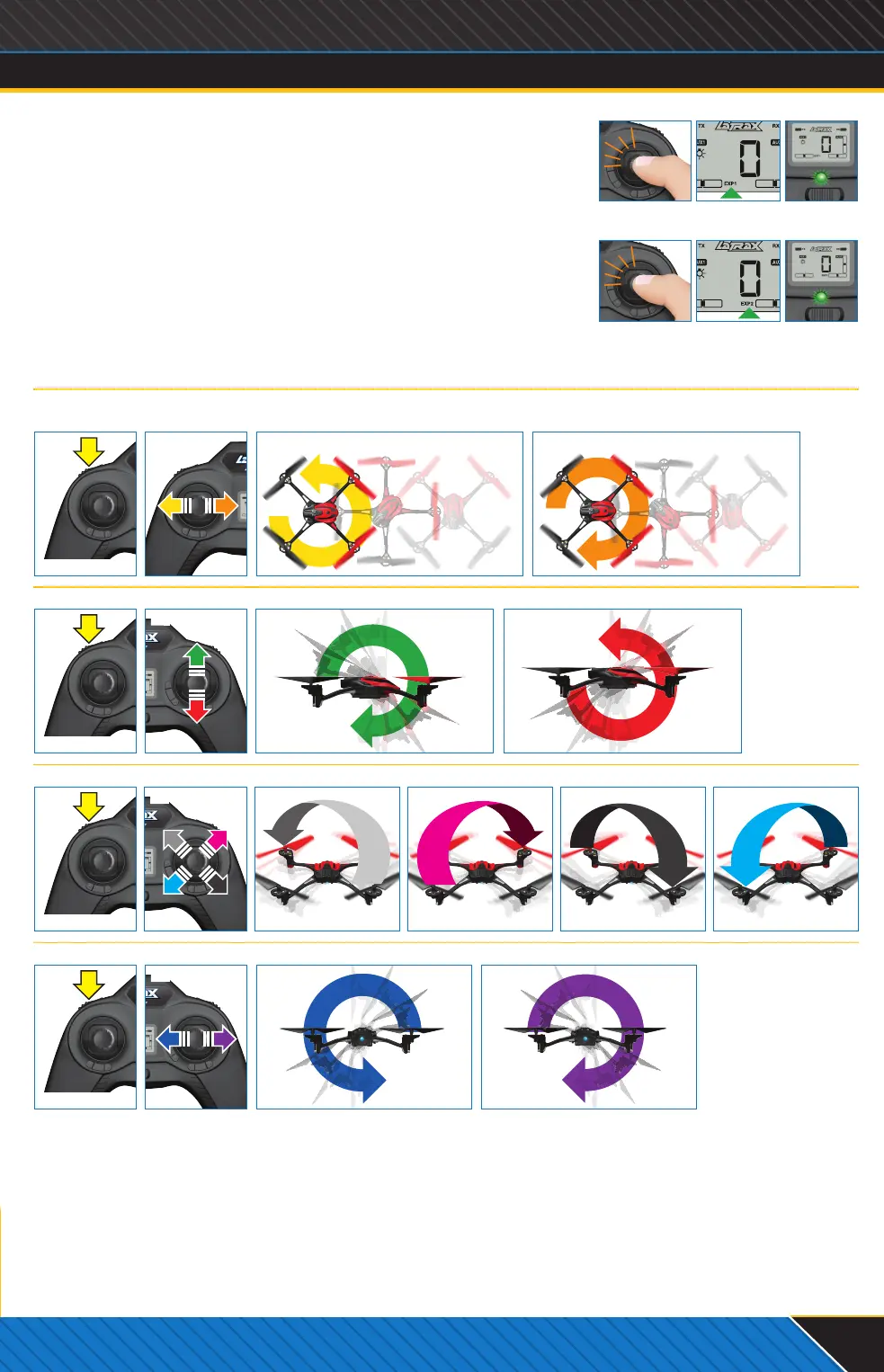
In Expert 1 Mode (EXP1), Alias can perform automated expert tricks and ips
when you press the AUX1 button, and then enter a quick stick command in the
chosen direction. Do not attempt these ight tricks until you are able to y
condently in Expert 1 Mode (EXP1).
Disarmed Screen
Armed Screen
2.
2.
Twist Right
Click once
1.
Press AUX1
Flashing
Left Flip
Right Flip
Twist Left
Twister: Continuous spin while maintaining normal directional and altitude control.
The helicopter will spin 5 times, and then stop at its starting orientation.
Selecting Expert 1
Front and Back Flips
Diagonal Front and Back Flips
Expert Level Pilots: Visit LaTrax.com to learn how to program multiple ips.
Side Flips
x1
x1
Click twice
(Click again to return
to Normal Mode)
Double
ashing
Selecting Expert 2
x2
x2
2.
2.
Diagonal Back LeftDiagonal Front Left Diagonal Front Right Diagonal Back Right
Front Flip Back Flip
TRICK TIPS
1.
Press AUX1
1.
Press AUX1
1.
Press AUX1
Specications are subject to change without notice.
KC1828-R01-Alias-Quickstart-130916.indd 3 9/16/13 5:24 PM



 To Next Page
 Loading...
