11
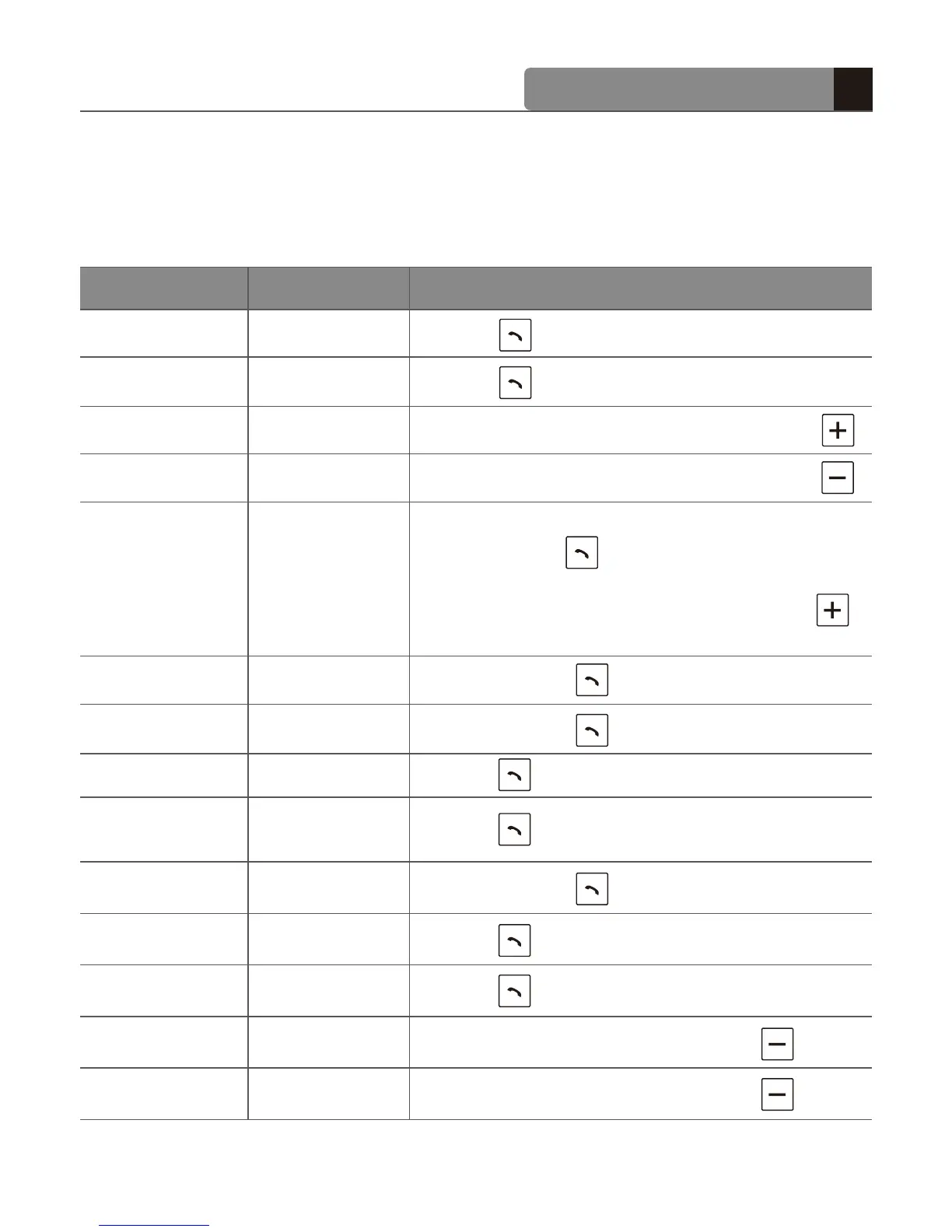
Function Action
Headset status
Power on
Power off
Volume up
Transferring
a call
Volume down
Call waiting
Ending a call
Answering a call
Voice dialing
Mute on
Pairing
Call reject
Mute off
Last number
redialing
Power off
Power on
Talking
Ringing
Ringing
Power off
Mute
Talking
Talking
Talking
Talking
Idle
Idle
Talking
How to use
Press for 2 s
Press for 5 s
Briefly press the volume up button
Press for 1 s
Briefly press
[Summary of button functions]
Briefly press
Briefly press
Press for 1 s
Press for 5 s
Press for 1 s
Briefly press the volume up button
Press the volume down button for 5 s
Press the volume down button for 5 s
- From the mobile phone to the headset:
Briefly press once
- From the headset to the mobile phone:
Press and hold the volume up button
for 5 s


 To Next Page