14
EN
Operation Guide
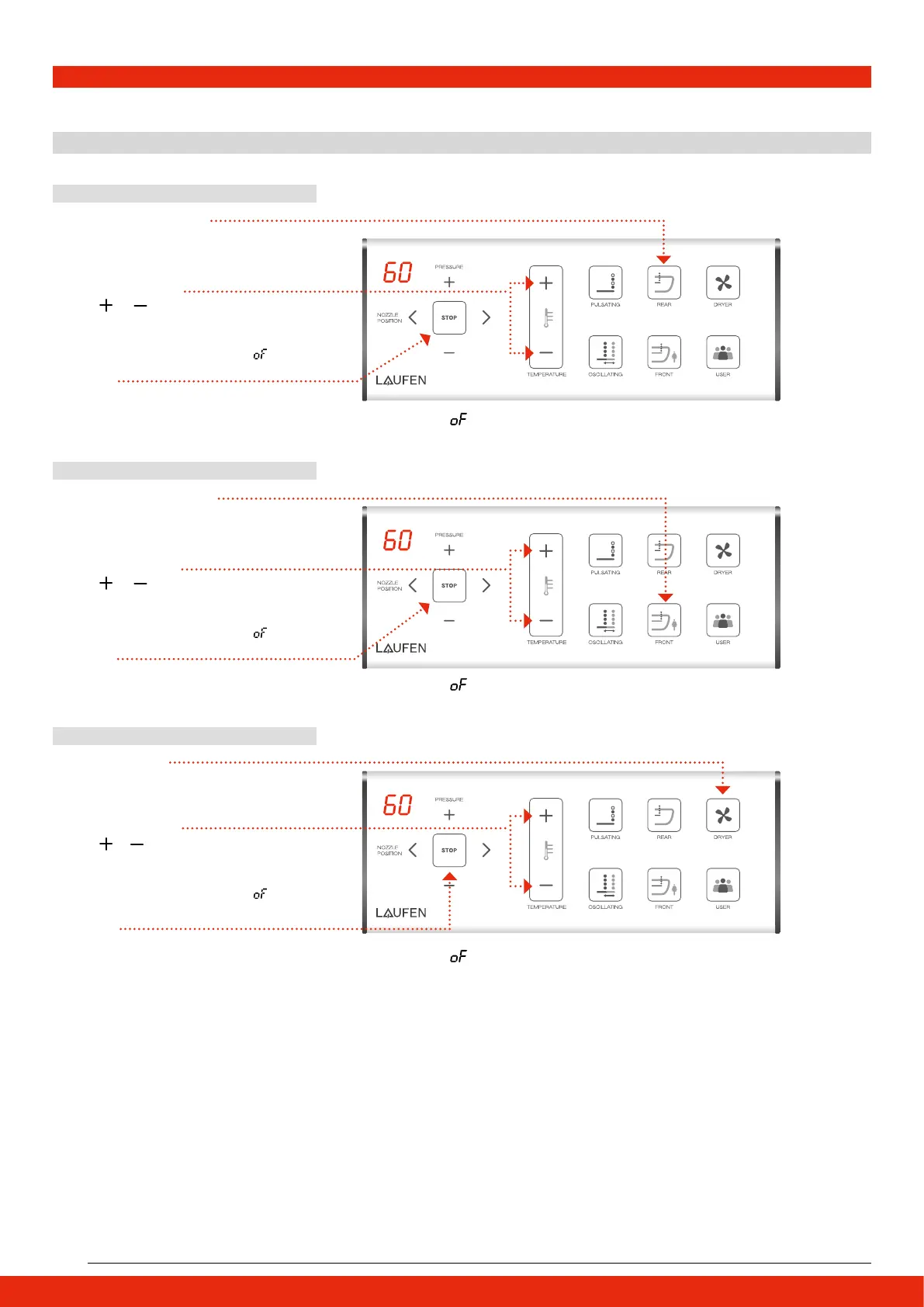
4 Time setting for Cleaning and Dryer Function
Rear cleaning time setting
Front cleaning time setting
Dryer time setting
Cleaning/Dryer function duration may be adjusted in order to automatically stop.
1 REAR cleaning duration
1 FRONT cleaning duration
1 DRYER duration
2 Adjustment setting
2 Adjustment setting
2 Adjustment setting
3 Confirm
3 Confirm
3 Confirm
Press REAR button button for 3 consecutive
seconds to adjust REAR cleaning duration.
Press FRONT button for 3 consecutive
seconds to adjust FRONT cleaning duration.
Press DRYER button button for 3 consecutive
seconds to adjust DRYER duration.
Press
or button for DRYER duration
adjustment.
7 setting levels:
Press
or button for REAR cleaning
duration adjustment.
7 setting levels:
Press
or button for FRONT cleaning
duration adjustment.
7 setting levels:
Press STOP button or wait 5 seconds to
confirm.
Press STOP button or wait 5 seconds to
confirm.
Press STOP button or wait 5 seconds to
confirm.
10↔20↔30↔40↔50↔60↔
10↔20↔30↔40↔50↔60↔
10↔20↔30↔40↔50↔60↔
Note: By setting , REAR function will stop automatically after 5 min. Please
press the REAR button again to resume the function.
Note: By setting
, FRONT function will stop automatically after 5 min.
Please press the FRONT button again to resume the function.
Note: By setting
, DRYER function will stop automatically after 5 min.
Please press the DRYER button again to resume the function.
FRONT
FRONT
FRONT


 To Next Page