STATUS
“STATUS” “CONTROLLER NOT DETECTED”
LAVA Computer MFG Inc.
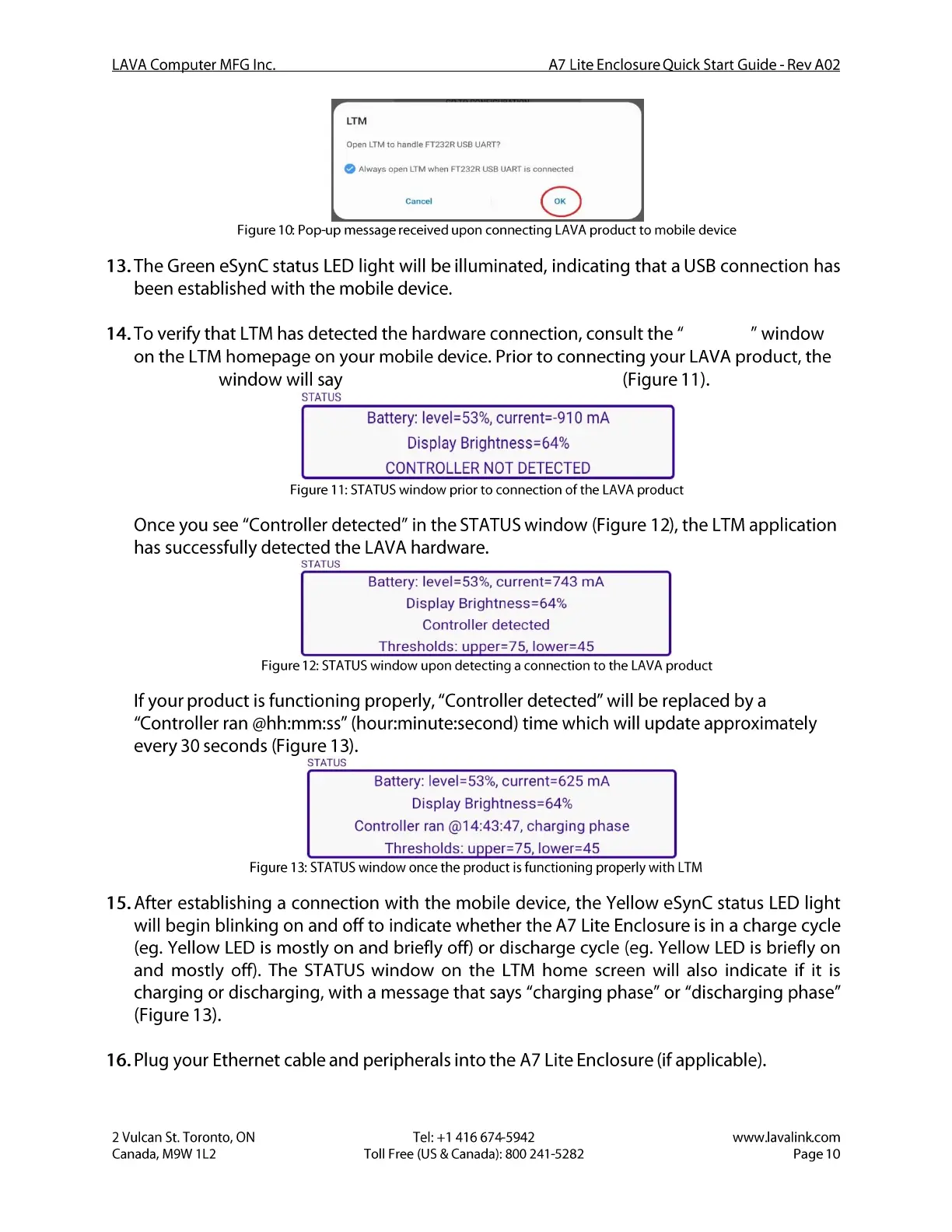
LTM
open LTM to handle FT232R use UART?
A7 Lite Enclosure Quick Start Guide - Rev A02
Always open LTM when FT232R USB UART iS connected
Figure 10:Pop-up message received upon connecting LAVA product to mobile device
13. The Green eSynC status LED light will be illuminated, indicating that a USBconnection has
been established with the mobile device.
14. To verify that LTM has detected the hardware connection, consult the "STATUS" window
on the LTM homepage on your mobile device. Prior to connecting your LAVA product, the
"STATUS" window will say "CONTROLLER NOT DETECTED" (Figure 11).
STATUS
Battery: level=53%, current=-910 mA
Display Brightness=64%
CONTROLLER NOT DETECTED
Figure 11:STATUSwindow prior to connection of the LAVA product
Once you see "Controller detected" in the STATUSwindow (Figure 12), the LTM application
has successfully detected the LAVA hardware.
STATUS
Battery: level=53%, current=743 mA
Display Brightness=64%
Controller detected
Thresholds: u er=75 lower=45
Figure 12: STATUSwindow upon detecting a connection to the LAVA product
If your product is functioning properly, "Controller detected" will be replaced by a
"Controller ran @hh:mm:ss" (hour:minute:second) time which will update approximately
every 30 seconds (Figure 13).
STATUS
Battery: level=53%, current=625 mA
Display Brightness=64%
Controller ran @14:43:47, charging phase
Thresholds: u er=75 lower=45
Figure 13: STATUSwindow once the product is functioning properly with LTM
15. After establishing a connection with the mobile device, the Yellow eSynC status LED light
will begin blinking on and off to indicate whether the A7 Lite Enclosure is in a charge cycle
(eg. Yellow LED is mostly on and briefly off) or discharge cycle (eg. Yellow LED is briefly on
and mostly off). The STATUSwindow on the LTM home screen will also indicate if it is
charging or discharging, with a message that says"charging phase" or "discharging phase"
(Figure 13).
16. Plug your Ethernet cable and peripherals into the A7 Lite Enclosure (if applicable).
2 Vulcan St. Toronto, ON
Canada, M9W I L2
Tel: +1 416 674-5942
Toll Free (US & Canada): 800 241-5282
www.lavalink.com
Page 10


 To Next Page
 Loading...