LAVA Computer MFG Inc.
A7 Lite Enclosure Quick Start Guide - Rev A02
Wired Ethernet Configuration (for Ethernet-capable products)
Depending on your mobile device and network configuration, you may need to enable or
reconfigure the wired connection settings on your device.
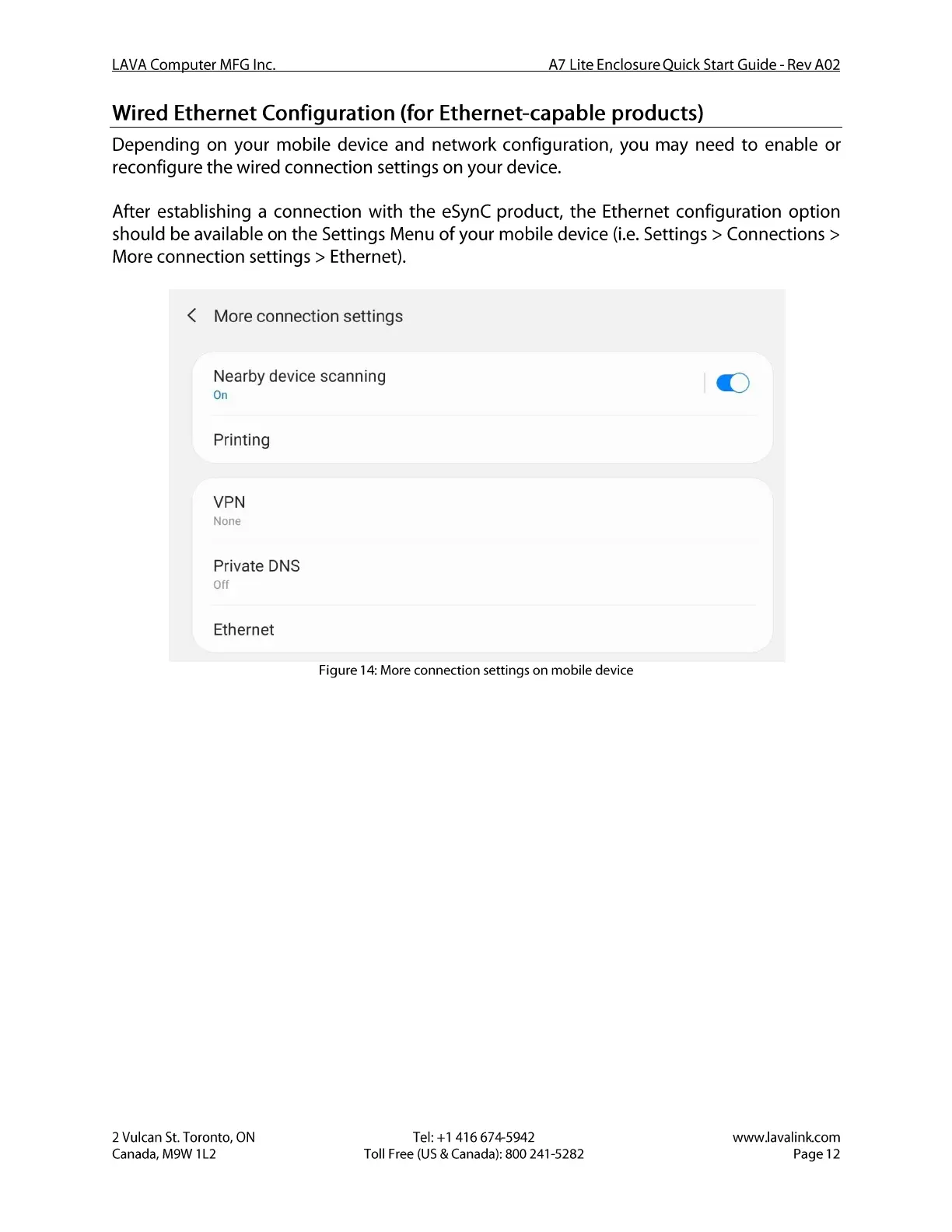
After establishing a connection with the eSynC product, the Ethernet configuration option
should be available on the Settings Menu of your mobile device (i.e. Settings > Connections >
More connection settings > Ethernet).
< More connection settings
Nearby device scanning
On
Printing
VPN
None
Private DNS
Off
Ethernet
2 Vulcan St. Toronto, ON
Canada, M9W I L2
Figure 14:More connection settings on mobile device
Tel: +1 416 674-5942
Toll Free (US & Canada): 800 241-5282
www.lavalink.com
Page 12


 To Next Page
 Loading...