LAVA Computer MFG Inc.
A7 Lite Enclosure Quick Start Guide - Rev A02
After establishing a connection with the A7 Lite Enclosure, if the Ethernet option is greyed out
or unavailable, the mobile device likely does not support a wired connection. If this is the
case,there is likely nothing that can be done to enable this feature on your mobile device.
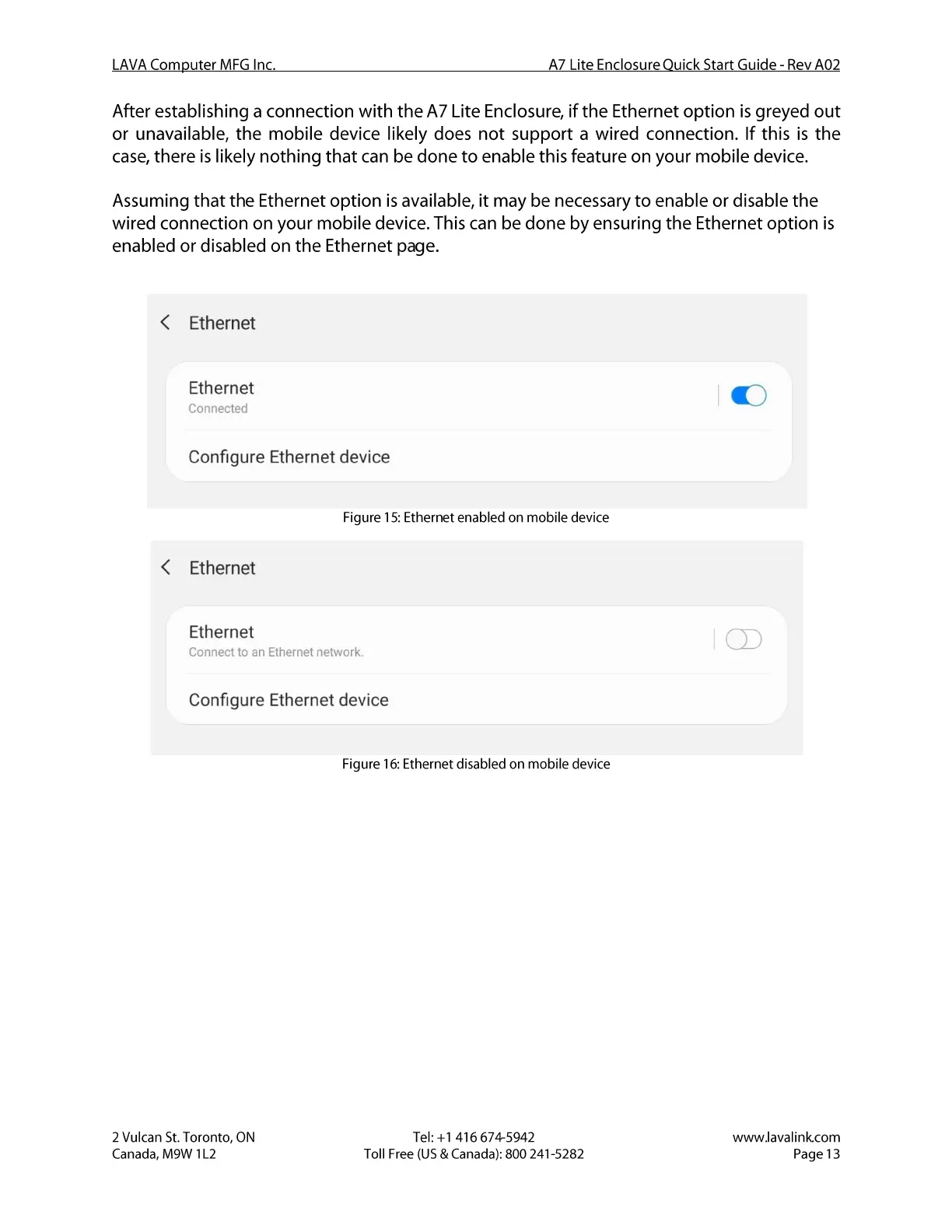
Assuming that the Ethernet option is available, it may be necessary to enable or disable the
wired connection on your mobile device. This can be done by ensuring the Ethernet option is
enabled or disabled on the Ethernet page.
Ethernet
Ethernet
Connected
Configure Ethernet device
Figure 15: Ethernet enabled on mobile device
Ethernet
Ethernet
Connect to an Ethernet network.
Configure Ethernet device
Figure 16: Ethernet disabled on mobile device
2 Vulcan St. Toronto, ON
Canada, M9W I L2
Tel: +1 416 674-5942
Toll Free (US & Canada): 800 241-5282
I CD
www.lavalink.com
Page 13


 To Next Page
 Loading...