LAVA Computer MFG Inc.
A7 Lite Enclosure Quick Start Guide - Rev A02
Most mobile devices will have DHCPenabled by default. If your network does not have a valid
DHCP server, you will need to manually configure an IP Address for the mobile device. Check
with your network administrator before using static IP settings.
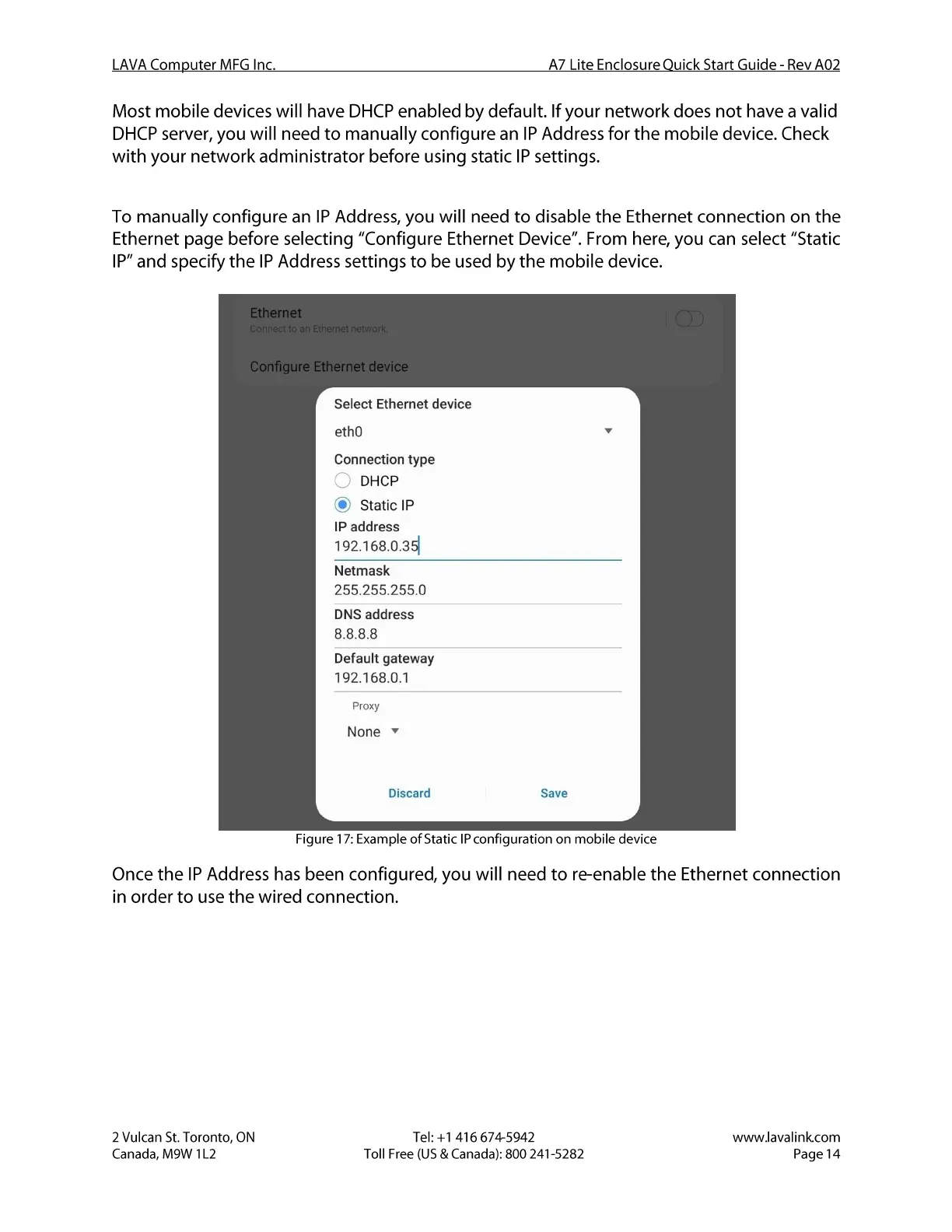
To manually configure an IP Address, you will need to disable the Ethernet connection on the
Ethernet page before selecting "Configure Ethernet Device". From here, you can select "Static
IP" and specify the IPAddress settings to be used by the mobile device.
Ethernet
n Etherr networ
onen
Configure Ethernet device
Select Ethernet device
ethO
Connection type
o
DHCP
@ Static IP
IP address
192.168.0.351
Netmask
255.255.255.0
DNS address
8.8.8.8
Default gateway
192.168.0.1
Proxy
None v
Discard
Save
Figure 17: Example of Static IPconfiguration on mobile device
Once the IP Address has been configured, you will need to re-enable the Ethernet connection
in order to use the wired connection.
2 Vulcan St. Toronto, ON
Canada, M9W I L2
Tel: +1 416 674-5942
Toll Free (US & Canada): 800 241-5282
www.lavalink.com
Page 14


 To Next Page
 Loading...