Figure 7:
LAVA Computer MFG Inc.
b) You will see a "Configuration Not Found" pop-up.
Click "OKAY" (Figure 6).
Configuration Not Found
A7 Lite Enclosure Quick Start Guide - Rev A02
The application configuration has never been set.
Please select the correct Product Family and Protection Type before
pressing APPLY to save the configuration.
If you are not using an Ethernet capable product, the Ethernet Enable
should also be set to Off.
The configuration is saved in the LTM_CFG.txt file in the application's
storage folder.
OKAY
Figure 6: Configuration Not Found pop-up
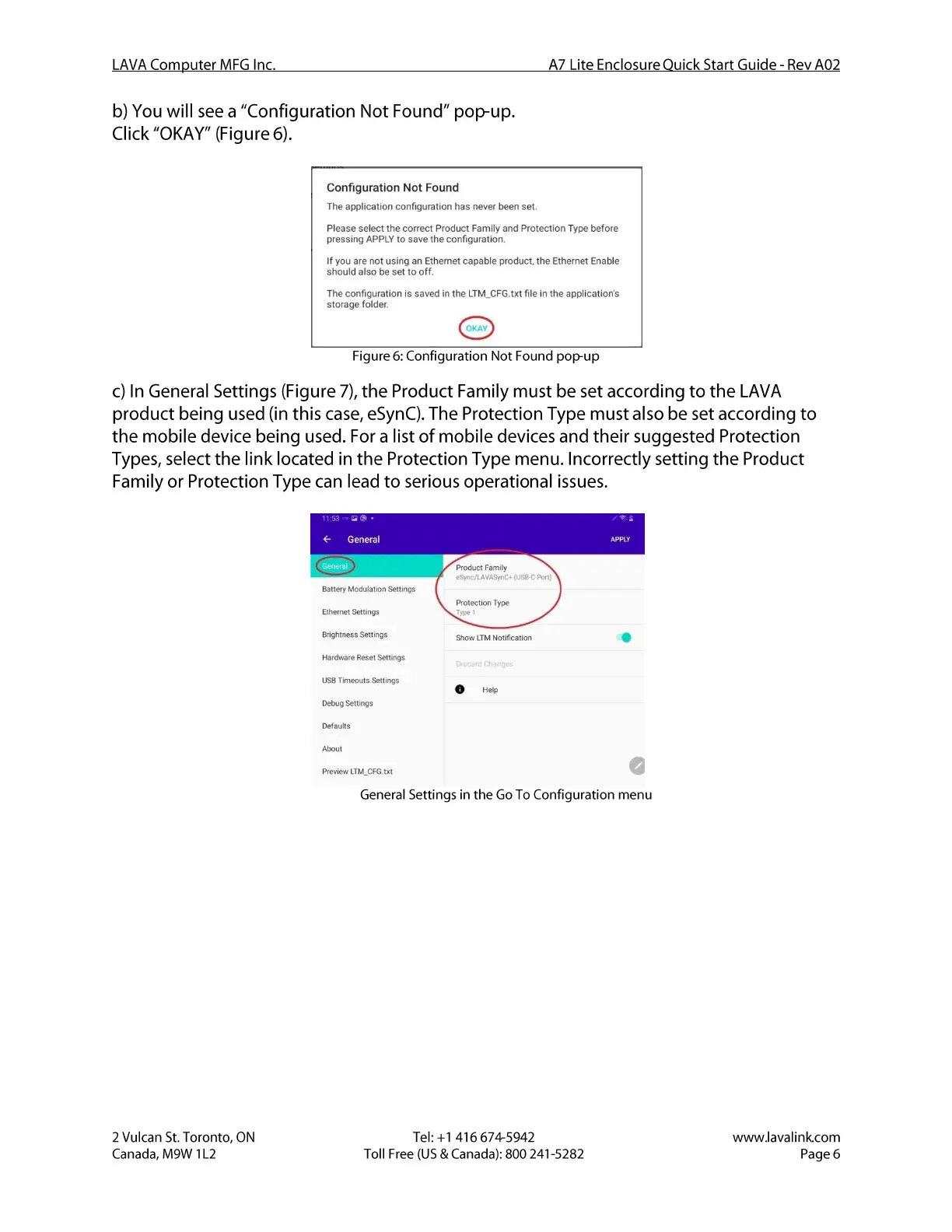
c) In General Settings (Figure 7), the Product Family must be set according to the LAVA
product being used (in this case, eSynC).The Protection Type must also be set according to
the mobile device being used. For a list of mobile devices and their suggested Protection
Types, select the link located in the Protection Type menu. Incorrectly setting the Product
Family or Protection Type can lead to serious operational issues.
General
Battery Modulation Settings
Ethernet Settings
Brightness Settings
Hardware Reset Settings
USBTimeouts Settings
Debug Settings
Defaults
preview LTM_CFG.txt
Product Family
eSync/LAVASynC. (USBC Port)
Protection Type
Show LTM Notification
o
e
2 Vulcan St. Toronto, ON
Canada, M9W I L2
Figure 7: General Settings in the Go To Configuration menu
Tel: +1 416 674-5942
Toll Free (US & Canada): 800 241-5282
www.lavalink.com
Page 6


 To Next Page
 Loading...