LAVA Computer MFG Inc.
A7 Lite Enclosure Quick Start Guide - Rev A02
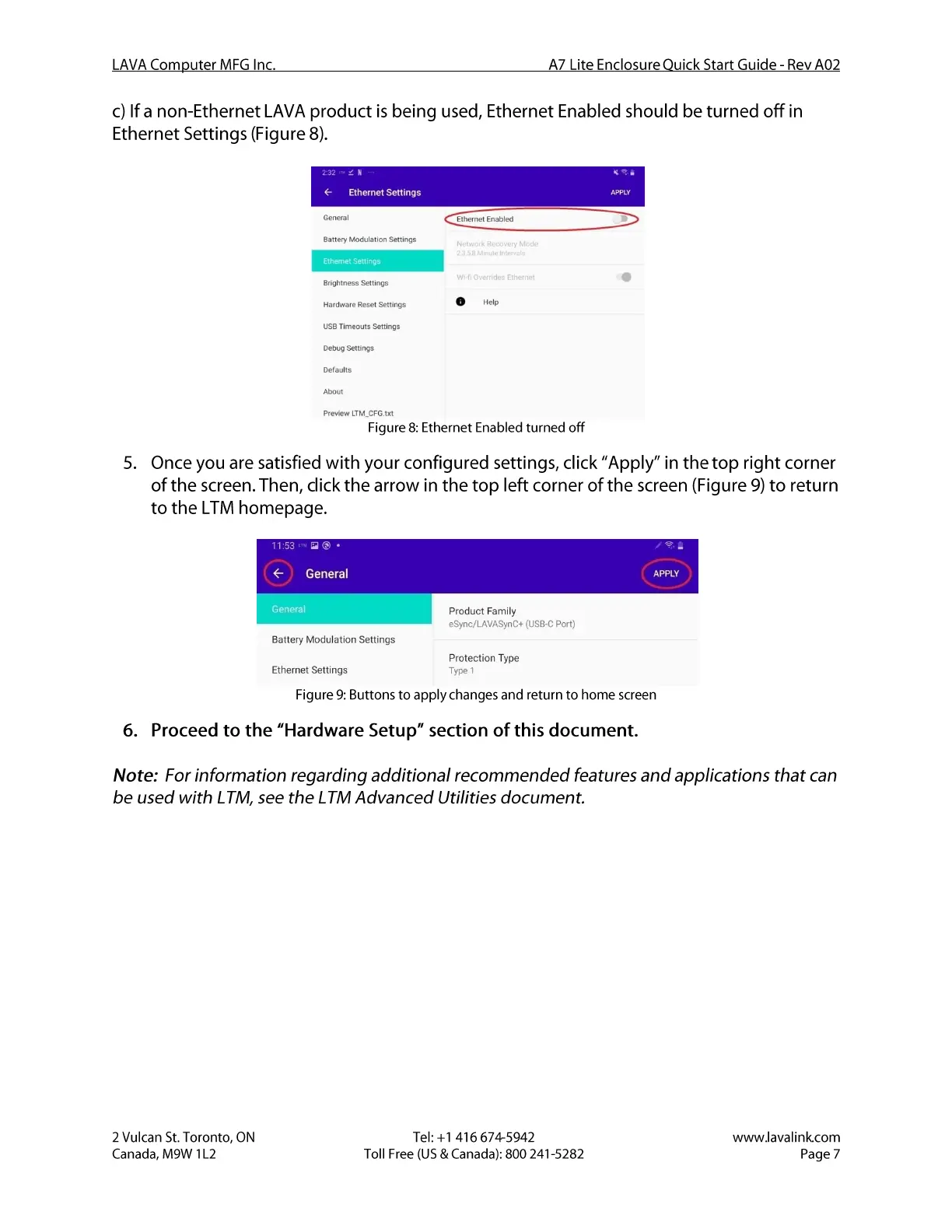
c) If a non-Ethernet LAVA product is being used, Ethernet Enabled should be turned off in
Ethernet Settings (Figure 8).
Ethernet Settings
General
Battery Modulation Settings
Ethernet SettinG
Brightness Settings
Hardware Reset Settings
Timeouts Settings
Debug Settings
Defaults
Preview LTM_CFG .txt
APPLY
Ethernet Enabled
o
5.
6.
Figure 8: Ethernet Enabled turned off
Once you are satisfied with your configured settings, click "Apply" in the top right corner
of the screen. Then, click the arrow in the top left corner of the screen (Figure 9) to return
to the LTM homepage.
11:53- •
General
General
Battery Modulation Settings
Ethernet Settings
APPLY
Product Family
eSync/LAVASynC+ (USBC Port)
Protection Type
Type 1
Figure 9: Buttons to apply changes and return to home screen
Proceed to the "Hardware Setup" section of this document.
Note: For information regarding additional recommended features and applications that can
be used with LTM, see the LTM Advanced Utilities document.
2 Vulcan St. Toronto, ON
Canada, M9W I L2
Tel: +1 416 674-5942
Toll Free (US & Canada): 800 241-5282
www.lavalink.com
Page 7


 To Next Page
 Loading...