23
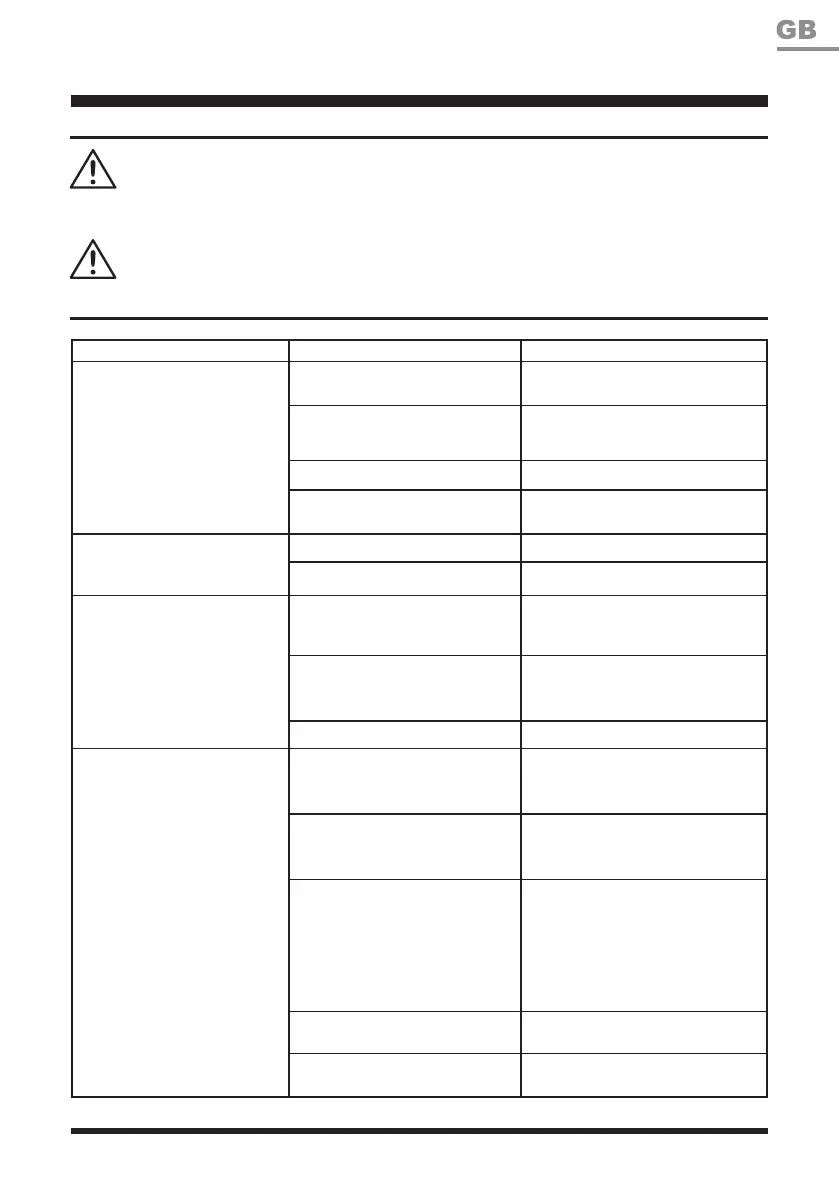
TROUBLESHOOTING
PROBLEM POSSIBLE CAUSE SOLUTION
The product doesn’t start.
The battery pack is not properly
inserted.
Insert the battery pack properly.
The battery pack is discharged.
Remove and charge the battery
pack.
The battery pack is damaged. Contact the After Sales Helpline.
Other electrical defect to the
product.
Contact the After Sales Helpline.
Intermittent operation.
Internal loose contact. Contact the After Sales Helpline.
On/Off Trigger is defective. Contact the After Sales Helpline.
Excessive vibration/loud
noise.
The line spool is dirty. Clean the line spool.
The line spool is defective.
Replace the line spool. Refer to
the Spool Replacement section in
this manual.
Motor defective. Contact the After Sales Helpline.
Unsatisfactory result.
The trimming line is worn or
damaged.
Replace the trimming line. Refer
to the Line Replacement section
in this manual.
Insufcient trimming line.
Install more line. Refer to the
Line Replacement section in this
manual.
The trimming line is not guided
out of the spool.
Remove the line spool and thread
the trimming line to the outside
through the eyelet. Check the line
end is not held in parking slots
on spool. Replace the spool if
necessary.
The trimmer head is dirty. Clean the trimmer head.
The battery pack capacity is too
low.
Charge the battery pack.
ONLY PERFORM THE STEPS DESCRIBED WITHIN THESE INSTRUCTIONS!
REMOVE THE BATTERY PACK BEFORE TROUBLESHOOTING.
WARNING
WARNING


 To Next Page