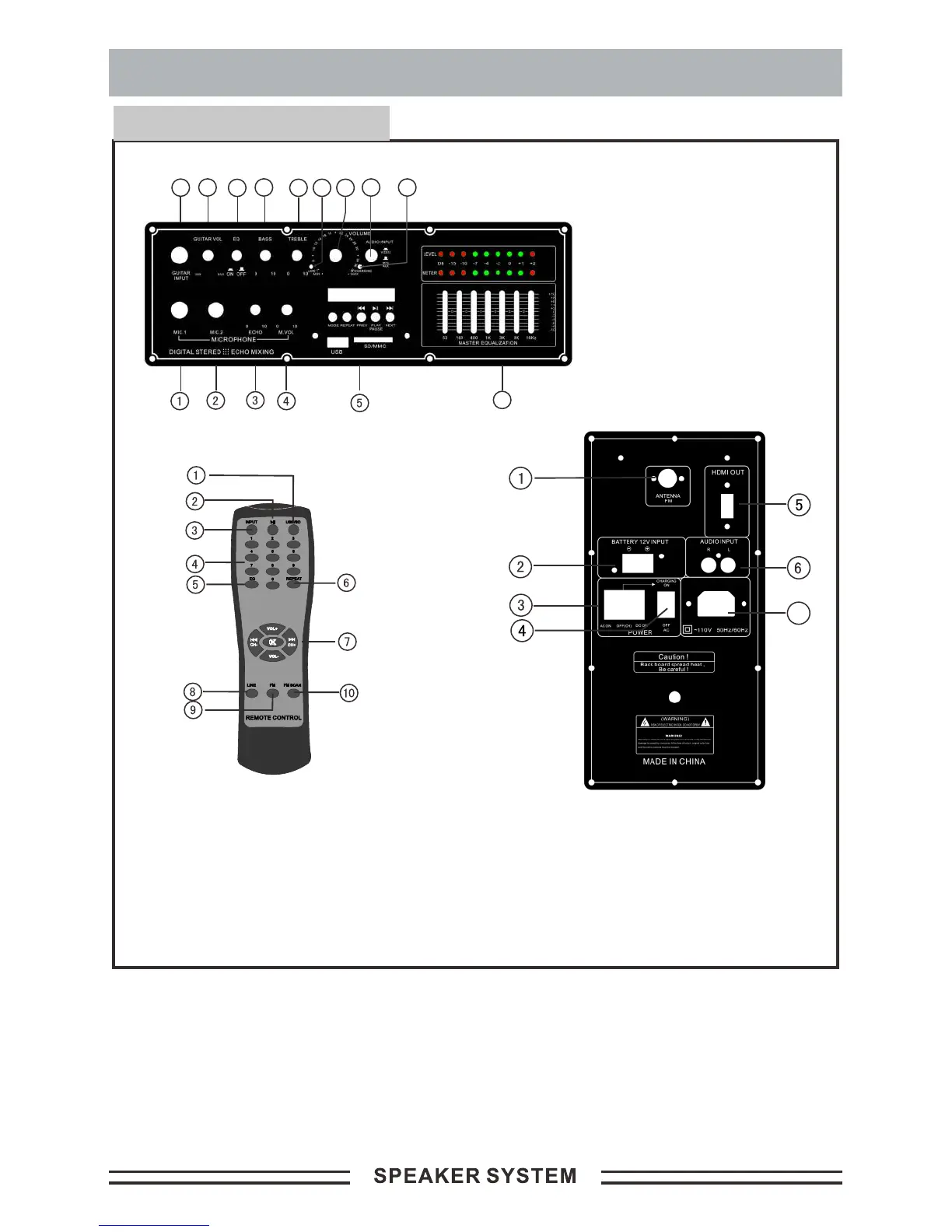
Schematic diagram:
1. USB/SD
2.
3.
select key
number select key
USB/SD play/pause control key
Input select USB/SD; FM ; LINE; BLUE
4. USB/SD play
5. EQ control key
6. USB/SD play repeat select key
7. Play control & FM CH- or CH+ & volume + or -
8. Line AUX input select key
9. Radio FM input select key
10. Radio FM scan control key
OPERATION INSTRUCTION FOR KARAOKE &WIRELESS MICROPHONE
1.Insert the microphone plug into the microphone input MIC2.
2.Adjust the microphone volume knob MIC VOL for proper volume.
Then adjust the echo depth to the proper position. Now you can start
the karaoke.
3.Open wireless MIC “on & off ” button, Adjust the microphone volume
knob MIC VOL for proper volume. and adjust the echo depth to the
proper position. Then you can start the wireless Microphone.
OPERATION PANEL
1. Radio FM antenna
2. DC12V battery input
3. DC/AC power on/off
4. AC power on/off
5. HDMI output
6. Audio DVD or AUX input
7. AC ~110V-120V/60Hz input
10
11
1213
14
6
89
7
15
1.
2. MIC 2 input jack;
3. MIC echo adjustor;
4. MIC volume;
5. USB/SD player control key ;
6. Charging & full LED;
7. Audio input Video & Mp3 Switch
8. Volume Adjustor;
9. Low voltage LED
10. Main treble volume;
11. Main bass volume;
12. EQ on/off key;
13. Guitar volume ;
14. Guitar input jack;
15. EQ control;
MIC 1 input jack;
7


 To Next Page